Crimson Arc Company Profile Presentation Template: A Structured Company Introduction
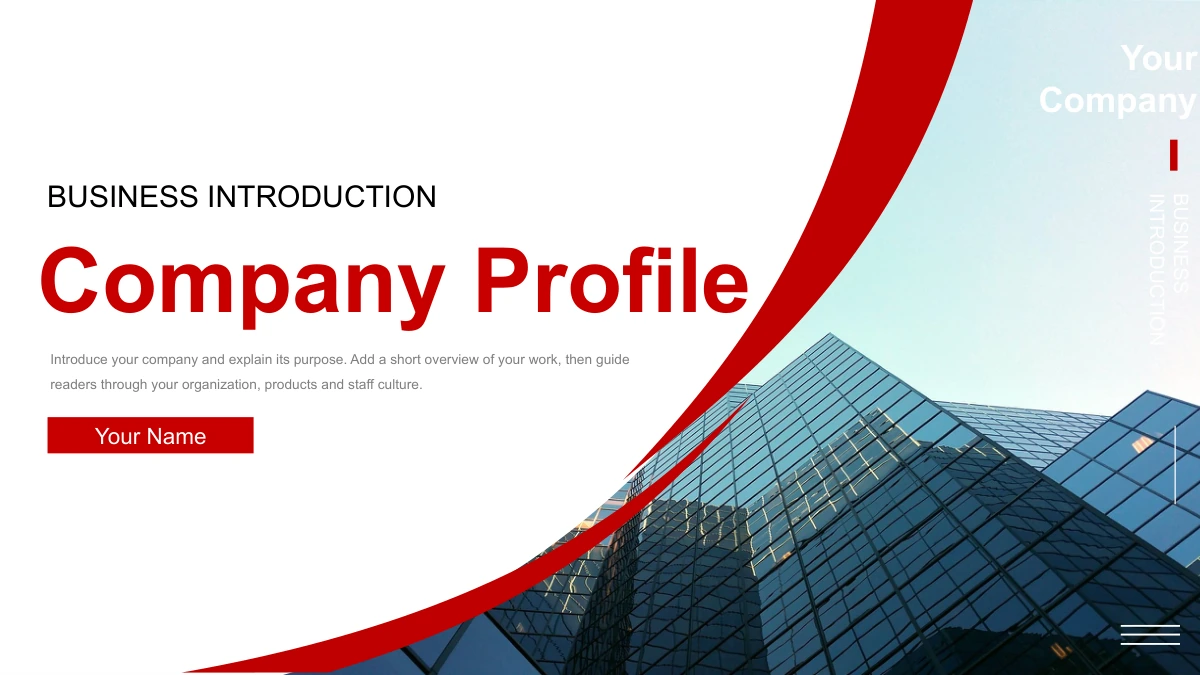
Crimson Arc Company Profile Presentation Template: red curves frame a company introduction built around glass offices, people and everyday work. Its 25 slides use white and gray space to keep short explanations separate from photographs. Four numbered sections cover the company profile, organization, products and staff culture. An organization tree, a four-stage line and several picture comparisons help you explain how the business works without turning every point into a paragraph. Crimson Arc Company Profile Presentation Template also includes manual bars and percentage rings for sample measures. Edit their labels, figures and shapes to match your own information. The final page repeats the opening design, giving you a consistent frame for a closing recap. Use Crimson Arc Company Profile Presentation Template for an introductory meeting or a company overview, then replace the sample photographs and presenter details where needed.
Key Features of Crimson Arc Company Profile Presentation Template
Choose Crimson Arc Company Profile Presentation Template to organize company information with photographs and editable diagrams.
Red Arcs and Office Photography
Crimson Arc Company Profile Presentation Template pairs red bands with glass-office photos. Keep the white and gray spaces clear when introducing your company.
Four Company Topics
Crimson Arc Company Profile Presentation Template separates profile, organization, products and staff culture. Four dividers guide the sequence.
Roles and Responsibilities
Crimson Arc Company Profile Presentation Template includes a portrait organization tree. Replace the sample roles and images, then check the reporting lines.
Manual Measures
Crimson Arc Company Profile Presentation Template offers bars and four percentage rings. Edit figures and shapes together to keep your sample measures clear.
Products in Context
Crimson Arc Company Profile Presentation Template uses photo comparisons and a static phone example. Describe your product range with accurate, concise notes.
Staff Culture Pages
Crimson Arc Company Profile Presentation Template adds numbered stages and activity layouts. Explain team practices with relevant pictures and concise captions.
How to Use Crimson Arc Company Profile Presentation Template
Preview Crimson Arc Company Profile Presentation Template, download the English file and prepare your own company overview.
-
Preview the Company Story
Review all 25 pages of Crimson Arc Company Profile Presentation Template, including the repeated closing cover. Choose the organization, product and culture layouts that fit your company story.
-
Download with a Paid Plan
Sign in with an active paid plan to download Crimson Arc Company Profile Presentation Template. Downloads are unlimited and repeatable. Save a copy before adding your company details.
-
Edit and Share Your Overview
Edit Crimson Arc Company Profile Presentation Template with your text and pictures. Check the manual figures, roles and text fit, then save the PPTX or export a PDF to share the overview.
Crimson Arc Company Profile Presentation Template FAQ
How do I download Crimson Arc Company Profile Presentation Template?
With an active paid plan, download Crimson Arc Company Profile Presentation Template as often as needed, including repeat downloads on the same day. The file is an English PPTX. Save an original copy of Crimson Arc Company Profile Presentation Template and edit a separate working file. Choose the sections of Crimson Arc Company Profile Presentation Template that match your meeting, then add your company information. Crimson Arc Company Profile Presentation Template provides a structure for your own overview.
How many pages does Crimson Arc Company Profile Presentation Template include?
Crimson Arc Company Profile Presentation Template contains 25 slides in 16:9 format. Four dividers on pages 3, 8, 13 and 19 introduce the profile, organization, products and staff culture. Crimson Arc Company Profile Presentation Template ends with a repeat of its cover. The page count of Crimson Arc Company Profile Presentation Template includes the opening and contents. Choose the portrait tree or culture stages in Crimson Arc Company Profile Presentation Template when they suit your story.
Can I change the text, colors and sample measures?
Edit headings and ordinary text in Crimson Arc Company Profile Presentation Template, then adjust its shape colors. Bars and rings in Crimson Arc Company Profile Presentation Template are manual illustrations with no linked chart or workbook. Change the 63%, 42%, 80% and 88% examples together with their shapes. Give each measure a clear meaning. Crimson Arc Company Profile Presentation Template lets you explain your own figures without treating its samples as verified company results.
Can I preview every page before downloading?
The gallery shows all 25 pages of Crimson Arc Company Profile Presentation Template in order. Compare the red-arc cover, four dividers and body layouts in Crimson Arc Company Profile Presentation Template. Look closely at the portrait tree, product pictures and rings before downloading. Enlarge the previews of Crimson Arc Company Profile Presentation Template to judge the space for your text. The complete preview of Crimson Arc Company Profile Presentation Template helps you choose suitable pages.
Can I use Crimson Arc Company Profile Presentation Template in another presentation editor?
Try Crimson Arc Company Profile Presentation Template in a presentation editor that supports PPTX. Check its curved bands, grouped diagrams, crops and symbol bullets after import. Keep an untouched copy of Crimson Arc Company Profile Presentation Template while testing another application, since import behavior varies. Review the manual bars and portrait tree before presenting. Export your edited Crimson Arc Company Profile Presentation Template as a PDF when you want to share a fixed layout.
Which fonts does Crimson Arc Company Profile Presentation Template use?
English text in Crimson Arc Company Profile Presentation Template uses Arial Regular and Bold. Wingdings supplies its circular section bullets. Fonts are not embedded in Crimson Arc Company Profile Presentation Template. Use matching fonts to keep headings and symbols consistent. If you choose a different text font for Crimson Arc Company Profile Presentation Template, check wrapping and spacing. Compare your result with the full preview of Crimson Arc Company Profile Presentation Template before presenting.
Why do translated pages describe the same English file?
The language options translate the website description of Crimson Arc Company Profile Presentation Template. All versions provide the same English PPTX. Ordinary headings and guidance in Crimson Arc Company Profile Presentation Template are English. Original writing on photographed screens and products remains in the images. To create another language version of Crimson Arc Company Profile Presentation Template, translate its editable text and review the fit. The website selector does not create a separate deck.
Can I use Crimson Arc Company Profile Presentation Template for commercial work?
Check the terms applicable to Crimson Arc Company Profile Presentation Template and the materials you keep or replace. Paid download access does not grant extra rights to brands or photographs in Crimson Arc Company Profile Presentation Template. Original creator and source information remains in the file. Before distributing an edited Crimson Arc Company Profile Presentation Template, confirm that your own content suits that purpose. Sample people and products in Crimson Arc Company Profile Presentation Template do not establish an endorsement.
How can I share Crimson Arc Company Profile Presentation Template with a colleague?
Use the share buttons on the Crimson Arc Company Profile Presentation Template page or copy its page link. Colleagues can explore the preview of Crimson Arc Company Profile Presentation Template before choosing it. Their download access requires their own active paid plan. Share your finished company presentation as an edited PPTX or exported PDF. Keep the Crimson Arc Company Profile Presentation Template page link separate from the company information you add to Crimson Arc Company Profile Presentation Template.