Yellow Frame Fashion Portfolio Presentation Template: yellow outlines and warm photo layouts
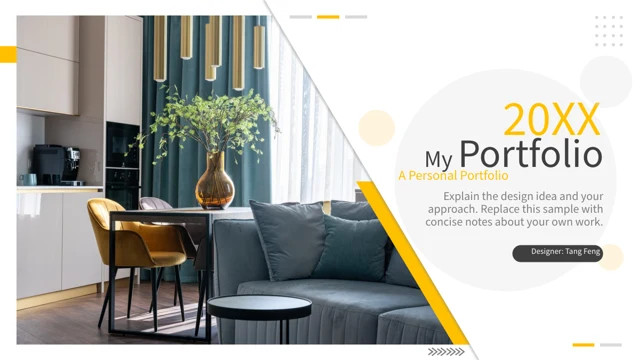
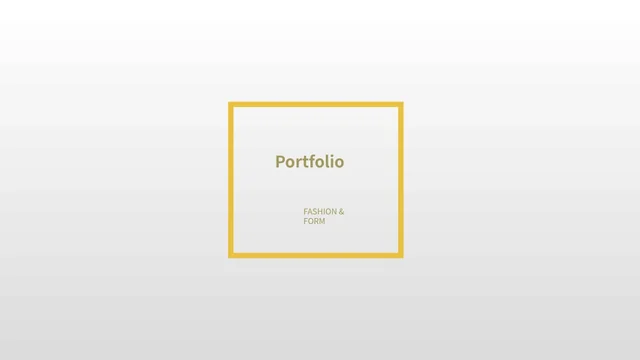
Yellow Frame Fashion Portfolio Presentation Template places warm fashion photographs against white-to-grey pages with yellow rectangular outlines. Its 17-page sequence begins with a framed cover, profile prompts, a photo introduction and four-item contents. Yellow Frame Fashion Portfolio Presentation Template then divides the pages into three parts, each opening with a small portrait and a short heading. Wide, narrow and overlapping images vary the rhythm. In Yellow Frame Fashion Portfolio Presentation Template, yellow panels alternate with fine frames; still-life and interior photographs provide quieter pages alongside the clothing scenes. Yellow Frame Fashion Portfolio Presentation Template contains editable captions and English guidance for describing your own work. It has no native charts, linked workbooks or tables. Choose a sequence, replace profile and contact prompts, and explain your pictures accurately. Review captions and the ending before sharing the 16:9 PowerPoint file.
Key Features of Yellow Frame Fashion Portfolio Presentation Template
Yellow accents, three parts and varied photo proportions.
Yellow Outlines and Panels
Yellow Frame Fashion Portfolio Presentation Template uses fine yellow frames and solid panels. Keep new captions concise and check contrast over the pale background.
Three Project Dividers
Yellow Frame Fashion Portfolio Presentation Template opens three parts with a small portrait. Name them for your work and keep the four-item contents consistent.
Wide and Narrow Pictures
Yellow Frame Fashion Portfolio Presentation Template mixes full-height photos with narrow columns and overlaps. Keep the proportions when replacing pictures.
Two-Sided Comparisons
Yellow Frame Fashion Portfolio Presentation Template places a framed picture between two text areas. Use each side for a clear observation about your selected work.
Still-Life and Interior Pages
Yellow Frame Fashion Portfolio Presentation Template includes a still-life scene and an interior photo. Write captions that explain each image in the sequence.
Profile and Closing Prompts
Yellow Frame Fashion Portfolio Presentation Template supplies profile and closing text to replace. Add accurate details and remove unchecked sample statements.
How to Use Yellow Frame Fashion Portfolio Presentation Template
Select your work, write captions and check the picture crops.
-
Choose Your Portfolio Pages
Review all 17 pages of Yellow Frame Fashion Portfolio Presentation Template. Select the photo arrangements you need, name the three project sections and match the contents to your portfolio.
-
Replace the Pictures and Text
Download Yellow Frame Fashion Portfolio Presentation Template with an active paid plan. Save a copy, add your images and replace profile prompts, contact details and sample text.
-
Check the Crops and Export
Review Yellow Frame Fashion Portfolio Presentation Template at presentation size. Check picture proportions, yellow-panel captions and the closing details; inspect the PDF before sharing.
Questions about Yellow Frame Fashion Portfolio Presentation Template
What is included in Yellow Frame Fashion Portfolio Presentation Template?
Yellow Frame Fashion Portfolio Presentation Template contains 17 slides in a 16:9 PowerPoint file. A framed cover leads to profile prompts, a photo introduction and four-item contents. Yellow Frame Fashion Portfolio Presentation Template includes three project dividers followed by photo-and-text arrangements, comparisons, still-life layouts and a closing page. The first contents item introduces the presenter; it does not add a fourth project divider. Review Yellow Frame Fashion Portfolio Presentation Template page by page to choose an order for your own work. Yellow Frame Fashion Portfolio Presentation Template provides layouts and editable wording rather than a verified biography, finished collection or assessed design portfolio.
Can I replace the photos in Yellow Frame Fashion Portfolio Presentation Template?
Yellow Frame Fashion Portfolio Presentation Template uses separate photographic picture objects in wide, tall and narrow areas. In Yellow Frame Fashion Portfolio Presentation Template, some pictures overlap a yellow frame or a second image, so inspect the crop and the visible edge after each change. Yellow Frame Fashion Portfolio Presentation Template does not identify the pictured people, the clothing maker or the place shown. Add accurate captions for your own images and check their applicable source terms. Keep the aspect ratio rather than stretching a portrait to fill a wider area. Review Yellow Frame Fashion Portfolio Presentation Template at the intended display size to make sure important picture details remain visible.
How should I write the profile in Yellow Frame Fashion Portfolio Presentation Template?
Yellow Frame Fashion Portfolio Presentation Template opens with fill-in prompts for a name, introduction, education and contact details. Those are examples, not verified information about a particular person. In Yellow Frame Fashion Portfolio Presentation Template, replace them with facts you are entitled to share and use a short introduction that suits your actual work. Yellow Frame Fashion Portfolio Presentation Template also contains guidance near the photographs; adapt it to explain a real design choice or observation. When using Yellow Frame Fashion Portfolio Presentation Template, distinguish your own contribution from a visual reference and remove first-person statements you cannot support.
How are the sections arranged in Yellow Frame Fashion Portfolio Presentation Template?
Yellow Frame Fashion Portfolio Presentation Template includes three dividers, each using the same small portrait above a part heading and short text. The contents has four entries because its first item is a self-introduction. In Yellow Frame Fashion Portfolio Presentation Template, name the three following parts according to your actual projects or a useful way to group the selected work. Yellow Frame Fashion Portfolio Presentation Template does not require you to use every page or keep unrelated examples in your final version. In Yellow Frame Fashion Portfolio Presentation Template, picture proportions and yellow accents connect the sequence while editable captions explain how the work fits together.
Can I change the yellow accents in Yellow Frame Fashion Portfolio Presentation Template?
Yellow Frame Fashion Portfolio Presentation Template uses yellow frames, solid panels and small accents with a pale background. Select an object in PowerPoint before changing it so you can distinguish a shape from a picture. In Yellow Frame Fashion Portfolio Presentation Template, a colour change to an editable shape does not recolour the clothing or lighting inside a photograph. Yellow Frame Fashion Portfolio Presentation Template includes white captions on some coloured areas and darker text elsewhere. After changing the palette, inspect both versions at presentation size. Keep a copy of Yellow Frame Fashion Portfolio Presentation Template before experimenting so you can return to its supplied colour arrangement if needed.
Does Yellow Frame Fashion Portfolio Presentation Template include editable charts?
Yellow Frame Fashion Portfolio Presentation Template has no native data charts, linked workbooks or tables. Its page arrangements are intended for photographs and explanatory text. In Yellow Frame Fashion Portfolio Presentation Template, changing a caption will not calculate a figure or update another layout automatically. Yellow Frame Fashion Portfolio Presentation Template includes a two-sided picture comparison and overlapping photo pages that you can use to explain specific visual choices. If your portfolio requires numerical results, insert your own chart and label its source clearly. Review the added material alongside the photo sequence in Yellow Frame Fashion Portfolio Presentation Template so the visual explanation and the figures remain consistent.
Which fonts does Yellow Frame Fashion Portfolio Presentation Template use?
Yellow Frame Fashion Portfolio Presentation Template uses Source Han Sans SC Regular and Bold for its English text. No font files are embedded. Open Yellow Frame Fashion Portfolio Presentation Template on your editing computer and check the cover title, narrow captions and closing text before exporting. If you choose a different font for Yellow Frame Fashion Portfolio Presentation Template, inspect its line breaks and the spacing near the yellow frames. A font change does not alter the lettering inside a photograph or replace a picture. Keep the captions concise, especially on the narrow white and yellow panels. Save an editable copy of Yellow Frame Fashion Portfolio Presentation Template and inspect the exported PDF for missing characters or text that no longer fits its box.
How do I download Yellow Frame Fashion Portfolio Presentation Template?
Yellow Frame Fashion Portfolio Presentation Template is available to members with an active paid plan. Sign in and use the PPTX download button on this detail page. Paid members can download Yellow Frame Fashion Portfolio Presentation Template without a daily limit, including repeat downloads. Browse all 17 preview pages before selecting the file. Save a working copy of Yellow Frame Fashion Portfolio Presentation Template before replacing the pictures, section headings or profile details. The downloaded PowerPoint file can be edited directly; you do not need to generate a new presentation first. Yellow Frame Fashion Portfolio Presentation Template gives you a starting arrangement for describing your own work and selecting an appropriate photo sequence.
What should I check before sharing Yellow Frame Fashion Portfolio Presentation Template?
Yellow Frame Fashion Portfolio Presentation Template needs a final review of its captions, picture crops and personal details after editing. Replace any remaining sample wording and check the three section names against the contents. View Yellow Frame Fashion Portfolio Presentation Template at the size you intend to present, especially the small captions on yellow or pale areas. Yellow Frame Fashion Portfolio Presentation Template does not grant additional rights to the original photographs or source design. Follow the applicable original terms and use accurate credits for your own material. Share the Yellow Frame Fashion Portfolio Presentation Template page link when another person needs to preview or obtain the file for themselves.