Green Editorial Portfolio Presentation Template: green geometry and magazine-style layouts
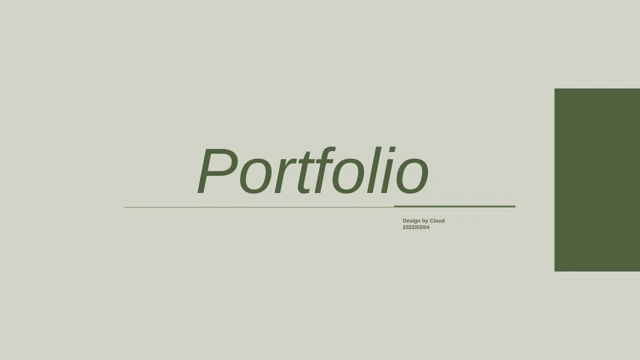
Green Editorial Portfolio Presentation Template brings together 10 widescreen slides in pale and dark green. The Portfolio cover leads to a four-column index over palm shadows. Green Editorial Portfolio Presentation Template uses square-and-circle grids for two numbered section pages; diamond strips connect later pages. A horizontal timeline carries vertical labels above and below its line. Green Editorial Portfolio Presentation Template also places poster images beside longer passages and pairs a Tasks heading with an image and short text blocks. A crossing band marks a writing page; the closing Thanks slide returns to palm shadows. Green Editorial Portfolio Presentation Template is a starting point for your own editorial work: the English financial passages and dates are samples, not verified project claims. Select useful layouts, replace the writing and images, and keep required designer and image credits. Review every page before deciding how to present your collection.
Key Features of Green Editorial Portfolio Presentation Template
Green panels, geometric markers and editorial pages.
Pale and dark green
Green Editorial Portfolio Presentation Template pairs light and dark green with palm shadows. Repeat these tones in titles and captions to connect your projects.
Four-column contents
Green Editorial Portfolio Presentation Template has four numbered contents columns. Replace the repeated sample writing with short labels that introduce your work.
Square-and-circle markers
Green Editorial Portfolio Presentation Template marks sections 01 and 02 with square-and-circle grids. Reuse the native shapes to distinguish your chosen projects.
Vertical-label timeline
Green Editorial Portfolio Presentation Template has a timeline with vertical labels and circular points. Keep labels short and check reading order after editing.
Poster and writing layouts
Green Editorial Portfolio Presentation Template places poster images beside writing blocks. Replace financial samples and pictures with your own work and context.
Diamond accents
Green Editorial Portfolio Presentation Template uses filled and outlined diamonds. Leave space around these accents so passages and headings stay easy to read.
How to Use Green Editorial Portfolio Presentation Template
Select the pages, replace the examples and review.
-
Choose the useful layouts
Review all 10 pages of Green Editorial Portfolio Presentation Template. Compare the index, timeline and poster layouts. Choose a project sequence and write short labels for each part.
-
Download a working copy
Sign in with an active paid plan to download Green Editorial Portfolio Presentation Template. Downloads are unlimited daily, including repeats. Save a copy before changing text and images.
-
Replace and review
Open Green Editorial Portfolio Presentation Template in PowerPoint. Replace sample text, dates and images; keep required credits. Check vertical labels and review a PDF before sharing.
Questions about Green Editorial Portfolio Presentation Template
How do I download Green Editorial Portfolio Presentation Template?
Sign in with an active paid plan and use the download button for Green Editorial Portfolio Presentation Template beside the preview. Green Editorial Portfolio Presentation Template is supplied as a PowerPoint (.pptx) file. Paid members can download Green Editorial Portfolio Presentation Template without a daily limit, including repeats. Save an original copy and edit a separate file so you can return to the initial layouts.
How many slides are in Green Editorial Portfolio Presentation Template?
Green Editorial Portfolio Presentation Template contains 10 slides in 16:9. The sequence includes a cover, a four-column contents page, two numbered section pages, a timeline, poster and writing layouts, and a Thanks page. The four contents entries in Green Editorial Portfolio Presentation Template do not mean four complete chapters. Choose or reorder pages of Green Editorial Portfolio Presentation Template to suit your own collection.
Can I edit the text and colors in Green Editorial Portfolio Presentation Template?
Yes. Text, colored panels, diamonds, circles and timeline objects in Green Editorial Portfolio Presentation Template remain editable. Replace the sample financial passages and dates in Green Editorial Portfolio Presentation Template with material relevant to your projects. Poster details inside a single image are not separate text boxes. After editing Green Editorial Portfolio Presentation Template, check short vertical labels, justified passages and image proportions.
Can I preview all of Green Editorial Portfolio Presentation Template before downloading?
The gallery shows every page of Green Editorial Portfolio Presentation Template. Use the thumbnails or arrows in Green Editorial Portfolio Presentation Template to compare the pale writing pages, darker contents page and timeline, and poster areas. Enlarge Green Editorial Portfolio Presentation Template to inspect small captions and rotated text. The preview shows the downloadable English copy; longer replacement passages can change its line breaks.
Will Green Editorial Portfolio Presentation Template work in another editor?
Green Editorial Portfolio Presentation Template uses the PowerPoint PPTX format. Another editor may import Green Editorial Portfolio Presentation Template, but vertical text, line breaks, fonts and image cropping can change. Compare an imported copy of Green Editorial Portfolio Presentation Template with the full preview, especially the timeline labels and justified paragraphs. Keep a PowerPoint copy for later changes.
Which fonts does Green Editorial Portfolio Presentation Template use?
The downloadable English Green Editorial Portfolio Presentation Template uses Arial, Times New Roman, Baskerville and Garamond. Fonts are not embedded. The copy adapts unavailable source fonts while retaining native layouts and images. If these fonts are missing on your device, select installed alternatives and review the cover, timeline and writing pages throughout Green Editorial Portfolio Presentation Template.
Is the text in Green Editorial Portfolio Presentation Template translated?
The visible sample text in Green Editorial Portfolio Presentation Template is English. The original financial passages in Green Editorial Portfolio Presentation Template remain examples, and the designer credit Design by Cloud is retained. Master placeholder prompts are also English in the downloadable copy. Translations on this website describe the same English Green Editorial Portfolio Presentation Template; they do not produce a separate PPTX for each language.
Can I use Green Editorial Portfolio Presentation Template commercially?
A commercial redistribution license for Green Editorial Portfolio Presentation Template has not been verified. Paid access grants a download, not additional rights to the designer’s work, poster artwork or photographs. Confirm the permissions needed for your intended use of Green Editorial Portfolio Presentation Template, keep required credits, and replace any images you are not authorized to publish.
How should I share Green Editorial Portfolio Presentation Template?
Share the public preview link when recommending Green Editorial Portfolio Presentation Template. For finished work, send a PDF or presentation containing writing and images you may distribute. Keep the editable version of Green Editorial Portfolio Presentation Template separately. Retain required Cloud and artwork credits, and confirm permission before redistributing the original Green Editorial Portfolio Presentation Template file.