Navy Wave Lesson Plan Presentation Template: explain the choices behind your lesson
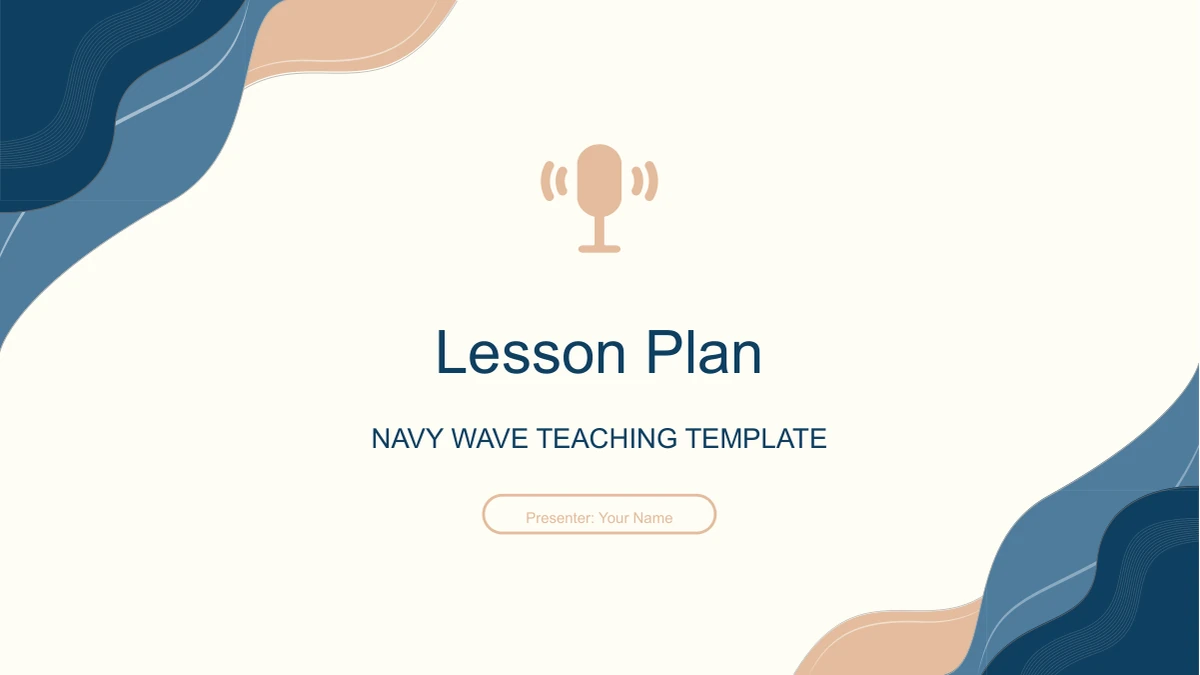
Navy Wave Lesson Plan Presentation Template opens with a microphone above a cream field, framed by navy and peach waves. The curved corners continue through a five-chapter outline: learning material, objectives, key points, methods and classroom sequence. In Navy Wave Lesson Plan Presentation Template, the teaching plan becomes a set of small, distinct decisions rather than one long text page. Photo pairs introduce the material and learners; circular diagrams separate the aims; cards compare teaching approaches. Navy Wave Lesson Plan Presentation Template also includes five folded process panels for a lesson from introduction to extension. All 18 pages of Navy Wave Lesson Plan Presentation Template use a 16:9 canvas, with matching opening and closing slides. Choose the pages that explain your actual class, replace the English examples and keep the short labels easy to read. The preview of Navy Wave Lesson Plan Presentation Template lets you compare the available spaces before fitting your own lesson into them.
Key Features of Navy Wave Lesson Plan Presentation Template
Wave borders and compact diagrams give each teaching decision a place.
A Microphone Opening
Navy Wave Lesson Plan Presentation Template pairs a microphone with navy and peach corner waves. Cream backgrounds keep the title separate from the decoration.
Five Teaching Chapters
Navy Wave Lesson Plan Presentation Template links a five-item outline to matching dividers. Move from material analysis to objectives, methods and classroom delivery.
Photos beside Analysis
Navy Wave Lesson Plan Presentation Template places writing and reading photos beside short analysis panels. A separate bookshelf circle accompanies three priorities.
Objectives in Circles
Navy Wave Lesson Plan Presentation Template arranges three aims around an arrow diagram. Numbered circles and icons help distinguish knowledge, skills and attitudes.
Methods in Small Cards
Navy Wave Lesson Plan Presentation Template offers six outlined teaching cards and four shield-shaped learning cards. Give each approach a short, specific explanation.
A Folded Lesson Sequence
Navy Wave Lesson Plan Presentation Template presents five stages on folded white panels. Use the numbered cards to describe how the class moves from its opening to extension.
How to Use Navy Wave Lesson Plan Presentation Template
Map your lesson, download the file and refine the classroom sequence.
-
Match the Pages to Your Class
Preview all 18 pages of Navy Wave Lesson Plan Presentation Template. Start with the five-chapter outline, then select the diagrams that explain your learning aims and the support your pupils need.
-
Download and Replace the Examples
Download Navy Wave Lesson Plan Presentation Template with an active paid membership. Add your lesson topic, change the sample analysis and give each teaching or learning card one concrete purpose.
-
Rehearse the Classroom Sequence
Check Navy Wave Lesson Plan Presentation Template in slideshow view. Read the five process cards in order, review the small photo-panel text and confirm that each activity supports a stated objective.
Questions about Navy Wave Lesson Plan Presentation Template
How do I download Navy Wave Lesson Plan Presentation Template?
Sign in with an active paid membership to download Navy Wave Lesson Plan Presentation Template. Daily downloads are unlimited, including repeats. Keep an untouched copy of Navy Wave Lesson Plan Presentation Template before editing, so you can restore a diagram, crop or divider. Use a separate working copy when adapting Navy Wave Lesson Plan Presentation Template to your class.
How many slides are in Navy Wave Lesson Plan Presentation Template?
Navy Wave Lesson Plan Presentation Template contains 18 slides in 16:9, including five chapters, an opening, outline and closing. Objectives in Navy Wave Lesson Plan Presentation Template have circular and card layouts; methods have two comparison pages. Select the layouts that explain your lesson, then remove unneeded pages from Navy Wave Lesson Plan Presentation Template.
Can I change the text and colours in Navy Wave Lesson Plan Presentation Template?
Edit the text and drawn shapes in Navy Wave Lesson Plan Presentation Template with PowerPoint. Apply navy and peach colour changes consistently across headings and cards. Photos and decorative artwork in Navy Wave Lesson Plan Presentation Template need picture-level edits. A changed label in Navy Wave Lesson Plan Presentation Template does not automatically update related objectives or process cards.
Can I preview all of Navy Wave Lesson Plan Presentation Template before downloading?
The gallery shows all 18 pages of Navy Wave Lesson Plan Presentation Template, including five dividers. Compare photos, circles and cards using the arrows or thumbnails. Inspect the six-card methods page of Navy Wave Lesson Plan Presentation Template for text space. If an explanation needs more room, choose a larger layout from Navy Wave Lesson Plan Presentation Template.
Can another presentation editor open Navy Wave Lesson Plan Presentation Template?
Navy Wave Lesson Plan Presentation Template comes as a PowerPoint PPTX. Other editors may alter curves, grouped diagrams, shadows or picture crops. Test a copy of Navy Wave Lesson Plan Presentation Template against the gallery, especially the folded process panels and shield cards. Their layered shapes are part of the design in Navy Wave Lesson Plan Presentation Template.
Which fonts are used in Navy Wave Lesson Plan Presentation Template?
Navy Wave Lesson Plan Presentation Template uses Arial; check that your presentation computer has it installed. Photo panels and shield cards in Navy Wave Lesson Plan Presentation Template have limited space for wider replacements. After changing fonts, check titles, circular labels and process text throughout Navy Wave Lesson Plan Presentation Template. Shorten any wording that becomes cramped.
Is the text inside Navy Wave Lesson Plan Presentation Template in English?
Navy Wave Lesson Plan Presentation Template has English slide text. Translated website pages describe this same file, not separate translated decks. Adapt Navy Wave Lesson Plan Presentation Template to your subject or language, keeping chapter names aligned with the outline. Longer wording may need shorter labels or spacing adjustments in Navy Wave Lesson Plan Presentation Template.
Can I use Navy Wave Lesson Plan Presentation Template commercially?
Check design and photo permissions before using Navy Wave Lesson Plan Presentation Template commercially. Paid access does not establish unrestricted asset rights. Replace any photo in Navy Wave Lesson Plan Presentation Template for which you lack permission, and retain required attribution. Review the example teaching statements in Navy Wave Lesson Plan Presentation Template for your audience and curriculum.
How should I share Navy Wave Lesson Plan Presentation Template?
Share the page link for Navy Wave Lesson Plan Presentation Template to show colleagues the original layouts. Send your completed Navy Wave Lesson Plan Presentation Template as a PDF or edited PPTX where permitted. Check chapter labels, remove unused examples and read the process cards in order. Keep an editable Navy Wave Lesson Plan Presentation Template for later revisions.