Turquoise Seascape Portfolio Presentation Template: Coastal Photography and Layered Turquoise Panels
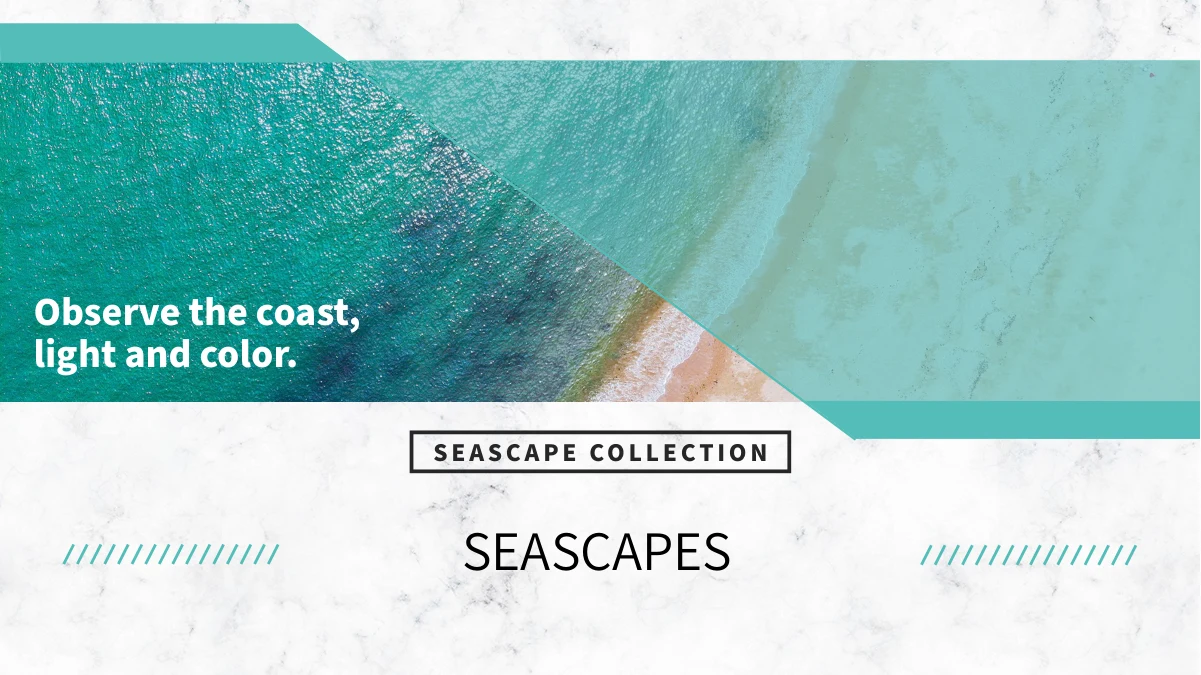
Turquoise Seascape Portfolio Presentation Template combines coastal photography with white marble textures, turquoise blocks and fine outline frames. Turquoise Seascape Portfolio Presentation Template follows a four-item contents page with dividers on pages 3, 9, 14 and 19. Turquoise Seascape Portfolio Presentation Template includes beach views, water bungalows, boardwalks, bridges and coastal city photographs. Three-image columns, tall strips and divided panoramas give each sequence a different pace. Other pages pair rounded corners and overlapping pictures with translucent note panels. Choose images for your topic and replace the sample guidance with accurate captions. Keep key subjects clear of narrow crops and leave space around notes placed over water or sky. Update the contents and section titles together, then review the matching opening and closing layouts. The supplied photographs illustrate the layouts; add location names or project claims only when you can verify them.
Key Features of Turquoise Seascape Portfolio Presentation Template
Coastal images, marble textures and flexible picture arrangements.
Turquoise Panels and Marble Texture
Turquoise Seascape Portfolio Presentation Template pairs white marble textures with turquoise panels. Keep new text readable over translucent blocks and busy photos.
Four Coastal Section Dividers
Turquoise Seascape Portfolio Presentation Template places dividers on pages 3, 9, 14 and 19. Rename contents entries and section headings together to fit your story.
Three-Image Columns
Turquoise Seascape Portfolio Presentation Template includes three-image columns and numbered photo cards. Pair each picture with a short caption that describes it.
Divided Panoramas and Tall Strips
Turquoise Seascape Portfolio Presentation Template splits wide views into strips and uses tall beach crops. Keep important subjects clear across the picture panels.
Layered Pictures and Note Panels
Turquoise Seascape Portfolio Presentation Template layers photos, outline frames and translucent notes. Keep captions close to the images they describe.
Matching Opening and Closing Pages
Turquoise Seascape Portfolio Presentation Template echoes its coastal opening on the closing page. Update both titles and check their placement over the shoreline.
How to Use Turquoise Seascape Portfolio Presentation Template
Choose a sequence, personalize the photos and review each crop.
-
Select Your Photo Sequence
Preview all 25 pages of Turquoise Seascape Portfolio Presentation Template. Choose columns, panoramas and layered layouts for your images, then match the four section headings to your sequence.
-
Download and Personalize
Download Turquoise Seascape Portfolio Presentation Template with an active paid plan; daily and repeat downloads are unlimited. Save a copy, replace sample notes and add accurate image captions.
-
Check Crops and Readability
Review Turquoise Seascape Portfolio Presentation Template at full size. Check photo strips, translucent panels and captions, then compare exported pages with the editable copy before sharing.
Questions About Turquoise Seascape Portfolio Presentation Template
How do I download Turquoise Seascape Portfolio Presentation Template?
Sign in with an active paid plan to download Turquoise Seascape Portfolio Presentation Template. Daily and repeat downloads of Turquoise Seascape Portfolio Presentation Template are unlimited. Turquoise Seascape Portfolio Presentation Template is supplied as an editable PowerPoint file. Save an untouched copy of Turquoise Seascape Portfolio Presentation Template before replacing photographs, adjusting the turquoise accents or rewriting the project guidance.
What is included in Turquoise Seascape Portfolio Presentation Template?
Turquoise Seascape Portfolio Presentation Template contains 25 slides in a 16:9 format. Turquoise Seascape Portfolio Presentation Template includes a coastal cover, four-item contents page, four section dividers and a matching closing page. The Turquoise Seascape Portfolio Presentation Template content layouts offer image columns, divided panoramas, layered photographs and translucent notes. Review every Turquoise Seascape Portfolio Presentation Template preview to choose the pages that fit your own sequence.
How are the sections in Turquoise Seascape Portfolio Presentation Template arranged?
Turquoise Seascape Portfolio Presentation Template has four section dividers on pages 3, 9, 14 and 19. Each Turquoise Seascape Portfolio Presentation Template divider combines a coastal photograph with a turquoise heading area. Rename the Turquoise Seascape Portfolio Presentation Template contents entries and divider titles together when changing the topic. Keep Turquoise Seascape Portfolio Presentation Template section labels concise so the numbers and headings remain easy to follow.
Can I replace the photographs in Turquoise Seascape Portfolio Presentation Template?
Turquoise Seascape Portfolio Presentation Template uses photographs within several picture arrangements, including tall strips, rounded corners and layered frames. Choose Turquoise Seascape Portfolio Presentation Template replacement images with enough space around the main subject. Check Turquoise Seascape Portfolio Presentation Template narrow crops and divided panoramas carefully so faces, buildings or horizon details remain visible. Rewrite the Turquoise Seascape Portfolio Presentation Template captions to match the pictures you actually select.
What should I check in the divided panoramas of Turquoise Seascape Portfolio Presentation Template?
Turquoise Seascape Portfolio Presentation Template includes a wide image divided into vertical strips and other multi-panel coastal arrangements. Keep the Turquoise Seascape Portfolio Presentation Template panels aligned when adjusting their size or position. Inspect the Turquoise Seascape Portfolio Presentation Template gaps and crop boundaries at full presentation size, especially around horizons and architectural edges. If a replacement image loses essential detail, choose another Turquoise Seascape Portfolio Presentation Template layout that gives the subject more room.
How do I edit the translucent panels in Turquoise Seascape Portfolio Presentation Template?
Turquoise Seascape Portfolio Presentation Template places some notes over photographs using translucent turquoise panels. Maintain strong contrast when changing Turquoise Seascape Portfolio Presentation Template colors or replacing a bright sea or sky image. Keep Turquoise Seascape Portfolio Presentation Template paragraphs short and avoid extending text beyond the panel edges. Review the exported Turquoise Seascape Portfolio Presentation Template pages to confirm that captions, underline accents and fine frames remain readable.
Which fonts does Turquoise Seascape Portfolio Presentation Template use?
Turquoise Seascape Portfolio Presentation Template uses Source Han Sans SC Normal and Heavy, plus Source Han Serif SC Regular. Turquoise Seascape Portfolio Presentation Template retains some original embedded font files, but not all currently used fonts are embedded. Install matching fonts if Turquoise Seascape Portfolio Presentation Template opens with substitutions, then check the section titles, small captions and bullet spacing. Compare the exported Turquoise Seascape Portfolio Presentation Template pages with the editable copy for unexpected changes in wrapping or alignment.
Does Turquoise Seascape Portfolio Presentation Template include charts or verified location information?
Turquoise Seascape Portfolio Presentation Template does not include native charts, tables or linked Excel workbooks. The photographs in Turquoise Seascape Portfolio Presentation Template serve as visual examples rather than verified documentation of your projects or destinations. Add location names or authorship claims to Turquoise Seascape Portfolio Presentation Template only when you can support them. Replace the Turquoise Seascape Portfolio Presentation Template sample guidance with information that accurately describes your selected images and intended presentation.
What should I review before sharing Turquoise Seascape Portfolio Presentation Template?
Check the Turquoise Seascape Portfolio Presentation Template contents entries and all four section headings. Review Turquoise Seascape Portfolio Presentation Template three-column captions, numbered cards and notes placed over photographs for consistency and legibility. Inspect Turquoise Seascape Portfolio Presentation Template tall strips, rounded corners and layered images for awkward crops or obscured subjects. Compare the exported Turquoise Seascape Portfolio Presentation Template cover and closing page with your editable copy, then confirm that every caption matches its picture.