Autumn Reader School Presentation Template: autumn scenes for a school reading conversation
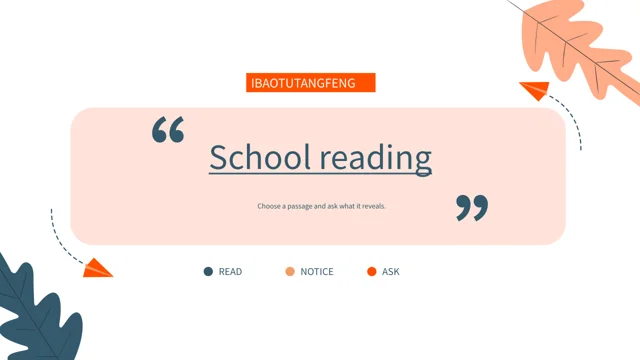
Autumn Reader School Presentation Template brings autumn leaves, paper planes and reading scenes to white and peach pages. The 25-slide, 16:9 deck has four section pages at 3, 8, 14 and 20, and closes with Thank you. Autumn Reader School Presentation Template pairs a red-chair reader with an umbrella, a fox, flowers and book steps. Begin with a passage, notice a detail and invite a response supported by the text. Autumn Reader School Presentation Template offers small cards, paired columns and connected nodes for notes. Percentages, cup prices, distances and drawn curves remain examples, not reading results or live offers. Editable text provides independent English guidance, with original visible wording in notes for its own page. Autumn Reader School Presentation Template retains pictures, audio and IBAOTUTANGFENG labels without treating those names as the writer of the new guidance. Select pages, separate quotations from responses and check the saved file before sharing.
Key Features of Autumn Reader School Presentation Template
Autumn illustrations and varied note areas give a reading group room to respond.
Autumn Leaves and Paper Planes
Autumn Reader School Presentation Template frames white and peach areas with autumn leaves and paper planes. Keep a reading point clear beside each illustration.
Four Parts for a Reading Conversation
Autumn Reader School Presentation Template has four section pages. Select a passage, examine a detail, compare responses and carry a question into the closing scene.
Readers, a Fox and Flower Scenes
Autumn Reader School Presentation Template pairs a red-chair reader with fox and flower scenes. Fit notes to their frames without inventing a pictured identity.
Paired Notes and Six Connected Points
Autumn Reader School Presentation Template includes paired notes and a six-point circle. Use the links to compare ideas; these shapes do not analyse answers.
Manual Examples and Drawn Curves
Autumn Reader School Presentation Template keeps manual percentages, sample prices and drawn curves. Explain your labels; no linked workbook calculates the examples.
A Thank-You Page with a Next Question
Autumn Reader School Presentation Template closes with Thank you. Revisit one observation and leave a question that another reader can answer from the book.
How to Use Autumn Reader School Presentation Template
Choose a passage, prepare a working copy and inspect the finished reading sequence.
-
Choose a Passage and Four-Part Sequence
Browse 25 previews of Autumn Reader School Presentation Template. Choose a book and passage, record its page, then select the four-part sequence and paired writing areas for your reading group.
-
Download and Keep a Working Copy
Get Autumn Reader School Presentation Template with an active paid plan. Daily downloads are unlimited and repeatable. Keep a reference copy; add book details and responses to a working copy.
-
Replace Examples and Review the Slides
Add short notes to Autumn Reader School Presentation Template. Replace sample labels, inspect pictures and links, then reopen the saved PPTX to check small captions, fonts and audio playback.
Questions about Autumn Reader School Presentation Template
How can I download Autumn Reader School Presentation Template for a school reading session?
Autumn Reader School Presentation Template is available after signing in with an active paid plan. Choose pages from the previews of Autumn Reader School Presentation Template before downloading, rather than expecting a completed report about a particular book. Daily downloads of Autumn Reader School Presentation Template are unlimited and can be repeated when you need another copy. Keep an untouched version of Autumn Reader School Presentation Template as a reference while arranging a shorter sequence for your class or reading group. In a working copy of Autumn Reader School Presentation Template, add accurate book details, page references and your own concise responses. Access to the PPTX does not create separate permissions for the pictures, recording or quotations you choose to share.
How are the pages of Autumn Reader School Presentation Template organised?
Autumn Reader School Presentation Template has 25 slides in a widescreen 16:9 format, with a four-item contents page. The four section pages of Autumn Reader School Presentation Template appear at 3, 8, 14 and 20, each using the autumn illustration style. Move through Autumn Reader School Presentation Template by introducing a passage, examining a detail, comparing responses and choosing a further question. You can shorten Autumn Reader School Presentation Template for a brief meeting by selecting suitable layouts and updating the contents to match the pages that remain. The final page of Autumn Reader School Presentation Template says Thank you, so it can acknowledge the group before introducing the next reading task.
Are the figures in Autumn Reader School Presentation Template linked to a spreadsheet?
Autumn Reader School Presentation Template keeps manually positioned percentages, prices and other numeric labels. Autumn Reader School Presentation Template has no native chart, embedded workbook or table object for calculating these examples. The two curves in Autumn Reader School Presentation Template are arranged drawing shapes with labels, not live series that update when a number changes. Cup prices in Autumn Reader School Presentation Template, such as $2.5, $3 and $3.2, are supplied examples rather than current offers, school fees or the price of downloading the template. Other labels in Autumn Reader School Presentation Template include a large number, a distance and a duration; they are not verified astronomy facts or measured reading times. Replace examples with information you can explain, and distinguish a visual comparison from an actual assessment.
Can I edit the illustrated scenes in Autumn Reader School Presentation Template?
Autumn Reader School Presentation Template combines editable ordinary text and layout shapes with supplied picture assets. The readers, fox, umbrella and flower scenes in Autumn Reader School Presentation Template are images, rather than separate editable characters or three-dimensional models. Replacing a picture in Autumn Reader School Presentation Template should be followed by a check of its crop, surrounding leaves and writing space. Keep printed lettering or source markings within the pictures of Autumn Reader School Presentation Template distinguishable from text you add yourself. Use Autumn Reader School Presentation Template to describe a passage or pose a question without assigning an identity, location or creator to an unidentified illustration. Retain relevant provenance and select replacement pictures with permissions suitable for the intended audience and sharing.
Where should book quotations go in Autumn Reader School Presentation Template?
Autumn Reader School Presentation Template provides compact cards, paired areas and wider writing fields. A short quotation in Autumn Reader School Presentation Template should include a chapter or page reference that another reader can find. Use neighbouring fields of Autumn Reader School Presentation Template to separate a detail from its interpretation, or place two responses side by side without repeating the same paragraph. The English prompts in Autumn Reader School Presentation Template are independent reading guidance, not verified extracts from a published book. When completing Autumn Reader School Presentation Template, label the book’s own words separately from your explanation and leave enough space for a different view. Choose a shorter extract for a small card rather than extending text over the autumn leaves, character pictures or connector lines.
Which fonts and languages are included in Autumn Reader School Presentation Template?
Autumn Reader School Presentation Template uses Source Han Sans SC Regular and Bold for ordinary editable text; font files are not embedded. The new editable guidance in Autumn Reader School Presentation Template is written in English. Original visible wording remains in reference notes for its own page of Autumn Reader School Presentation Template, while original source labels and picture lettering stay with their materials. Names such as IBAOTUTANGFENG in Autumn Reader School Presentation Template indicate supplied source content, not the author of the new guidance or a verified pupil’s identity. The website’s language versions describe the same Autumn Reader School Presentation Template PPTX, rather than separate translated slide files. Install suitable fonts or choose a replacement available to your editor, then inspect small node captions, part headings and broad cover text.
How should I handle the audio in Autumn Reader School Presentation Template?
Autumn Reader School Presentation Template retains the source recording alongside its picture assets and source labels. The presence of audio in Autumn Reader School Presentation Template does not establish the performer’s identity or provide an additional music licence. Open Autumn Reader School Presentation Template in your editor to check playback and decide whether the recording supports the group’s reading activity. Static page previews of Autumn Reader School Presentation Template show the layouts but do not play the track or confirm what listeners will hear in your presentation software. When sharing Autumn Reader School Presentation Template, preserve relevant source information and check the permissions required for the materials and context. Keep the recording, book quotations and your own discussion prompts distinct instead of attributing every element to one source name.
What should I check in previews of Autumn Reader School Presentation Template?
Autumn Reader School Presentation Template includes a preview of each of its 25 final pages. Review Autumn Reader School Presentation Template from the opening book scene to the closing Thank you page and note how the text areas vary beside the illustrations. The paired notes and six connected points in Autumn Reader School Presentation Template need different amounts of writing; choose the reading point before deciding which frame to use. Review sample percentages, cup prices and drawn curves in Autumn Reader School Presentation Template as layout examples, not completed reports. After downloading Autumn Reader School Presentation Template, check your replacements in the saved file as well as in the editor. Look at picture crops, the red-chair reader, autumn leaves and connecting lines together, rather than judging a caption in isolation.
How do I finish and share Autumn Reader School Presentation Template?
Autumn Reader School Presentation Template works best when each chosen page has one reading purpose. Before presenting Autumn Reader School Presentation Template, replace ordinary examples with accurate book information, brief quotations and responses that the group can discuss. Check the small cards and paired writing fields of Autumn Reader School Presentation Template after changing a font so captions do not run into nearby pictures. Export Autumn Reader School Presentation Template to PDF if you need a static handout, then inspect all retained pages in their intended order. Keep an editable copy of Autumn Reader School Presentation Template for later discussion and test the source audio separately when sharing the PPTX. Preserve provenance, distinguish words from the book from your own explanation and use the thank-you scene to acknowledge contributions.