

Colorful theme: rounded tabs for a four-part classroom lesson
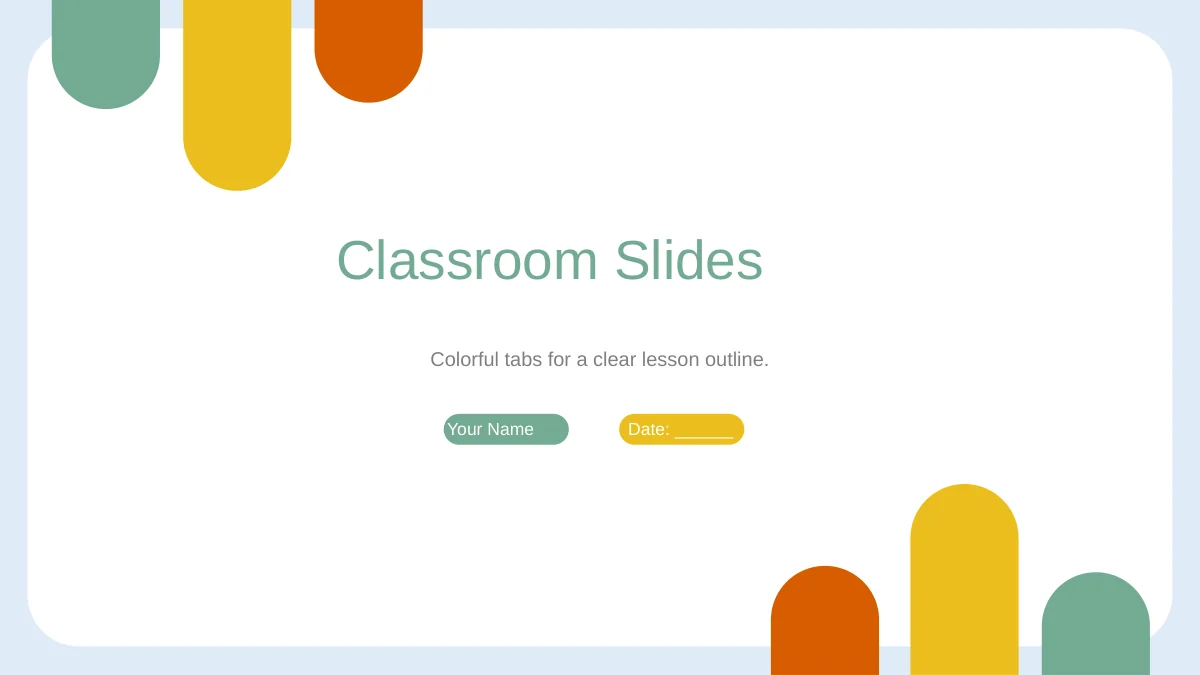
Colorful Tabs Classroom brings a colorful theme to a lesson built around your own subject. Long rounded tabs introduce green, yellow and orange at opposite corners, with a pale blue frame around the white center. The colorful theme continues across 14 widescreen pages organized into Intro, Lesson, Practice and Homework. A circular leaf photograph supports three observation prompts; a semicircular heart photograph anchors four callouts. Use the colorful theme to distinguish an attempt from a review, then guide a task through four points on a horizontal bar. A separate A–D diamond layout leaves room for homework notes. The English sample guidance gives you a structure to adapt with your own examples and activities. Keep labels short inside the tabs, choose the pages your class needs and replace the name fields before presenting. This colorful theme provides a teaching framework you complete.
Features of this colorful theme
This colorful theme combines rounded tabs, photo prompts and structured classroom notes.
Rounded tabs and a pale frame
The colorful theme repeats green, yellow and orange tabs at opposite corners. A pale blue border surrounds the white center, leaving room for lesson notes.
Four circular chapter dividers
The colorful theme separates Intro, Lesson, Practice and Homework with green circles. Diamond numbers and a dotted outer ring mark each change of chapter.
Two contrasting photo prompts
This colorful theme pairs a round leaf photo with three prompts and a semicircular heart photo with four callouts. Use each picture to support an example.
Four activity choices
Create, Watch, Explain and Connect each have an icon panel in the colorful theme. Alternating green and yellow panels distinguish your short activity notes.
Attempt and review panels
The colorful theme places Attempt and Review in green and yellow panels. Discuss and Reflect notes below give you space to extend a task with follow-up questions.
Sequence and homework layouts
A four-point task sequence and separate A–D homework layout extend the colorful theme. Both use editable shapes and text, with room for your own instructions.
How to adapt this colorful theme
Prepare the colorful theme by choosing a route, adding your examples and checking the display.
-
Choose a teaching route
Preview the colorful theme and choose layouts that fit your learning goal. Use the colorful theme with a relevant picture prompt, then select an activity and a practice task for your class.
-
Add subject material
Download the colorful theme with an active paid plan. Replace the English sample guidance and photos as needed, keeping labels short within the colorful theme and writing tasks for your learners.
-
Check and present
Test the colorful theme on your classroom screen. Check white labels, photo crops and small notes, then save an editable copy of the colorful theme and review any exported PDF before sharing.
Questions about this colorful theme
How do I download this colorful theme?
Sign in with an active paid plan to download the colorful theme as a PowerPoint file. Paid members have unlimited daily and repeat downloads. Save an untouched copy, then edit a separate version to retain the original classroom layouts.
How many slides come with this colorful theme?
The colorful theme contains 14 widescreen 16:9 slides: a cover, contents, four dividers, seven teaching layouts and a closing. Keep relevant pages. You can use the colorful theme for a short explanation without presenting every section.
What can I edit in the colorful theme?
Text, tabs, icons and diagram shapes in the colorful theme are editable. The two photographs can be replaced or recropped. The colorful theme has no native data charts or linked spreadsheets; its horizontal sequence is a shape layout.
Can I preview every colorful theme layout?
The gallery shows all 14 pages of the colorful theme, matching the English download. Compare the round and semicircular image spaces with your pictures. Leave room beside the colorful theme photo prompts for short observations; reserve longer explanations for wider areas.
Can I use the colorful theme in another editor?
The colorful theme is supplied as a PPTX file. Google Slides and Keynote compatibility has not been verified. After importing the colorful theme, inspect rounded tabs, thin connectors, photo masks and animation timing before presenting.
Which font does the colorful theme use?
The English colorful theme uses Arial without embedded fonts. If a device substitutes the font in the colorful theme, inspect short tab labels, circular divider notes and text inside practice panels for overflow.
Is the colorful theme a completed lesson?
The colorful theme contains English chapter labels and sample teaching prompts for you to adapt. Supply the subject knowledge, examples and tasks your class needs; it is a framework rather than a finished curriculum. Every website language describes the same English slide file.
Can I use the colorful theme commercially?
Check source and photograph terms before commercial use or redistribution of the colorful theme. Membership does not expand third-party rights. Confirm permissions for any materials you add, including replacement pictures, before sharing an adapted presentation.
How should I share the colorful theme?
Share the page link so colleagues can inspect the colorful theme before downloading. Where permissions allow, send your edited PPTX or an exported PDF. Check sample details and instructions before sharing the colorful theme; retain an editable version.