Minimalist White Design Presentation Template: White Spaces, Soft Shadows and Olive Type
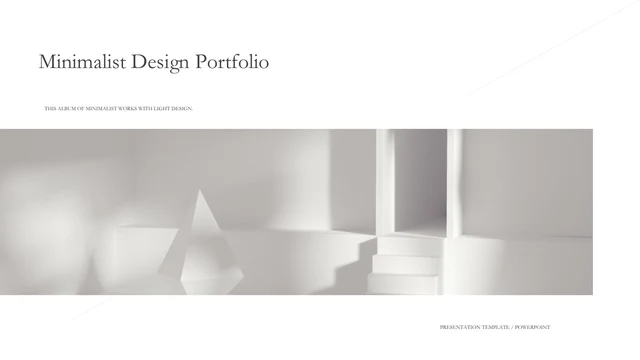
Minimalist White Design Presentation Template builds its visual identity around white interiors and the shadows that fall across them. A wide architectural image stretches across the opening page, while olive serif headings introduce the content. Minimalist White Design Presentation Template contains 25 widescreen slides, including three chapter dividers marked One, Two and Three. The layouts vary the scale of the same visual language: a chair in a quiet room, pale wall details, tall interior views and architectural forms. Minimalist White Design Presentation Template places these pictures beside short notes, paired captions or three text columns. Thin lines and restrained grey panels help separate the content without filling the open space. The closing page returns to the opening image. Choose photographs with a similar sense of light, then replace the sample headings and placeholder paragraphs with descriptions of your own work. Keep the text concise so that the photographs and margins remain the focus.
Key Features of Minimalist White Design Presentation Template
Explore the white photography, olive headings and spacious arrangements in Minimalist White Design Presentation Template.
White Interior Photography
Minimalist White Design Presentation Template uses pale rooms, architectural forms and chair photographs. Soft shadows add depth while the surrounding space stays quiet.
Olive Serif Headings
Minimalist White Design Presentation Template pairs olive serif titles with small body text. Keep headings concise so their weight and shape remain clear against white.
Three Chapter Dividers
Minimalist White Design Presentation Template separates the sequence with One, Two and Three pages. Rename the chapters to reflect the actual projects in your portfolio.
Paired Picture Comparisons
Minimalist White Design Presentation Template provides paired images with nearby captions. Use the arrangements to compare views while keeping their descriptions distinct.
Three-Column Text
Minimalist White Design Presentation Template includes a page with three text columns above a wide image. Give each column one idea and keep their lengths balanced.
Tall Image Arrangements
Minimalist White Design Presentation Template alternates vertical crops with wide photographs. Check the edges of each picture when replacing the original interior images.
How to Use Minimalist White Design Presentation Template
Select a sequence, replace the examples and check the light details.
-
Plan Three Chapters
Review all 25 pages of Minimalist White Design Presentation Template. Select the picture comparisons, wide-image pages and text layouts you need, then arrange them around three clear project sections.
-
Save an Editable Copy
Download Minimalist White Design Presentation Template with an active paid membership. Daily and repeat downloads are unlimited. Keep the original PPTX and save a separate copy for your photographs and text.
-
Check Light and Spacing
Personalize Minimalist White Design Presentation Template in PowerPoint. Replace sample headings and images, inspect picture crops and check the pale details on your presentation screen before exporting.
Questions About Minimalist White Design Presentation Template
How can I download Minimalist White Design Presentation Template?
Use the download button on Minimalist White Design Presentation Template after signing in with an active paid membership. The download provides the editable PowerPoint file shown in the gallery. Paid members can download Minimalist White Design Presentation Template repeatedly without a daily limit. Before saving Minimalist White Design Presentation Template, compare the full preview with the type of photographs and writing you want to present. Keep one original Minimalist White Design Presentation Template and make a separate working copy, so you can return to the supplied layouts while trying different arrangements.
How many slides does Minimalist White Design Presentation Template contain?
Minimalist White Design Presentation Template includes 25 slides in a 16:9 widescreen format. Three divider pages break the sequence into chapters, while the remaining layouts offer photographs with captions, paired images and text columns. You can select fewer pages from Minimalist White Design Presentation Template for a shorter presentation. When rearranging Minimalist White Design Presentation Template, rename One, Two and Three to reflect your own sections or keep their numbering consistent. The cover and closing of Minimalist White Design Presentation Template use a matching architectural image, which can help give the finished deck a clear beginning and end.
What can I edit in Minimalist White Design Presentation Template?
Text boxes, shapes and picture objects in Minimalist White Design Presentation Template remain available for editing in PowerPoint. Change the olive headings, replace the interior photographs and rewrite the placeholder paragraphs. When replacing a picture in Minimalist White Design Presentation Template, inspect the crop instead of assuming that a new image will fit the same frame. The slender rules and grey panels in Minimalist White Design Presentation Template can also be adjusted where they are separate shapes. Text that is part of a picture in Minimalist White Design Presentation Template must be edited with that picture, not as a native text box.
Can I view all of Minimalist White Design Presentation Template before downloading?
Yes. Every page of Minimalist White Design Presentation Template is shown in the public preview, with thumbnails for moving through the sequence. Enlarge the pictures to examine the small captions and the pale image details in Minimalist White Design Presentation Template. Look at the three-column page and paired-photo pages before deciding how much text to prepare. The preview of Minimalist White Design Presentation Template shows the supplied file; replacing photographs or fonts may change the balance. Check your edited Minimalist White Design Presentation Template on the screen you intend to use, especially when the room is bright.
Does Minimalist White Design Presentation Template include editable charts?
Minimalist White Design Presentation Template uses photographic and text-based layouts rather than native data charts. There is no embedded chart workbook in Minimalist White Design Presentation Template. The paired images and three-column page can help organize a comparison, but they do not automatically calculate or plot figures. If you need a chart in Minimalist White Design Presentation Template, add one in PowerPoint using your own verified data and leave enough space for readable labels. Review its contrast alongside the quiet photography so it fits the visual rhythm of Minimalist White Design Presentation Template without overwhelming the other pages.
Which fonts are used in Minimalist White Design Presentation Template?
Minimalist White Design Presentation Template uses STKaiti, Source Han Serif Heavy and Source Han Sans Normal for its visible English text. Original embedded font resources are retained in Minimalist White Design Presentation Template, but they do not guarantee that every font or newly typed character will display identically on another system. Prepare matching fonts before editing Minimalist White Design Presentation Template or choose replacements and review the spacing. Check the cover, olive headings and narrow introductory labels throughout Minimalist White Design Presentation Template. Some headings need more width than the sample wording, so shorten the text if it begins to crowd its frame.
Is Minimalist White Design Presentation Template supplied in English?
Minimalist White Design Presentation Template has English editable display text, while several body areas contain Latin placeholder paragraphs. Replace those passages with descriptions of your own projects before presenting Minimalist White Design Presentation Template. The website translations all describe the same downloadable Minimalist White Design Presentation Template rather than separate translated slide files. Original photographs and genuine object attribution are preserved. A presentation app that imports PPTX may open Minimalist White Design Presentation Template, but compare its fonts, line breaks and crops with the preview; PowerPoint is the primary editing reference for the supplied file.
Can I use Minimalist White Design Presentation Template in a commercial presentation?
Check the applicable terms for Minimalist White Design Presentation Template and the material you include in your final presentation. Downloading Minimalist White Design Presentation Template through a paid account does not grant additional rights to every photograph or font. For client work, select images that you are authorized to use and retain required credits in Minimalist White Design Presentation Template. If you intend to sell a finished design or distribute an editable copy, confirm the relevant permissions first. You can replace the original pictures in Minimalist White Design Presentation Template with photographs of your own work while keeping the overall layout.
How do I share a finished Minimalist White Design Presentation Template?
For a template recommendation, share the public page of Minimalist White Design Presentation Template so others can see the full gallery and download through their own eligible accounts. For your own completed portfolio, export the edited Minimalist White Design Presentation Template to PDF or present it from your chosen app after checking the result. Keep the editable Minimalist White Design Presentation Template for future changes. Inspect small text, pale backgrounds and picture edges in the exported file, and confirm any required image credits. Avoid distributing the unedited Minimalist White Design Presentation Template beyond what its applicable terms permit.