Mountain Design Portfolio Presentation Template: mountain photographs and four design chapters
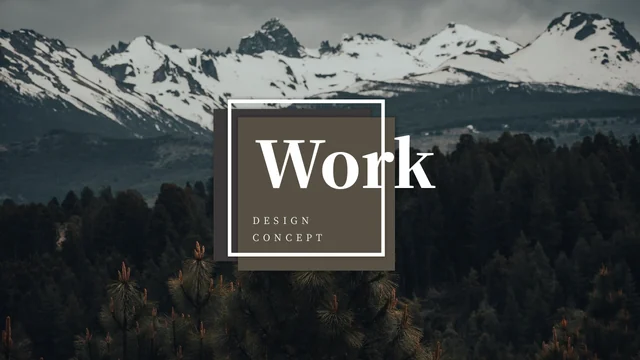
Mountain Design Portfolio Presentation Template places mountain photography around a four-part design portfolio. Mountain and lake photographs set the visual mood. Mountain Design Portfolio Presentation Template includes a contents page and separate chapters for graphic design, environmental design, visual communication and image art. Choose sections that fit your work. Mountain Design Portfolio Presentation Template gives photographs room through image-led pages, caption areas and two six-picture galleries. Add your own project context so that viewers understand what each image demonstrates. Mountain Design Portfolio Presentation Template contains editable guidance rather than verified project results; replace it with accurate descriptions of your role, decisions and final work. Review all 15 pages of Mountain Design Portfolio Presentation Template before downloading, then select a consistent set of photographs and keep a working copy for later changes.
Key Features of Mountain Design Portfolio Presentation Template
Photographs, chapters and space for your work.
Mountain Photography
Mountain Design Portfolio Presentation Template uses peaks, forests and lakes. Choose photos that suit your work and keep subjects clear in each frame.
Four Design Chapters
Mountain Design Portfolio Presentation Template lists four design disciplines. Rename them for your projects and match the contents to the final sequence.
Consistent Chapter Dividers
Mountain Design Portfolio Presentation Template has dividers on pages 3, 6, 9 and 12. Give each chapter a brief heading that explains the projects that follow.
Six-Picture Galleries
Mountain Design Portfolio Presentation Template has six-image pages on slides 11 and 14. Choose a coherent group of photographs and review their crops before presenting.
Project Caption Areas
Mountain Design Portfolio Presentation Template pairs pictures with short text areas. Explain your role and design choices while keeping each photograph easy to read.
A Simple Closing Slide
Mountain Design Portfolio Presentation Template ends with a landscape and a thank-you heading. Finish your story clearly and give viewers a practical way to reach you.
How to Use Mountain Design Portfolio Presentation Template
Choose the work, add context and review.
-
Review the Sequence
Preview the 15 pages of Mountain Design Portfolio Presentation Template and choose a sequence for your work. Match the four chapters to your projects and select pages that explain your design decisions.
-
Download and Add Your Work
Get Mountain Design Portfolio Presentation Template with an active paid plan. Open a copy in PowerPoint and add your words and photographs. Paid members can download again without a daily limit.
-
Check the Finished Portfolio
Review Mountain Design Portfolio Presentation Template at presentation size. Check crops, line breaks and captions, then save an editable copy and inspect the PDF before sharing your work.
Questions about Mountain Design Portfolio Presentation Template
How do I download Mountain Design Portfolio Presentation Template?
Sign in with an active paid plan and use the download button on Mountain Design Portfolio Presentation Template. Paid members can download Mountain Design Portfolio Presentation Template without a daily limit and repeat the download while their plan remains eligible. Save Mountain Design Portfolio Presentation Template before editing, then adapt a separate copy of Mountain Design Portfolio Presentation Template. The complete gallery is available to inspect without downloading the file, so you can decide whether its photographs and page structure suit your portfolio.
How many slides are included in Mountain Design Portfolio Presentation Template?
Mountain Design Portfolio Presentation Template contains 15 slides in a 16:9 format. The contents of Mountain Design Portfolio Presentation Template introduce four design disciplines, followed by dividers on pages 3, 6, 9 and 12. Mountain Design Portfolio Presentation Template also includes two six-picture gallery pages and a landscape-led closing slide. You can remove or reorder pages in Mountain Design Portfolio Presentation Template, but update the index and headings so that the edited portfolio follows a clear sequence rather than the original sample order.
Can I edit Mountain Design Portfolio Presentation Template?
The text and native shapes in Mountain Design Portfolio Presentation Template can be edited in PowerPoint. Replace the short headings and guidance in Mountain Design Portfolio Presentation Template with descriptions of your own work, then adjust the pictures and colours to suit your presentation. Mountain Design Portfolio Presentation Template keeps photographs separate from the surrounding text areas; changing a picture does not make lettering inside that image editable. Check each crop and caption in Mountain Design Portfolio Presentation Template after your changes, especially on the narrow vertical-photo layouts.
Can I preview Mountain Design Portfolio Presentation Template before downloading?
Yes. Every slide of Mountain Design Portfolio Presentation Template appears in the public gallery, with thumbnails and arrow controls for moving through Mountain Design Portfolio Presentation Template. Enlarge Mountain Design Portfolio Presentation Template to check headings, picture proportions and small labels at a useful size. Pay particular attention to the six-picture pages when comparing Mountain Design Portfolio Presentation Template with your intended content. Access to the preview does not require a file download or paid membership; downloading the PPTX requires an eligible paid plan.
Can I open Mountain Design Portfolio Presentation Template in another editor?
Mountain Design Portfolio Presentation Template is supplied as a PowerPoint (.pptx) file. An editor that imports PPTX may open it, but fonts, picture crops, spacing and native shapes can display differently. Test a copy of Mountain Design Portfolio Presentation Template in your chosen software before making extensive changes. Compare the mountain cover, chapter pages and grids of Mountain Design Portfolio Presentation Template with the online preview. After editing Mountain Design Portfolio Presentation Template, check the exported file in the application or display you will actually use.
Which fonts does Mountain Design Portfolio Presentation Template use?
The main source typefaces in Mountain Design Portfolio Presentation Template are Source Han Serif CN Regular and Heavy. Mountain Design Portfolio Presentation Template also retains the original embedded font parts and theme declarations, including DengXian and Calibri. Keep the supplied notices and follow the relevant terms if you reuse or change the fonts. If your editor substitutes a typeface in Mountain Design Portfolio Presentation Template, inspect the headings, captions and line breaks again before presenting or exporting your finished portfolio.
Are the examples in Mountain Design Portfolio Presentation Template translated?
The editable Chinese headings and guidance in Mountain Design Portfolio Presentation Template are adapted to concise English. The website descriptions can be read in the site's supported languages, but those versions describe the same English version of Mountain Design Portfolio Presentation Template. Mountain Design Portfolio Presentation Template does not provide a separate translated deck for every website language. Original photographs, picture lettering and source-credit names are retained. Review the examples in Mountain Design Portfolio Presentation Template and replace them with your own project descriptions before sharing the file.
Can I use Mountain Design Portfolio Presentation Template commercially?
Check the permissions relevant to your intended use of Mountain Design Portfolio Presentation Template, including the complete design, photographs and any fonts you supply. Download access to Mountain Design Portfolio Presentation Template is not an additional licence for every included asset. Replace sample images when you need material with permissions you can verify, and keep required credits and notices. If you share or sell a finished presentation based on Mountain Design Portfolio Presentation Template, confirm the applicable rights first rather than assuming that an editable file removes those conditions.
How can I share Mountain Design Portfolio Presentation Template?
Use the share control beside the download button on Mountain Design Portfolio Presentation Template, or copy the page URL and send it to the people who need to review the design. The link lets them inspect Mountain Design Portfolio Presentation Template and choose their own eligible download option. To share your finished work, export your edited copy of Mountain Design Portfolio Presentation Template from the presentation software and check its images and text first. Keep an editable version of Mountain Design Portfolio Presentation Template with your project files, and respect any required credits or redistribution conditions.