Rapidesign Presentation Template: Navy Triangles and Photo-Led Chapter Pages
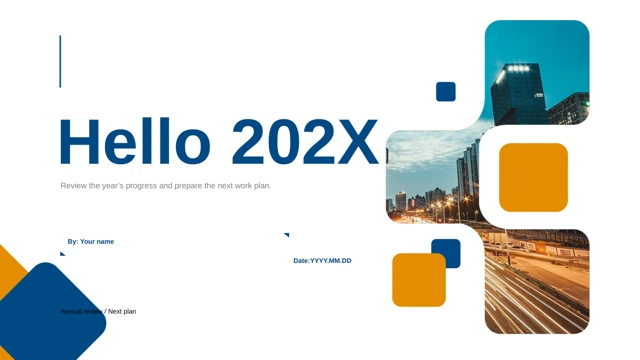
Rapidesign Presentation Template opens on blue mountain silhouettes beneath a bracketed design name. White pages and navy panels in Rapidesign Presentation Template alternate with photographs of the sea, forest, snow and night sky. Rapidesign Presentation Template ends with a matching mountain thank-you page. Four dividers in Rapidesign Presentation Template carry Part 01 through Part 04 over the same landscape. The contents page in Rapidesign Presentation Template lists three source entries; review that list if your outline uses all four parts. Rapidesign Presentation Template keeps the source structure. Photo pages in Rapidesign Presentation Template range from a four-image collage to two raised images above a navy text band. A coastal road follows an angular crop in Rapidesign Presentation Template; a misty forest sits in a wide frame. Rapidesign Presentation Template also includes a monitor frame, night-sky strip, brush-like portrait mask and overlapping navy text card. Keyboard and city photographs share one narrow strip. A final content page in Rapidesign Presentation Template places five map pins along a horizontal route with separate title and text fields. The route in Rapidesign Presentation Template uses editable shapes, not linked chart data. Rapidesign Presentation Template contains no native chart or embedded Excel workbook. Replace English prompts, checking text against dark panels and photo edges. Rapidesign Presentation Template preserves every original image and shape position. Chinese master prompts and unsupported Chinese display references are changed to English and Arial; original English references remain. Cover, divider and closing labels in Rapidesign Presentation Template are fitted inside their existing frames, and the contents spelling is corrected. Fonts are not embedded. Rapidesign Presentation Template is an editable starting point, with original landscape and people photographs whose rights need checking for your intended use.
Key Features of Rapidesign Presentation Template
Photos, navy shapes and four parts.
Navy triangles
Rapidesign Presentation Template pairs white pages with navy panels and landscapes.
Four dividers
Rapidesign Presentation Template keeps four numbered parts and a three-entry source contents page.
Photo collages
Rapidesign Presentation Template mixes grids, wide strips, a monitor frame and shaped crops.
Layered panels
Rapidesign Presentation Template places text on navy cards beside coast, forest and night views.
Five-pin route
Rapidesign Presentation Template provides separate text fields along a horizontal shape route.
Editable originals
Rapidesign Presentation Template retains nineteen slides, original pictures and shape positions.
How to Use Rapidesign Presentation Template
Download and replace prompts.
-
Preview
Rapidesign Presentation Template: compare photos, text space and the four parts.
-
Download
Rapidesign Presentation Template: active paid members have unlimited daily downloads.
-
Edit
Rapidesign Presentation Template: replace prompts, match the contents and review fonts.

Questions about Rapidesign Presentation Template
How do I download Rapidesign Presentation Template?
Rapidesign Presentation Template requires an active paid plan. Sign in and select the download button to receive the editable PowerPoint file. Daily downloads are unlimited; you can download again while your plan is active.
How many slides are in Rapidesign Presentation Template?
Rapidesign Presentation Template contains nineteen original 16:9 slides. Four numbered dividers, varied photo layouts and a matching closing page are retained. The source contents lists only three parts, so update it to match your chosen outline.
Can I edit the route in Rapidesign Presentation Template?
Rapidesign Presentation Template uses shapes and separate text labels for its five-pin route. Select the relevant shapes or text boxes in PowerPoint. There is no native chart or embedded workbook; route captions do not update automatically from data.
Can I preview all of Rapidesign Presentation Template?
Rapidesign Presentation Template displays every page above. Use the arrows or thumbnails to compare the navy text bands, four-image collage, brush crop and small route captions before downloading. Check whether your text fits those spaces.
Will Rapidesign Presentation Template work in another editor?
Rapidesign Presentation Template is supplied as a PowerPoint .pptx file. A compatible editor may import Rapidesign Presentation Template. Compare photograph crops, overlapping panels, title spacing and the five-pin route against the preview after conversion.
Which fonts does Rapidesign Presentation Template use?
Rapidesign Presentation Template replaces unsupported Chinese references with Arial while preserving emphasis. Original English references include Open Sans, Helvetica and other source styles. Fonts are not embedded; inspect substitutions and line breaks on your device before presenting.
Are the examples in Rapidesign Presentation Template translated?
Rapidesign Presentation Template retains its original English editing prompts and repeated sample passages. Chinese master and layout prompts are translated into English. The source contents typo is corrected. Localized website descriptions refer to the same English PPTX.
Can I use Rapidesign Presentation Template commercially?
Rapidesign Presentation Template preserves the source landscape, city and people photographs. Confirm that you have the necessary rights for your use and any retained images. The editing prompts are placeholders, and the file does not establish commercial permission for those assets.
How do I share Rapidesign Presentation Template?
Rapidesign Presentation Template can be shared using the page link or social sharing controls. Before sharing your edited Rapidesign Presentation Template, replace sample text, align the contents with your four-part outline and review photo crops, small captions and exported pages.