Wooden Concepts Furniture Presentation Template: A Calm Product Guide
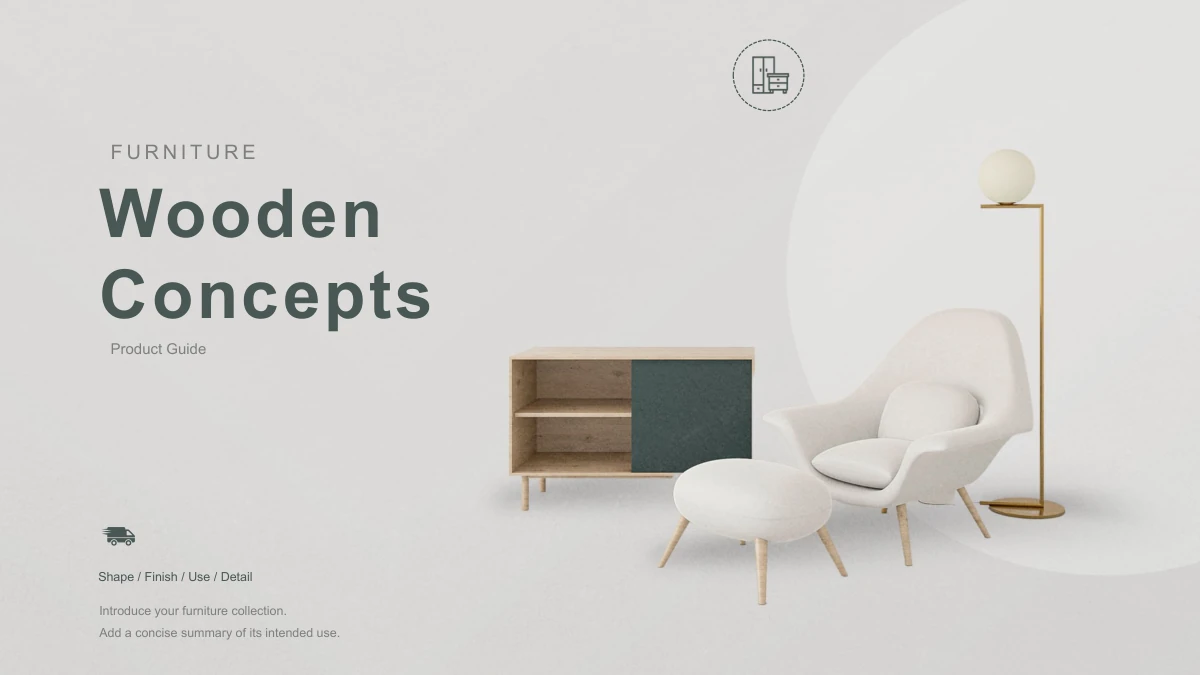
Wooden Concepts Furniture Presentation Template sets furniture against soft gray textures, white circles and dark slate green headings. Navy and white chairs, footstools, wooden cabinets, side tables and globe lamps recur across the 19 slides. Wooden Concepts Furniture Presentation Template opens with a collection cover, then uses four parts for a brand story, new products, classic styles and ordering information. Icon columns, three product cards and numbered notes provide several ways to organize a short explanation. Use Wooden Concepts Furniture Presentation Template to describe your own collection with verified details and clear captions. The furniture cutouts are static pictures; the ordering section provides space for instructions rather than a working shop. Wooden Concepts Furniture Presentation Template closes by repeating the opening design. Replace the English sample guidance with your content, retaining a distinction between a product description and a claim you can support.
Key Features of Wooden Concepts Furniture Presentation Template
Choose layouts in Wooden Concepts Furniture Presentation Template for item descriptions, comparisons and clear next steps.
Soft Gray Textures and White Circles
Wooden Concepts Furniture Presentation Template pairs gray textures with white circles and slate green headings. Keep new text distinct from the pale background.
Furniture Cutouts and Detail Images
Wooden Concepts Furniture Presentation Template uses static chairs, cabinets and lamps. Replace pictures thoughtfully while retaining their proportions and crops.
Four Parts for a Product Guide
Wooden Concepts Furniture Presentation Template separates story, products, styles and ordering. Four dividers keep the sequence clear as you choose relevant slides.
Cards for Side by Side Descriptions
Wooden Concepts Furniture Presentation Template includes three item cards and icon columns. Give each item a short heading and a verified detail for comparison.
Numbered Notes and a Bullet List
Wooden Concepts Furniture Presentation Template offers numbered notes and a three point list. Use these layouts for product details and concise enquiry instructions.
An Opening Design Repeated at the End
Wooden Concepts Furniture Presentation Template ends with its original cover composition. Keep this visual close or add your own final message within the text boxes.
How to Use Wooden Concepts Furniture Presentation Template
Preview Wooden Concepts Furniture Presentation Template, download the English PPTX with a paid plan, and prepare your furniture guide.
-
Review the Full Collection
Browse all 19 previews of Wooden Concepts Furniture Presentation Template. Compare the four dividers, furniture cards and numbered notes, then choose the layouts that suit your intended audience.
-
Download an Editable Copy
Sign in with an active paid plan to download Wooden Concepts Furniture Presentation Template. Daily and repeat downloads are unlimited. Keep the original English PPTX and edit a separate copy.
-
Edit and Share Your Guide
Update text and pictures in Wooden Concepts Furniture Presentation Template. Check product captions, image crops and contrast, then save the PPTX or export a PDF to share your finished guide.
Wooden Concepts Furniture Presentation Template FAQs
How do I download Wooden Concepts Furniture Presentation Template?
Download Wooden Concepts Furniture Presentation Template after signing in with an active paid plan. Daily downloads are unlimited, including repeat downloads. Save an original copy of Wooden Concepts Furniture Presentation Template before editing. Select layouts in Wooden Concepts Furniture Presentation Template and replace the guidance with your collection details. Access to the PPTX does not verify the products shown.
How many slides are in Wooden Concepts Furniture Presentation Template?
Wooden Concepts Furniture Presentation Template contains 19 slides in a 16:9 canvas. Four dividers introduce story, products, styles and ordering. Wooden Concepts Furniture Presentation Template includes icon columns, product cards and numbered notes. The last page of Wooden Concepts Furniture Presentation Template repeats the cover rather than a thanks message.
Can I edit the text and colors in Wooden Concepts Furniture Presentation Template?
Edit ordinary headings, descriptions and native shapes in Wooden Concepts Furniture Presentation Template. Keep new copy concise. Wooden Concepts Furniture Presentation Template uses static furniture pictures, so editing text does not alter image pixels. When adjusting Wooden Concepts Furniture Presentation Template, preserve contrast and distinguish verified specifications from general descriptions. There are no native charts or workbooks.
Can I preview every page of Wooden Concepts Furniture Presentation Template?
All 19 pages of Wooden Concepts Furniture Presentation Template appear in the gallery. Open larger previews before choosing layouts. In Wooden Concepts Furniture Presentation Template, furniture compositions, detail thumbnails and pale cards allow different amounts of text. Compare these spaces with your material. The complete preview of Wooden Concepts Furniture Presentation Template also includes the repeated cover at the end.
Can I use Wooden Concepts Furniture Presentation Template in another editor?
Open Wooden Concepts Furniture Presentation Template in an editor that accepts PowerPoint files. Test a copy first. Other editors may display fonts, crops or spacing differently in Wooden Concepts Furniture Presentation Template. Inspect chair cards, circles and the final cover after import. Export a sample PDF from Wooden Concepts Furniture Presentation Template and compare it with the previews; editor compatibility varies.
Which fonts does Wooden Concepts Furniture Presentation Template use?
The English text in Wooden Concepts Furniture Presentation Template uses Arial Regular and Bold, without embedded fonts. Make matching fonts available to keep Wooden Concepts Furniture Presentation Template close to the previews. If you change fonts, inspect the contents list and card headings for wrapping. Recheck Wooden Concepts Furniture Presentation Template after any font change, especially before exporting a PDF.
Is the content of Wooden Concepts Furniture Presentation Template in English?
Ordinary text in Wooden Concepts Furniture Presentation Template is concise English sample guidance, not a finished sales presentation. All language versions of this page link to the same English Wooden Concepts Furniture Presentation Template PPTX. Localized descriptions do not create separately translated decks. Replace placeholders in Wooden Concepts Furniture Presentation Template, keeping original source attribution distinct from your own statements.
Can I use Wooden Concepts Furniture Presentation Template commercially?
Use Wooden Concepts Furniture Presentation Template according to service terms and rights attached to original materials. Paid access does not grant extra rights to photos, furniture designs, logos or fonts. Original 1PPT attribution remains distinct from your content in Wooden Concepts Furniture Presentation Template. Before distributing a commercial presentation made with Wooden Concepts Furniture Presentation Template, check rights for images and added material.
How can I share Wooden Concepts Furniture Presentation Template?
Share the Wooden Concepts Furniture Presentation Template page link or use its sharing button. Recipients can review Wooden Concepts Furniture Presentation Template and download it with their own active paid plan. To deliver your edited guide, save a PPTX or export a PDF after checking the content. Sharing Wooden Concepts Furniture Presentation Template does not grant extra rights to original pictures or materials.