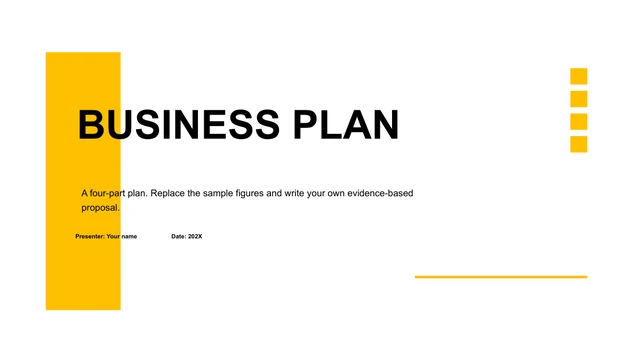
Yellow Frame Business Presentation Template: Yellow Frames for a Four-Part Business Story
Yellow Frame Business Presentation Template contains 20 original 16:9 slides. Black chapter pages contrast with white content pages and yellow frames. The opening of Yellow Frame Business Presentation Template breaks an architectural photograph into vertical strips behind a thin rectangular outline. The closing repeats that image treatment; 202X remains a year placeholder. Four numbered dividers in Yellow Frame Business Presentation Template provide an editable business outline. A yellow diagonal overlay, colleagues around a laptop, a team portrait and building photographs offer different ways to support your topic. Yellow Frame Business Presentation Template combines photo-and-text blocks with icons; those photographs are design assets, not evidence about your actual organization. Yellow Frame Business Presentation Template uses editable shapes rather than native charts or embedded workbooks. The 78/62/11/27% labels, 42/75/30% rings and 53/72/60/90% column-style figures are independent examples. Yellow Frame Business Presentation Template also has 56/65/60/58% magnifier callouts and upward arrows labeled 63/79/63/88%. Verify every number and update each shape manually. A four-stage winding path marked PROJECT 1–4 in Yellow Frame Business Presentation Template can describe a sequence without claiming a timeline. A hub with three connected circles, four outlined cards and a three-branch numbered graphic provide other comparison layouts. Select pages that support your argument in Yellow Frame Business Presentation Template, and shorten text before adding more boxes. Yellow Frame Business Presentation Template retains original images and all shape coordinates. Source promotional URLs are cleared and repetitive paste instructions become concise English guidance. Add your organization, real year, verified examples and relevant image permissions. Check yellow-on-black contrast, small labels, crop boundaries and exported pages, then retain an editable copy.
Key Features of Yellow Frame Business Presentation Template
Yellow frames and clear business layouts.
Yellow frames
Yellow Frame Business Presentation Template uses yellow lines on black and white.
Four parts
Yellow Frame Business Presentation Template keeps four dividers across 20 pages.
Photo layouts
Yellow Frame Business Presentation Template pairs portraits with architectural photos.
Shape figures
Yellow Frame Business Presentation Template has editable percentages and arrow figures.
Process paths
Yellow Frame Business Presentation Template includes a winding path and linked circles.
English prompts
Yellow Frame Business Presentation Template has brief guidance and cleared source URLs.
How to Use Yellow Frame Business Presentation Template
Review, download and personalize your story.
-
Preview
Yellow Frame Business Presentation Template: inspect photo strips and shape values.
-
Download
Yellow Frame Business Presentation Template: paid members have unlimited daily downloads.
-
Edit
Yellow Frame Business Presentation Template: replace examples and check each percentage.

Questions about Yellow Frame Business Presentation Template
How do I download Yellow Frame Business Presentation Template?
Yellow Frame Business Presentation Template requires an active paid plan. Sign in and select Download PPTX. Repeated downloads of Yellow Frame Business Presentation Template have no daily limit while your plan is active.
How many slides are in Yellow Frame Business Presentation Template?
Yellow Frame Business Presentation Template preserves 20 original 16:9 pages. Four numbered black dividers separate the business layouts, followed by a repeated photo-strip closing. The 202X year in Yellow Frame Business Presentation Template is a placeholder, not a current report date.
Can I edit the figures in Yellow Frame Business Presentation Template?
Yellow Frame Business Presentation Template uses shapes for all its numeric visuals; there are no native charts or embedded workbooks. The examples are 78/62/11/27%, rings 42/75/30%, column-style 53/72/60/90%, magnifier 56/65/60/58% and arrows 63/79/63/88%. Update labels and corresponding shapes in Yellow Frame Business Presentation Template manually; their appearance does not establish a calculated result.
Can I preview all of Yellow Frame Business Presentation Template?
Yellow Frame Business Presentation Template shows all supplied pages above. Use thumbnails or arrows to inspect black dividers, vertical photo strips, yellow overlays, portrait crops, percentage shapes, the winding path and the closing page.
Will Yellow Frame Business Presentation Template work in another editor?
Yellow Frame Business Presentation Template is a PowerPoint .pptx. A compatible editor may import Yellow Frame Business Presentation Template. Compare grouped shapes, narrow photo strips, yellow frames, shadows and text wrapping with the preview before presenting.
Which fonts does Yellow Frame Business Presentation Template reference?
Yellow Frame Business Presentation Template uses Arial and Calibri in its text, with Arial Black as the main-theme heading font. Chinese font bindings were changed to Arial. Check bold cover words, chapter numbers and small percentage signs in Yellow Frame Business Presentation Template if fonts are substituted.
Is Yellow Frame Business Presentation Template in English?
Yellow Frame Business Presentation Template is an English PPTX. Existing headings are retained or shortened, repetitive paste instructions become brief editing prompts, and source promotional URLs are cleared. Year and percentage examples remain for you to replace. Site languages translate this page, not the English download.
Can I use Yellow Frame Business Presentation Template commercially?
Yellow Frame Business Presentation Template preserves original photographs and design assets. Confirm the rights needed for your purpose and replacement images. A paid download alone does not establish a commercial license for every asset.
How do I share Yellow Frame Business Presentation Template?
Yellow Frame Business Presentation Template can be shared through the social button or page link. Before sending a presentation using Yellow Frame Business Presentation Template, replace the year and organization, verify every independent percentage, check photo rights and inspect exported pages.