180 Degree Editorial Presentation Template: Large Angles and a Photographic Editorial Rhythm
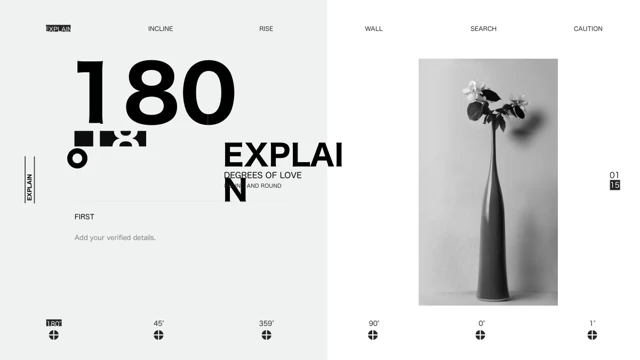
180 Degree Editorial Presentation Template begins with a grayscale flower vase beside a large 180° number. Explain, Degrees of Love and Round and Round are source design labels. Inverted numbers and vertical captions repeat the rhythm. 180 Degree Editorial Presentation Template keeps 15 slides in 16:9. The moon photograph on the contents page in 180 Degree Editorial Presentation Template introduces three numbered sections, beginning on pages 3, 7 and 11. Their wide photographs show colored mountain peaks, a dark snow range and a canyon. The angles in 180 Degree Editorial Presentation Template, including 45°, 359°, 90°, 0° and 1°, are graphic labels rather than measured results. 180 Degree Editorial Presentation Template alternates broad image panels with portraits and small galleries. A succulent photograph, a swimmer, a person above the clouds and flower branches appear among the source images. 180 Degree Editorial Presentation Template uses two tall picture columns and a separate nine-tile arrangement. The final portrait in 180 Degree Editorial Presentation Template repeats the cover-style angles. 180 Degree Editorial Presentation Template contains no native charts or embedded workbooks. The large numbers, page markers and photo captions in 180 Degree Editorial Presentation Template are independent text and shapes. Repeated Latin filler becomes short English editing prompts, and an opaque source code is removed. 180 Degree Editorial Presentation Template retains all original image bytes, object positions and page order. 180 Degree Editorial Presentation Template should be checked closely when replacing text. Rotated and inverted headings are part of the design, and narrow columns in 180 Degree Editorial Presentation Template need short captions. Keep negative space; test small type at presentation size. Each localized page describes the same English PPTX; 180 Degree Editorial Presentation Template does not confirm commercial rights to its source photographs.
Key Features of 180 Degree Editorial Presentation Template
Angles, photos and spacing.
Large angles
180 Degree Editorial Presentation Template uses large 180° type and smaller angle labels.
Three sections
180 Degree Editorial Presentation Template keeps three numbered parts in 15 slides.
Photo contrasts
180 Degree Editorial Presentation Template pairs grayscale portraits with mountains.
Image galleries
180 Degree Editorial Presentation Template includes tall photo columns and a nine-tile grid.
Rotated type
180 Degree Editorial Presentation Template retains inverted numbers and vertical captions.
Portrait ending
180 Degree Editorial Presentation Template repeats the cover-style angle layout at the close.
How to Use 180 Degree Editorial Presentation Template
Shorten text and review.
-
Preview
180 Degree Editorial Presentation Template: inspect all 15 pages.
-
Download
180 Degree Editorial Presentation Template: active paid members download without daily limits.
-
Edit
180 Degree Editorial Presentation Template: replace captions and check rotated type.
Questions about 180 Degree Editorial Presentation Template
How do I download 180 Degree Editorial Presentation Template?
180 Degree Editorial Presentation Template requires an active paid plan. Sign in and choose Download PPTX. Daily downloads are unlimited and the same file can be downloaded again.
How many pages are in 180 Degree Editorial Presentation Template?
180 Degree Editorial Presentation Template has 15 original slides in 16:9. Three numbered parts begin on pages 3, 7 and 11. 180 Degree Editorial Presentation Template ends with a portrait and large angle typography.
Can I edit 180 Degree Editorial Presentation Template?
180 Degree Editorial Presentation Template contains editable text and shapes, with photographs kept as images. There are no native charts or embedded workbooks. 180 Degree Editorial Presentation Template angle numbers and page labels are independent examples; photographs do not become separately editable objects.
Can I preview all of 180 Degree Editorial Presentation Template?
180 Degree Editorial Presentation Template provides all 15 page previews before download. Inspect the moon contents, section photographs, vertical captions, galleries and the final portrait. 180 Degree Editorial Presentation Template keeps the complete source sequence.
Can another editor open 180 Degree Editorial Presentation Template?
180 Degree Editorial Presentation Template is a .pptx file that compatible editors may import. Compare rotated type, photo cropping and narrow captions with the previews. 180 Degree Editorial Presentation Template does not guarantee identical font rendering or object behavior in another application.
Which fonts does 180 Degree Editorial Presentation Template use?
180 Degree Editorial Presentation Template keeps references to DIN, DIN Medium, DFGothic-EB, Poppins, Poppins SemiBold, Montserrat Light, Montserrat Medium and Titillium, with theme font bindings. 180 Degree Editorial Presentation Template has no embedded fonts. Check inverted headings and small vertical captions after substitution.
Is 180 Degree Editorial Presentation Template translated?
180 Degree Editorial Presentation Template replaces repeated Latin filler with brief English editing prompts and translates Chinese master instructions. The original English design labels and graphic angles remain. All localized pages describe the same English 180 Degree Editorial Presentation Template file.
Can I use 180 Degree Editorial Presentation Template commercially?
180 Degree Editorial Presentation Template does not confirm rights to the source photographs or design. Get permission or use images you are licensed to share. 180 Degree Editorial Presentation Template numeric angles and captions are illustrative design elements, not verified measurements or business facts.
How should I share 180 Degree Editorial Presentation Template?
180 Degree Editorial Presentation Template should be shared as your finished presentation or exported PDF after replacing captions and images. Check inverted titles and small text. 180 Degree Editorial Presentation Template needs a separate rights check before redistribution of the template itself.