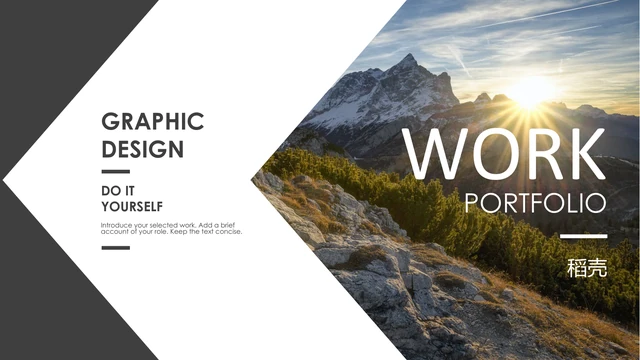
Angular Graphic Portfolio Presentation Template: angular photo frames and contrasting grey panels
Angular Graphic Portfolio Presentation Template opens with a sunlit mountain inside an angled photo area. White space meets dark grey, with a graphic-design label on the left. Twelve widescreen pages of Angular Graphic Portfolio Presentation Template develop that contrast through a three-entry project menu, paired views and two diamond-shaped photographs beside a grey diamond. A media page places notes over a translucent grey panel beside a slanted canyon image. The same three landscapes appear as circular pictures and later as square photographs crossing a dark band. Angular Graphic Portfolio Presentation Template also offsets coastal views, combines large and small pictures and closes with a cloudy mountain image. Each project pairs a title and brief notes with related images. Choose work that fits the crops and explain what you contributed. The landscapes are examples, not proof of your travels or authorship. Replace them with suitable permitted work.
Key Features of Angular Graphic Portfolio Presentation Template
Angles, diamonds, circles and contrasting grey panels.
Angled Opening Page
Angular Graphic Portfolio Presentation Template uses a white inward angle on its mountain cover. Keep a short title legible against the dark image.
Three-Entry Project Menu
Angular Graphic Portfolio Presentation Template has three menu entries for graphic, media and photo work. Match each brief label to the pages you select.
Diamond Photo Crops
Angular Graphic Portfolio Presentation Template has two diamond photos beside a grey shape. Check the subjects and horizon before replacing these landscapes.
Circular and Square Trios
Angular Graphic Portfolio Presentation Template shows the same photo trio in circles and square frames. Use brief captions that stay separate from the project notes.
Grey Project Panels
Angular Graphic Portfolio Presentation Template puts white notes on grey panels beside angled images. Explain the idea and your role with space around the text.
Offset Image Pairs
Angular Graphic Portfolio Presentation Template offsets coastal views and layers photo groups over dark bands. Choose related images and keep the notes concise.
How to Use Angular Graphic Portfolio Presentation Template
Select Angular Graphic Portfolio Presentation Template layouts that suit the images and roles you want to show.
-
Choose a Project Sequence
Preview all twelve pages of Angular Graphic Portfolio Presentation Template. Compare the menu and shaped photo frames, then choose a sequence that explains your projects without repeating views.
-
Keep an Untouched Original
Download Angular Graphic Portfolio Presentation Template with an active paid plan. Save an untouched original first; eligible members can download repeatedly without a daily limit.
-
Replace Images and Notes
Edit Angular Graphic Portfolio Presentation Template in PowerPoint. Add images and short project notes, inspect crops and font wraps, then open the exported PDF before sharing your work.
Angular Graphic Portfolio Presentation Template FAQs
How do I download Angular Graphic Portfolio Presentation Template?
Sign in with an active paid plan and use the download control for Angular Graphic Portfolio Presentation Template. Save an untouched Angular Graphic Portfolio Presentation Template before editing images and project notes. Eligible members can download Angular Graphic Portfolio Presentation Template repeatedly without a daily count limit. Browse the gallery first. Paid access supplies the file, not additional commercial rights or permission to redistribute the photographs and design.
How many pages are in Angular Graphic Portfolio Presentation Template?
Angular Graphic Portfolio Presentation Template contains twelve 16:9 pages, with an angled cover, a three-entry menu, photo layouts and a mountain ending. The selected-project page carries 01. Angular Graphic Portfolio Presentation Template has no native charts or embedded spreadsheets. Select or rearrange pages of Angular Graphic Portfolio Presentation Template; the file includes the entire sequence shown in the gallery.
Can I edit Angular Graphic Portfolio Presentation Template?
Angular Graphic Portfolio Presentation Template contains native headings, notes, lines and grey shapes. Replace pictures in Angular Graphic Portfolio Presentation Template with permitted work and inspect diamond, circle and angled crops. Angular Graphic Portfolio Presentation Template does not turn pictured scenery or captured lettering into native text or objects. Replace images to change their pictured content.
Can I preview all of Angular Graphic Portfolio Presentation Template?
All twelve pages of Angular Graphic Portfolio Presentation Template are available to view without buying the download. Use the thumbnails or arrows and enlarge small notes. The previews show the English Angular Graphic Portfolio Presentation Template supplied in the file. Compare the different crops and image groups before choosing Angular Graphic Portfolio Presentation Template. Review the edited deck at its intended display size and check the export.
Which editors support Angular Graphic Portfolio Presentation Template?
Angular Graphic Portfolio Presentation Template is a .pptx containing native text and shapes with photographic images. PowerPoint opens Angular Graphic Portfolio Presentation Template; other editors may import it, with possible font, crop or alignment differences. Test a copy of Angular Graphic Portfolio Presentation Template in your intended editor, compare each page with the gallery and check the export. Identical rendering is not guaranteed.
Which fonts does Angular Graphic Portfolio Presentation Template use?
Angular Graphic Portfolio Presentation Template preserves Century Gothic text references and uses Calibri for adapted text; deeper references also include Calibri Light and Arial. Four original Calibri font parts remain in Angular Graphic Portfolio Presentation Template: Regular, Bold, Italic and Bold Italic. The previews use Century Gothic Regular and Bold, Calibri and Microsoft YaHei for the retained Chinese brand credit. When opening or changing fonts in Angular Graphic Portfolio Presentation Template, check character support, line breaks and spacing. Font embedding in a document does not grant rights to distribute fonts separately.
Does Angular Graphic Portfolio Presentation Template have other languages?
The website description of Angular Graphic Portfolio Presentation Template is translated, but every language downloads the same English .pptx. The project headings and prompts in Angular Graphic Portfolio Presentation Template are English; the genuine 稻壳 source credit retains its original form. A website translation does not change the deck or photographed content. For another language, replace editable project text in Angular Graphic Portfolio Presentation Template and check glyphs, alignment and reading order.
Can I use Angular Graphic Portfolio Presentation Template commercially?
Commercial and template redistribution permission for Angular Graphic Portfolio Presentation Template is unverified. A paid plan lets you download Angular Graphic Portfolio Presentation Template; it does not establish ownership of the design or photographs. Source author 阿源 and visible 稻壳 credit remain; neither establishes commercial permission. Obtain permissions for your intended use of Angular Graphic Portfolio Presentation Template and replace examples with suitable material.
How do I share Angular Graphic Portfolio Presentation Template?
Share the page for Angular Graphic Portfolio Presentation Template through its public URL or sharing controls. Friends need their own download eligibility for Angular Graphic Portfolio Presentation Template. Before sending an edited Angular Graphic Portfolio Presentation Template, replace the examples and check asset rights and redistribution permission. Export a PDF, open it to inspect crops, captions and project notes, then send it. Keep the editable working copy for later changes.