Aqua Coastal Photo Portfolio Presentation Template: coastal photographs, teal circles and layered picture frames
Aqua Coastal Photo Portfolio Presentation Template pairs coastal photographs with white space, teal circles and shadowed picture frames. Its 24 widescreen slides move from a wave-photo cover through narrow portraits, wide comparisons and diagonal image bands. Aqua Coastal Photo Portfolio Presentation Template has four numbered breaks on pages 3, 9, 16 and 20, with three circles beside a framed beach view. Aqua Coastal Photo Portfolio Presentation Template includes harbour photographs, shells and starfish, an aerial beach picture and four repeated views around a circle. Short English prompts help you describe the visible crop, light and composition without inventing a travel story. Aqua Coastal Photo Portfolio Presentation Template finishes with a wave-photo Thanks page. Ordinary titles and captions are editable; original wording remains in same-slide reference notes. Use the supplied photographs as starting material, rather than proof of your travel or authorship.
Key Features of Aqua Coastal Photo Portfolio Presentation Template
Coastal pictures, aqua accents and flexible photo comparisons.
Wave-Photo Opening
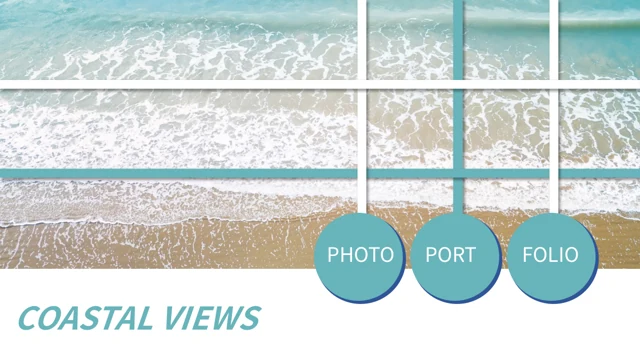
Aqua Coastal Photo Portfolio Presentation Template opens with waves, white rails and teal circles. Keep short title words readable beside the aqua accents.
Four Numbered Breaks
Aqua Coastal Photo Portfolio Presentation Template has four breaks with circles and a framed beach view. Match part labels to your chosen picture sequence.
Shadowed Picture Frames
Aqua Coastal Photo Portfolio Presentation Template pairs narrow and wide pictures in white frames. Review each crop and nearby caption after replacing an image.
Diagonal Photo Bands
Aqua Coastal Photo Portfolio Presentation Template uses diagonal pictures and teal panels. Describe the visible composition without guessing a travel location.
Repeated and Paired Views
Aqua Coastal Photo Portfolio Presentation Template pairs harbour views and repeats a beach picture around a circle. Explain framing and scale in short captions.
Sea Details and Aerial Views
Aqua Coastal Photo Portfolio Presentation Template shows shells, starfish and an aerial beach picture. Retain source information and describe the visible scene.
How to Use Aqua Coastal Photo Portfolio Presentation Template
Choose your sequence, write supported captions and review each crop.
-
Choose Your Photo Sequence
Review all 24 pages of Aqua Coastal Photo Portfolio Presentation Template. Choose breaks and picture comparisons that suit your subject, then plan concise titles and supported captions.
-
Download and Add Your Content
Download Aqua Coastal Photo Portfolio Presentation Template with an active paid plan. Keep an unchanged copy, replace ordinary examples and choose photographs you are entitled to include.
-
Review Crops and Readability
Check Aqua Coastal Photo Portfolio Presentation Template in your editor. Review crops, narrow labels, teal-panel contrast and part order, then reopen a saved or exported copy before sharing.
Questions about Aqua Coastal Photo Portfolio Presentation Template
What does Aqua Coastal Photo Portfolio Presentation Template include?
Aqua Coastal Photo Portfolio Presentation Template contains 24 PowerPoint slides in a 16:9 widescreen format. Aqua Coastal Photo Portfolio Presentation Template combines coastal photographs with white space, aqua panels and teal circles. Aqua Coastal Photo Portfolio Presentation Template provides four numbered breaks, paired pictures, diagonal image bands and a wave-photo closing page. Aqua Coastal Photo Portfolio Presentation Template uses short English prompts for ordinary titles and captions, with original wording retained in same-slide reference notes. Browse all previews of Aqua Coastal Photo Portfolio Presentation Template before deciding which pages to use. The supplied pictures are starting material. Use supported captions and retain relevant source information, without claiming a verified trip or photographic authorship.
How are the parts arranged in Aqua Coastal Photo Portfolio Presentation Template?
Aqua Coastal Photo Portfolio Presentation Template has numbered breaks on pages 3, 9, 16 and 20. Aqua Coastal Photo Portfolio Presentation Template uses a framed beach view, three teal circles and a narrow part label for those breaks. Aqua Coastal Photo Portfolio Presentation Template follows the breaks with photo studies, picture comparisons and short writing areas for your selected sequence. Adapt the part labels of Aqua Coastal Photo Portfolio Presentation Template together with your sequence, keeping titles brief. Select useful pages from Aqua Coastal Photo Portfolio Presentation Template and review the order together with your captions. These breaks do not establish verified trips, locations or completed photography projects.
Which photographs appear in Aqua Coastal Photo Portfolio Presentation Template?
Aqua Coastal Photo Portfolio Presentation Template shows waves, sandy beaches, tidal flats, waterfront buildings and harbour views. Aqua Coastal Photo Portfolio Presentation Template also includes shells, starfish, a lifeguard tower and a beach seen from above. Aqua Coastal Photo Portfolio Presentation Template places these pictures in wide panels, narrow portraits, circular crops and diagonal bands, with some views repeated for comparison. Choose photographs from Aqua Coastal Photo Portfolio Presentation Template by visible composition, without guessing a photographer or place. Retain relevant source information when adapting Aqua Coastal Photo Portfolio Presentation Template. Source place labels do not verify an itinerary, pictured identities or photographic authorship.
What can I edit in Aqua Coastal Photo Portfolio Presentation Template?
Aqua Coastal Photo Portfolio Presentation Template contains ordinary editable titles, captions, numbered labels and layout shapes. Aqua Coastal Photo Portfolio Presentation Template uses teal circles, white rails and picture frames. Photographs in Aqua Coastal Photo Portfolio Presentation Template remain image assets, and lettering baked into a picture is separate from an ordinary text box. Aqua Coastal Photo Portfolio Presentation Template includes manual numbered observations and picture comparisons, with no native data charts or embedded workbooks. Adapt Aqua Coastal Photo Portfolio Presentation Template with concise text that describes your chosen images. After replacing a photograph, check its crop and adjacent caption; keep source information distinct from your own contribution, rather than treating examples as verified results.
How can I use the picture comparisons in Aqua Coastal Photo Portfolio Presentation Template?
Aqua Coastal Photo Portfolio Presentation Template places narrow waterfront photographs beside wider harbour views. Aqua Coastal Photo Portfolio Presentation Template compares beaches, tidal flats and still-life details through layered frames and diagonal bands. Aqua Coastal Photo Portfolio Presentation Template also repeats a beach picture four times around a central circle for comparison. Select comparison pages in Aqua Coastal Photo Portfolio Presentation Template to explain visible light, scale and framing. Keep captions in Aqua Coastal Photo Portfolio Presentation Template brief enough for the original writing areas. These layouts support visual observation, not measured research, linked data or a verified travel narrative.
Which fonts does Aqua Coastal Photo Portfolio Presentation Template use?
Aqua Coastal Photo Portfolio Presentation Template uses Source Han Sans SC Regular and Bold for ordinary editable text. No font files are embedded in Aqua Coastal Photo Portfolio Presentation Template. Choose suitable fonts in your editor and inspect captions and circle labels. Aqua Coastal Photo Portfolio Presentation Template has narrow part titles, large opening words and vertical accents, so substitutes can change spacing or line breaks. Compare Aqua Coastal Photo Portfolio Presentation Template with its previews after saving or exporting the file. Reopen Aqua Coastal Photo Portfolio Presentation Template to check missing characters, text contrast and alignment beside the photographs. Image lettering stays part of the picture when you change ordinary text fonts.
Is the whole file of Aqua Coastal Photo Portfolio Presentation Template in English?
Aqua Coastal Photo Portfolio Presentation Template supplies independent English editing guidance for ordinary headings and captions. Aqua Coastal Photo Portfolio Presentation Template retains the original visible wording in same-slide reference notes, separate from the new guidance. Photographs and their source information remain in Aqua Coastal Photo Portfolio Presentation Template, so picture lettering is not rewritten as ordinary editable text. All website languages describe the same Aqua Coastal Photo Portfolio Presentation Template, rather than separate files translating every image and reference note. Adapt Aqua Coastal Photo Portfolio Presentation Template to your audience with short, supported captions and appropriate source references. Source place labels and Chinese notes do not verify travel, photographic authorship or a new presentation creator.
Does Aqua Coastal Photo Portfolio Presentation Template provide extra image permissions?
Aqua Coastal Photo Portfolio Presentation Template preserves the supplied pictures and their source information. Membership access to Aqua Coastal Photo Portfolio Presentation Template does not create a new licence for every third-party photograph or printed detail. Aqua Coastal Photo Portfolio Presentation Template does not verify every photographer or location, or permission for a particular publication. When adapting Aqua Coastal Photo Portfolio Presentation Template, use material you are entitled to include and retain relevant credits. Before distributing an edited Aqua Coastal Photo Portfolio Presentation Template, check the permissions that apply to your chosen images and intended use. Keep source information separate from the English prompts and your own contribution.
How do I download and share Aqua Coastal Photo Portfolio Presentation Template?
Download Aqua Coastal Photo Portfolio Presentation Template with an active paid membership. Active paid members can download Aqua Coastal Photo Portfolio Presentation Template repeatedly without a daily count limit. Browse all 24 previews and keep an unchanged Aqua Coastal Photo Portfolio Presentation Template beside your working copy. Choose useful pages, add supported captions and retain image sources. Check Aqua Coastal Photo Portfolio Presentation Template in your presentation app, since typography, image crops and shadows can differ across editors. Share your edited Aqua Coastal Photo Portfolio Presentation Template in a format the recipient can open. Keep an editable copy and inspect exported pages for readable labels and balanced picture frames.