Architecture Portfolio Presentation Template: building photographs and quiet blue-grey pages for a project collection
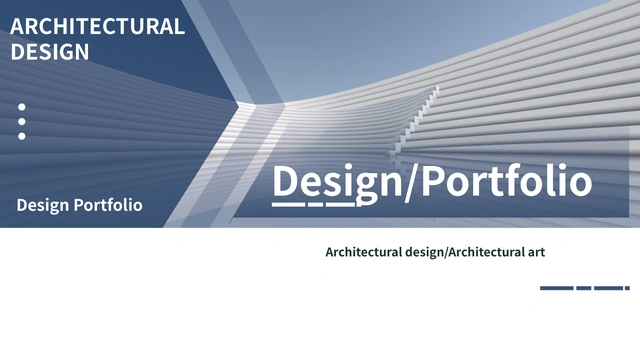
Architecture Portfolio Presentation Template arranges building photographs across 14 widescreen pages. A ribbed facade opens the collection and returns on the Thanks closing. White space and blue-grey panels keep captions separate from photographs. Four numbered openers on pages 3, 6, 9 and 12 divide Architecture Portfolio Presentation Template into chapters. Inside, a three-card gallery, five slanted photo strips and paired-image pages offer different ways to compare a facade, a detail or a wider setting. Choose a sequence for your own work before replacing the samples in Architecture Portfolio Presentation Template. Say what each image shows and identify your actual contribution. Keep captions short enough for their existing areas. Photographs in Architecture Portfolio Presentation Template are visual examples, not proof that you designed the pictured buildings. Check their permissions and replace any image that does not belong in your collection.
Key Features of Architecture Portfolio Presentation Template
Building photographs, numbered chapters and blue-grey note panels.
Building Photographs
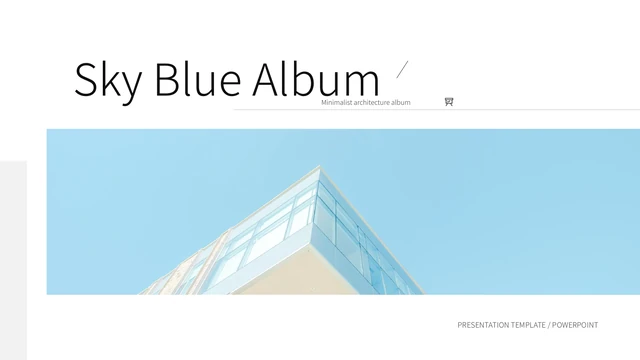
Architecture Portfolio Presentation Template pairs facade photos with wider views. Add precise captions and explain your actual contribution.
Four Chapter Openers
Architecture Portfolio Presentation Template starts four chapters on pages 3, 6, 9 and 12. Use clear topics to connect the images that follow.
A Three-Card Gallery
Architecture Portfolio Presentation Template places three photographs above notes. Keep each caption specific and linked to its image above.
Five Slanted Photo Strips
Architecture Portfolio Presentation Template includes five slanted image strips. Check replacement crops to keep useful building details clear.
Paired Views and Note Panels
Architecture Portfolio Presentation Template pairs photographs with blue-grey text panels. Show a broad view and a detail, then explain each.
A Matching Closing Page
Architecture Portfolio Presentation Template repeats the cover building on the Thanks page. Adapt both ends and write a relevant closing note.
How to Use Architecture Portfolio Presentation Template
Select your projects, explain each image and check the finished album.
-
Choose a Project Sequence
Preview Architecture Portfolio Presentation Template and group your material into four chapters. Select gallery, strip or paired-photo pages according to what each project needs to explain.
-
Download and Keep the Original
Download Architecture Portfolio Presentation Template with an active paid plan. Daily and repeat downloads are unlimited. Keep a working copy separate for comparing original crops and page order.
-
Replace Captions and Compare Views
Edit Architecture Portfolio Presentation Template in PowerPoint. Replace examples and permitted photos, check angled crops and note lengths, then reopen the exported album and inspect every page.
Questions about Architecture Portfolio Presentation Template
How do I download Architecture Portfolio Presentation Template?
Use the download button after signing in with an active paid plan. Paid access to Architecture Portfolio Presentation Template allows unlimited daily and repeat downloads. The gallery is public, so you can inspect Architecture Portfolio Presentation Template before deciding which pages to use. Save the original Architecture Portfolio Presentation Template and create a working copy for your project collection. Keep your approved photographs and captions together so later changes are easier to track.
How many pages are in Architecture Portfolio Presentation Template?
Architecture Portfolio Presentation Template contains 14 slides in 16:9 format, including a cover, contents and Thanks closing. Numbered chapters in Architecture Portfolio Presentation Template start on pages 3, 6, 9 and 12. Select the layouts that help explain your actual work. Architecture Portfolio Presentation Template need not be used in full: remove a redundant page when another view and a precise caption already make the point.
What can I edit in Architecture Portfolio Presentation Template?
Editable text and manually drawn shapes in Architecture Portfolio Presentation Template can be changed in PowerPoint. A detail inside a photograph or icon may require replacing that image. Architecture Portfolio Presentation Template does not contain native data charts or linked workbooks. Use the photo and note layouts to describe your own evidence. Sample captions in Architecture Portfolio Presentation Template do not establish project authorship, measured performance or approval by a client.
Can I view every page of Architecture Portfolio Presentation Template?
All 14 previews of Architecture Portfolio Presentation Template are available without a paid plan. Browse the thumbnails and arrows, then enlarge a page to inspect its captions and image proportions. Compare the five slanted strips in Architecture Portfolio Presentation Template with your photos before choosing that layout. The Architecture Portfolio Presentation Template gallery shows static slide appearance; it does not verify photo permissions or whether every image detail is independently editable.
Does Architecture Portfolio Presentation Template work in other editors?
Architecture Portfolio Presentation Template is supplied as a PowerPoint PPTX. Other editors may import the file, but compatibility has not been confirmed. Compare imported Architecture Portfolio Presentation Template pages with the public previews, paying attention to shadows, angled crops and text wrapping. Keep the original Architecture Portfolio Presentation Template separate from an imported copy. Export and reopen your finished album, checking each page on the device you intend to use.
Which fonts does Architecture Portfolio Presentation Template use?
Architecture Portfolio Presentation Template retains three original embedded Source Han Sans CN font parts: Regular, Bold and Medium. Regular and Bold have Apache 2.0 notices; Medium has SIL OFL 1.1. These font licenses do not grant rights to the architecture photos or complete Architecture Portfolio Presentation Template design. Support for embedded fonts varies by editor. After opening Architecture Portfolio Presentation Template elsewhere, compare chapter numbers, titles and captions with the gallery.
Is Architecture Portfolio Presentation Template in English?
The downloadable Architecture Portfolio Presentation Template uses English editable headings and short sample guidance. The source ARCHITECTURAL DESIGN wording remains part of the design. Language versions of this website describe the same English Architecture Portfolio Presentation Template, rather than separate translated slide files. Replace examples in Architecture Portfolio Presentation Template with accurate project names and notes. A building photograph, source credit or file property does not prove that the presented project is yours.
Can I use Architecture Portfolio Presentation Template for client work?
Commercial use and redistribution rights for the complete Architecture Portfolio Presentation Template are unverified. A paid download does not add permission to use its architectural photographs or design. Font notices cover the font software only. Before adapting Architecture Portfolio Presentation Template for client work, verify image permissions and retain required credits. Use approved replacements where necessary. Do not present an example building in Architecture Portfolio Presentation Template as your own project without supporting information.
How should I share Architecture Portfolio Presentation Template?
Share the public Architecture Portfolio Presentation Template page using the control beside the download button, or copy its URL. Recipients can view the gallery and download Architecture Portfolio Presentation Template through their own active paid plan. Before distributing an adapted file, check photo rights and remove private or unsupported project statements. Export a PDF if useful, reopen it to inspect the captions and crops, and retain an editable Architecture Portfolio Presentation Template working copy.