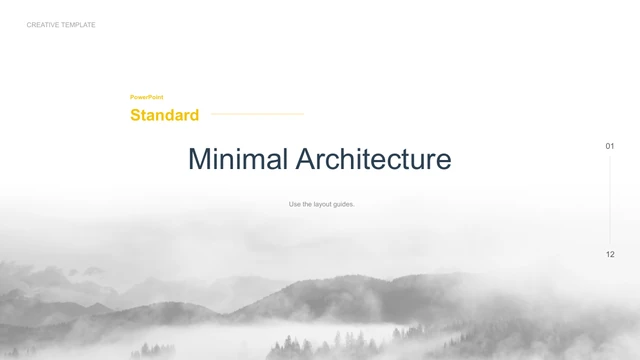
Sky Blue Architecture Album Presentation Template: white pages and blue-sky photographs for a visual project album
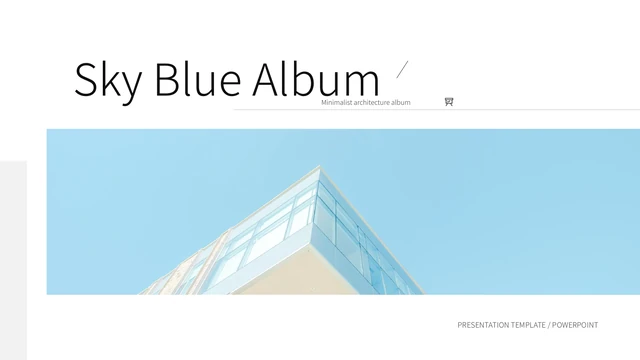
Sky Blue Architecture Album Presentation Template uses a glass building against blue sky for its opening and Thanks closing. White margins, pale grey blocks and narrow rules frame the photographs. Three numbered pages at 3, 7 and 10 organize Sky Blue Architecture Album Presentation Template into chapters. Some layouts pair two building details; others place a tall view beside a short note or combine three photographs on one page. Use Sky Blue Architecture Album Presentation Template to compare a wider view with a detail. State the place and your actual contribution. The file includes 15 slides: 14 design pages and an originally hidden source guide. That guide remains available in the preview of Sky Blue Architecture Album Presentation Template. Its photo-source statements do not establish that every image is cleared for your use. Keep required credits and use permitted replacements.
Key Features of Sky Blue Architecture Album Presentation Template
Blue-sky photographs, white margins and three numbered chapters.
A Wide Building Cover
Sky Blue Architecture Album Presentation Template opens with a wide glass-building photograph. Keep its edge and blue sky clear when choosing a new cover image.
Three Numbered Chapters
Sky Blue Architecture Album Presentation Template begins chapters on pages 3, 7 and 10. Give each opening a distinct subject and connect the pages that follow.
Paired Building Views
Sky Blue Architecture Album Presentation Template places building photographs in pairs. Choose useful comparisons and tell the viewer what each image explains.
Tall Images and Short Notes
Sky Blue Architecture Album Presentation Template combines tall photographs with quiet note areas. Check the crop and keep captions within their original space.
Three-Image Compositions
Sky Blue Architecture Album Presentation Template includes three-image pages with varied proportions. Decide which view leads and give each supporting image a role.
A Retained Source Guide
Sky Blue Architecture Album Presentation Template keeps the original hidden guide as page 15. Read its source statements and check permissions for your intended use.
How to Use Sky Blue Architecture Album Presentation Template
Arrange your projects, choose photographs and check the completed album.
-
Outline Three Chapters
Preview Sky Blue Architecture Album Presentation Template and group your projects into three chapters. Choose paired or three-image layouts to explain each subject without repeating the same view.
-
Download a Working Copy
Download Sky Blue Architecture Album Presentation Template with an active paid plan; daily and repeat downloads are unlimited. Keep the original apart from your working copy to compare crops.
-
Write Specific Captions
Edit Sky Blue Architecture Album Presentation Template in PowerPoint. Replace examples and permitted photos. Check tall crops and short notes, then reopen your export and inspect every page.
Questions about Sky Blue Architecture Album Presentation Template
How do I download Sky Blue Architecture Album Presentation Template?
Sign in with an active paid plan and use the download button. Paid access to Sky Blue Architecture Album Presentation Template allows unlimited daily and repeat downloads. You can review Sky Blue Architecture Album Presentation Template in the public gallery before choosing layouts. Save an unchanged copy of Sky Blue Architecture Album Presentation Template and work on a separate file. Keep your permitted photographs and project captions together for later revisions.
How many slides are in Sky Blue Architecture Album Presentation Template?
Sky Blue Architecture Album Presentation Template contains 15 slides in 16:9 format. Fourteen pages form the photo album, including three numbered chapter openings and the Thanks closing. Page 15 is an originally hidden source guide, retained in Sky Blue Architecture Album Presentation Template and included in the public preview. Select the design pages that help explain your work; Sky Blue Architecture Album Presentation Template does not require you to use every layout.
What can I edit in Sky Blue Architecture Album Presentation Template?
Editable text and drawn shapes in Sky Blue Architecture Album Presentation Template can be changed in PowerPoint. Details stored inside a photograph may require replacing that image. Sky Blue Architecture Album Presentation Template has no native data charts or linked Excel workbooks. Use Sky Blue Architecture Album Presentation Template to describe your actual projects rather than treat the sample captions as finished material. Check image crops and spacing after each replacement.
Can I preview all of Sky Blue Architecture Album Presentation Template?
All 15 previews of Sky Blue Architecture Album Presentation Template are public and free to view. Use the thumbnails and arrows, then enlarge a page to inspect its proportions. Compare the tall images and paired views in Sky Blue Architecture Album Presentation Template with your own photographs. The gallery shows static page appearance; it does not verify image permissions or establish that you designed a pictured building. Review the source guide in Sky Blue Architecture Album Presentation Template as a source statement.
Can another editor open Sky Blue Architecture Album Presentation Template?
Sky Blue Architecture Album Presentation Template is provided as a PowerPoint PPTX file. Other editors may support importing it, but compatibility has not been confirmed. Compare imported pages of Sky Blue Architecture Album Presentation Template with the gallery, checking light text, narrow rules and tall image crops. Keep the original Sky Blue Architecture Album Presentation Template apart from the imported copy. Export and reopen the finished album, reviewing every page on your intended screen.
Which fonts does Sky Blue Architecture Album Presentation Template use?
The visible source text in Sky Blue Architecture Album Presentation Template uses Source Han Sans CN Light, including its original bold formatting. Other font references and embedded faces remain in the source package; they are not all used on the current pages. Sky Blue Architecture Album Presentation Template retains the original font-guide statements and font notices. Font availability and embedding support vary by editor. Compare the headings and captions in Sky Blue Architecture Album Presentation Template with the gallery after opening or importing it.
Is the downloaded Sky Blue Architecture Album Presentation Template in English?
Sky Blue Architecture Album Presentation Template has English editable headings and short sample guidance. Existing English design labels remain, and the original source guide is translated with its credits intact. Website translations describe the same English Sky Blue Architecture Album Presentation Template, not separate slide files in each language. Replace the examples in Sky Blue Architecture Album Presentation Template with exact project names and captions. A source credit, building photograph or file property does not establish authorship of the project.
Can I use Sky Blue Architecture Album Presentation Template commercially?
Commercial and redistribution rights for the whole Sky Blue Architecture Album Presentation Template have not been independently verified. Paid access adds no photograph or design permissions. The guide in Sky Blue Architecture Album Presentation Template names Pexels and describes the source photos as CC0; that is an original statement, not individual image verification. Check permissions and keep required credits before adapting Sky Blue Architecture Album Presentation Template for a client or distributing an edited file. Replace images when necessary.
How should I share Sky Blue Architecture Album Presentation Template?
Share the public page of Sky Blue Architecture Album Presentation Template using the sharing control or copy its URL. Recipients can inspect Sky Blue Architecture Album Presentation Template and download with their own active paid plan. Before sending an edited Sky Blue Architecture Album Presentation Template, check the image permissions and remove private information or unsupported project claims. Reopen any exported PDF to check captions and crops. Keep an editable copy for future changes.