

Bear Clip Classroom Presentation Template: lesson notes on clipped paper
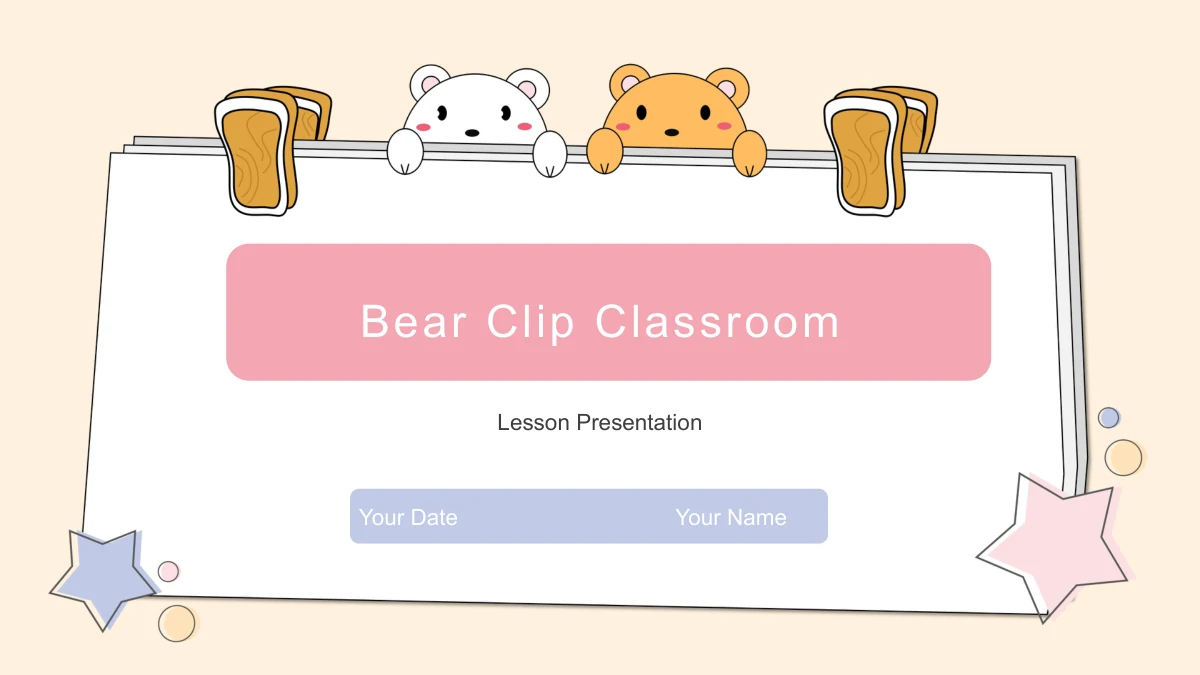
Two bears peek over a stack of white paper held by oversized clips in Bear Clip Classroom. Cream backgrounds, pastel stars and small circles frame the pages, while pink and lavender labels separate headings from short notes. The 15-slide sequence opens with a cover and plan, then moves through Overview, Ideas, Activities and Review before a matching thank-you page. Inside, a rabbit-filled cup sits between four observations, heart envelopes introduce three messages, and a cloud blows rainbow curls beside review prompts. Other layouts arrange paired views, four numbered ideas, a three-part flow and a dashed cycle. The English text offers prompts to replace with your own topic and examples. It provides a visual framework rather than a complete lesson. Choose the pages that help explain your material, keep notes brief and give the illustrations room to breathe. The repeated paper frame keeps the different arrangements connected.
Key Features of Bear Clip Classroom Presentation Template
Clipped paper, pastel labels and room for short notes.
Bears Above a Paper Frame
White and golden bears peek over layered paper held by large clips. Stars and circles soften the cream background while the white center keeps your notes clear.
Four Clear Section Openings
Overview, Ideas, Activities and Review each have a numbered divider. Pink and lavender numerals mark the changes while leaving space for a brief section prompt.
Illustrated Notes and Messages
A cup of rabbits sits between four notes, and three heart envelopes introduce separate messages. These images give each layout a playful setting for your material.
Paired Views and Four Ideas
Two-column pages leave room for contrasting points, while four numbered entries divide a topic into smaller ideas. Replace the prompts with your own brief examples.
A Flow and a Simple Cycle
Two arrows link three text areas on the flow page. A separate dashed loop connects three numbered notes, helping you explain a sequence without using a data chart.
A Rainbow Cloud for Review
A rainbow-blowing cloud accompanies Remember, Discuss and Continue. Use the three notes to revisit key ideas before finishing with the matching Thank You page.
How to Use Bear Clip Classroom Presentation Template
Select layouts, add your examples and rehearse.
-
Choose a lesson sequence
Look through all 15 previews and select the layouts that fit your topic. Keep the four sections as a starting point, then decide where paired views, messages or a simple sequence will help.
-
Add your classroom material
Use an active paid membership to download the English PPTX and save a working copy. Replace the sample headings and prompts with your explanations, keeping notes short around the illustrations.
-
Check the finished slides
Review text spacing, picture crops and the order of your flow or cycle after editing. Export a PDF to inspect every page, then test the presentation on the computer you will use in class.
Questions about Bear Clip Classroom Presentation Template
What does the 15-slide file include?
It includes a cover, plan page, four section dividers, eight content pages and a closing. The dividers on slides 3, 6, 9 and 12 introduce Overview, Ideas, Activities and Review.
Is this a finished lesson for a particular subject?
No. The file contains general English prompts for introducing ideas, discussing examples and reviewing material. Add your own subject content and activities. The bears and other illustrations provide decoration rather than a prescribed curriculum.
Which elements are editable?
You can edit text boxes and separate drawing shapes, including labels and arrows. The bears, paper-frame artwork and other detailed illustrations are images; their internal parts are not individually editable.
Can I inspect every page before downloading?
Yes. All 15 pages appear in the gallery in slide order. Compare the space for short paragraphs, two-column notes and numbered points before deciding which layouts suit your presentation.
Are the flow and cycle linked to a spreadsheet?
No. They are drawing-based layouts with arrows, a dashed loop and editable notes. The file has no native data charts or embedded workbooks. Adjust the wording and diagram elements to match the sequence you want to explain.
How should I adapt the illustrated pages?
Keep replacement text within the existing note areas so it does not crowd the rabbits, envelopes or rainbow cloud. If you replace an image, check its crop and position. Repeated sample sentences are placeholders to rewrite for your topic.
Which fonts and editors should I check?
The English PPTX uses Arial for its visible text, without embedded fonts. Check line breaks on your own computer. Google Slides and Keynote compatibility has not been tested, so inspect any converted version before presenting.
Who can download it, and what language is the file?
An active paid membership is required. Members can download without a daily limit and repeat downloads when needed. Every language version of this page provides the same English PPTX; changing the website language does not translate the slides.
Can I use the artwork in a commercial project?
The download does not independently establish rights to every source illustration. Check the relevant permissions before commercial reuse and retain applicable source credits. Your Name and Your Date on the cover are editable fields for your presentation.