Lotus Crane Book Sharing Presentation Template: lotus artwork, cranes and pale paper layouts
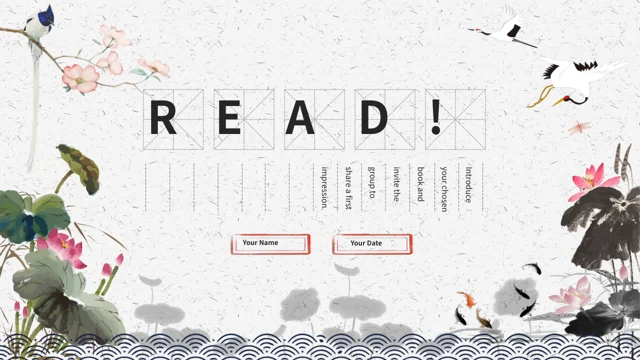
Lotus Crane Book Sharing Presentation Template sets book discussion on pale paper with blue wave borders. Its 24 slides keep the original 16:9 format. Lotus, koi, cranes and flowering branches frame notes and image panels. Lotus Crane Book Sharing Presentation Template has a four-item index and section breaks on pages 3, 8, 13 and 18. Later layouts include street photographs, a tower picture and circular orchid artwork with printed words. Lotus Crane Book Sharing Presentation Template uses these as visual material, without identifying a verified artist or location. Numbered comparisons are manual layouts, not linked data charts or workbooks. Ordinary editable text provides independent English reading guidance; original wording remains in same-page reference notes. Lotus Crane Book Sharing Presentation Template keeps the supplied images and audio, and its final page repeats the opening reading layout. Choose a book, cite passages clearly and allow space for different interpretations.
Key Features of Lotus Crane Book Sharing Presentation Template
Lotus, cranes and thoughtful spaces for a shared reading conversation.
Pale Paper and Blue Waves
Lotus Crane Book Sharing Presentation Template combines pale paper and blue waves. Keep notes clear on the light background and leave the border pattern visible.
Lotus and Crane Artwork
Lotus Crane Book Sharing Presentation Template includes lotus, koi, cranes and flowering branches. Use this art beside your own supported reading observations.
Four Reading Sections
Lotus Crane Book Sharing Presentation Template offers an index and four section breaks. Match their names to your book choice, notes, themes and group discussion.
Numbered Comparisons
Lotus Crane Book Sharing Presentation Template arranges numbered notes and comparisons. Add a supported point and page reference without claiming measured data.
Photographs and Picture Panels
Lotus Crane Book Sharing Presentation Template includes street pictures and circular orchid art. Check crops and distinguish printed words from your own captions.
Opening and Closing Reading Pages
Lotus Crane Book Sharing Presentation Template repeats its reading layout on the last page. Summarise shared ideas and check that the labels suit your group.
How to Use Lotus Crane Book Sharing Presentation Template
Choose layouts, prepare brief reading notes and review the saved file.
-
Choose a Sequence for Your Book
Review all 24 pages of Lotus Crane Book Sharing Presentation Template. Select section breaks and image panels that suit your book, then arrange a sequence for notes and discussion questions.
-
Download and Keep a Reference
Get Lotus Crane Book Sharing Presentation Template with an active paid plan. Daily downloads are unlimited and repeatable. Keep the original as a reference while editing a separate working copy.
-
Add Reading Notes and Review
Adapt Lotus Crane Book Sharing Presentation Template with your book and notes. Check narrow labels, vertical text, picture crops, fonts and audio, then reopen the saved file before sharing.
Questions about Lotus Crane Book Sharing Presentation Template
Where can I get Lotus Crane Book Sharing Presentation Template and inspect its pages?
Lotus Crane Book Sharing Presentation Template has a gallery of 24 pages, from the five-letter reading cover to its repeated closing layout. Before downloading Lotus Crane Book Sharing Presentation Template, compare the framed notes, artwork and later photographic panels in the previews. An active paid plan provides the PPTX of Lotus Crane Book Sharing Presentation Template through the download control after signing in. Downloads of Lotus Crane Book Sharing Presentation Template are unlimited each day and can be repeated when you need another copy. Open Lotus Crane Book Sharing Presentation Template in your chosen editor to check text and recording playback, since static previews do not play audio. Receiving the file does not grant additional rights to its supplied pictures or recording.
How can I plan a reading route with Lotus Crane Book Sharing Presentation Template?
Lotus Crane Book Sharing Presentation Template places four section breaks on pages 3, 8, 13 and 18 after a four-item index. The English guide in Lotus Crane Book Sharing Presentation Template progresses through book choice, reading notes, themes and discussion. Use the first part of Lotus Crane Book Sharing Presentation Template to identify a book and an opening question rather than fill every space with a long summary. The middle parts of Lotus Crane Book Sharing Presentation Template can connect a passage, its context and a theme before you invite other views. Select only the pages of Lotus Crane Book Sharing Presentation Template that serve the conversation and rename the index entries if you change the route. The pictures set a visual tone; they do not establish the subject or setting of your chosen book.
How should I write in the vertical areas of Lotus Crane Book Sharing Presentation Template?
Lotus Crane Book Sharing Presentation Template retains vertical writing areas and ruled spaces beside lotus and bird artwork. Write a compact reading observation in Lotus Crane Book Sharing Presentation Template and place its passage reference where readers can find it easily. Try a short quotation before adding longer text to Lotus Crane Book Sharing Presentation Template, because the original writing direction makes Latin words behave differently from horizontal text. After editing Lotus Crane Book Sharing Presentation Template, reopen the file and inspect line breaks, rotated words and the compact labels at your intended display size. Keep the decorative artwork and border rules separate from the text you enter in Lotus Crane Book Sharing Presentation Template. A short excerpt and a clear explanation are easier to follow than a full page of copied book content.
What belongs in the numbered layouts of Lotus Crane Book Sharing Presentation Template?
Lotus Crane Book Sharing Presentation Template uses manually arranged numbers, circles and small note groups to organise ideas. In the comparison layouts of Lotus Crane Book Sharing Presentation Template, state one reading, offer another and identify the passage supporting each view. Some labels in Lotus Crane Book Sharing Presentation Template repeat their original numbers; they are sample layout labels rather than calculated scores. The file of Lotus Crane Book Sharing Presentation Template contains no native data charts, tables or embedded workbooks. Use the spaces in Lotus Crane Book Sharing Presentation Template for evidence and responses, not claims about measured reading progress or audience results. Preserve a clear distinction between a quoted passage, your interpretation and a comment made by another reader.
Can the orchid inscription in Lotus Crane Book Sharing Presentation Template serve as my own quotation?
Lotus Crane Book Sharing Presentation Template includes circular orchid artwork with a printed Chinese inscription. That inscription stays within the picture in Lotus Crane Book Sharing Presentation Template and is not an ordinary text box for rewriting. A visible mark in Lotus Crane Book Sharing Presentation Template does not verify the artist of every supplied picture or identify the author of your new reading notes. If you discuss the artwork in Lotus Crane Book Sharing Presentation Template, distinguish what is visibly depicted from an attribution or translation that needs its own reliable source. Add your selected book quotation separately in the editable areas of Lotus Crane Book Sharing Presentation Template and state its source clearly. Keep relevant source details with reused artwork and check the permissions appropriate to your intended use.
How do the photograph panels in Lotus Crane Book Sharing Presentation Template support a discussion?
Lotus Crane Book Sharing Presentation Template combines several street photographs, a tower image and framed or circular picture areas with notes. Choose a photograph for Lotus Crane Book Sharing Presentation Template because it helps explain your topic, and add a source or an accurate caption for your own replacement. Do not identify a city, historical event or book setting from the supplied photographs in Lotus Crane Book Sharing Presentation Template without supporting information. Compare the picture impression with a passage when using Lotus Crane Book Sharing Presentation Template, while making clear which connection is your interpretation. Recheck the crops of Lotus Crane Book Sharing Presentation Template after replacing an image so that important details are not lost. Supplied visual material does not prove a photograph’s location, creator or connection to the book you choose.
What should I check about fonts when opening Lotus Crane Book Sharing Presentation Template?
Lotus Crane Book Sharing Presentation Template uses Source Han Sans SC Regular and Bold for ordinary editable letters and reading guidance. These font files are not embedded in Lotus Crane Book Sharing Presentation Template, so install suitable fonts or select a replacement available in your editor. In Lotus Crane Book Sharing Presentation Template, pay particular attention to the split index title, small name and date boxes, vertical notes and compact picture labels. A font change in Lotus Crane Book Sharing Presentation Template can alter spacing and wrapping even when the writing area remains the same. Picture inscriptions in Lotus Crane Book Sharing Presentation Template remain part of the images and are not changed by choosing another text font. Review the saved presentation for missing characters and text extending beyond its allotted area.
Which parts of Lotus Crane Book Sharing Presentation Template remain in their original language?
Lotus Crane Book Sharing Presentation Template supplies independently written English prompts for ordinary editable titles and note areas. The previous visible wording of Lotus Crane Book Sharing Presentation Template stays in reference notes on the same pages, separately from those new prompts. Chinese inscriptions inside the artwork of Lotus Crane Book Sharing Presentation Template remain original visual material, so the package is not entirely English. The fifteen website languages describing Lotus Crane Book Sharing Presentation Template lead to the same presentation file rather than fifteen translated slide decks. When personalising Lotus Crane Book Sharing Presentation Template, identify your own book, observations and quotations accurately instead of treating an original sample name as your author credit. You can use the reference notes to distinguish original wording from the new reading guidance.
How can I use the last page and audio of Lotus Crane Book Sharing Presentation Template?
Lotus Crane Book Sharing Presentation Template ends by repeating the opening reading layout instead of adding a separate thank-you design. Use that last page of Lotus Crane Book Sharing Presentation Template to gather final reactions, return to your opening question or suggest the next reading. The original recording in Lotus Crane Book Sharing Presentation Template is retained with the supplied material; its presence does not establish a verified performer or new music permission. Test the audio of Lotus Crane Book Sharing Presentation Template in the editor you will actually use and decide whether it suits your meeting. For a static handout, export Lotus Crane Book Sharing Presentation Template to PDF and check the final layout, knowing that the recording will not play in a page preview. Retain a working slide copy for future changes and verify the chosen sharing format before the meeting.