Beige Fashion Album Presentation Template: warm framing for a four-part photo album
Beige Fashion Album Presentation Template sets portrait photographs beside warm beige panels and thin brown rules. The 15-page sequence has a cover, contents, four dividers, eight picture spreads and thanks. Beige Fashion Album Presentation Template alternates upright pictures, paired views and small image groups; Fashion and Lady labels recur across the spreads. Beige Fashion Album Presentation Template uses spacious white areas for short notes while the photographs provide most of the detail. Four numbered chapters let you divide a shoot or collection into related groups. Beige Fashion Album Presentation Template keeps a matching opening and ending, with large serif titles and spaced Photo lettering. Choose your own sequence, replace the sample prompts and explain the people, clothing or settings shown. The supplied portraits illustrate the layout and do not establish authorship of your work. Check image permissions and credits before sharing the finished album.
Key Features of Beige Fashion Album Presentation Template
Warm panels, portrait groups and four clear chapters.
Warm Beige Panels
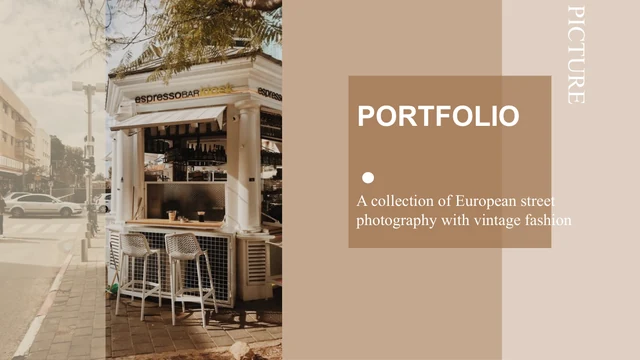
Beige Fashion Album Presentation Template pairs pale panels with white space and brown rules. Keep captions concise so the pictures remain the focus of each spread.
Four Numbered Chapters
Beige Fashion Album Presentation Template has a contents page and four matching dividers. Group related photos together and name each chapter to suit its sequence.
Portrait Picture Frames
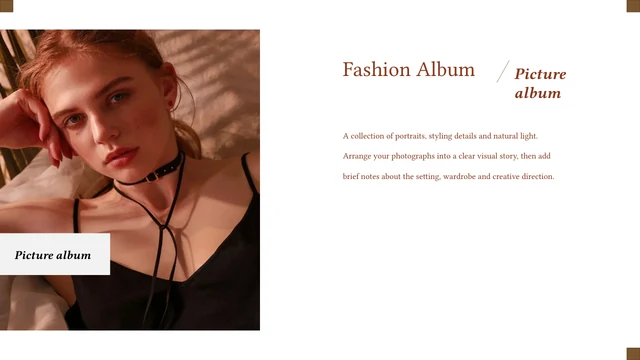
Beige Fashion Album Presentation Template has tall frames for full-length and close-up photos. Inspect faces, clothing and edges when adjusting the original crops.
Varied Photo Groups
Beige Fashion Album Presentation Template alternates pairs, staggered photos and small groups. Choose related images that add context rather than repeating a view.
Serif Fashion Labels
Beige Fashion Album Presentation Template uses italic Fashion and Lady labels beside the photos. Replace these native words if another title better fits your album.
A Matching Ending
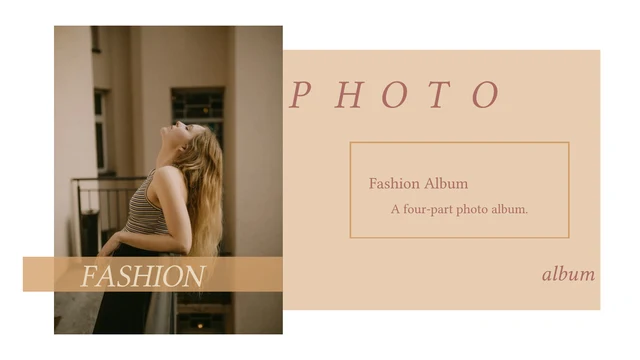
Beige Fashion Album Presentation Template repeats the cover portrait and beige panel on the thanks page. Add a brief closing note and keep credits easy to read.
How to Use Beige Fashion Album Presentation Template
Choose a sequence, replace the photographs and inspect the final album.
-
Plan Your Chapters
Review all 15 pages of Beige Fashion Album Presentation Template. Group photographs into four themes, select useful frames and plan brief notes that explain the views without crowding them.
-
Download and Edit
Get Beige Fashion Album Presentation Template with an active paid plan; daily and repeat downloads are unlimited. Save a copy, replace portraits and chapter prompts, then add captions and credits.
-
Review the Album
Check Beige Fashion Album Presentation Template on your screen. Inspect face crops, narrow captions and chapter order, export a PDF and reopen it to read every spread before sharing your album.
Questions about Beige Fashion Album Presentation Template
How do I download Beige Fashion Album Presentation Template?
Sign in with an active paid plan, then use the download button for Beige Fashion Album Presentation Template. Eligible members have unlimited daily and repeat downloads. Beige Fashion Album Presentation Template is an English PowerPoint (.pptx); save the original and work on a copy. Access to Beige Fashion Album Presentation Template does not establish photograph permissions. Check the assets you keep and add appropriate credits.
How many pages are in Beige Fashion Album Presentation Template?
Beige Fashion Album Presentation Template contains 15 slides in 16:9. The sequence in Beige Fashion Album Presentation Template has a cover, a four-item contents page, four numbered dividers, eight photograph spreads and thanks. Each chapter has two picture spreads with recurring Fashion or Lady labels. Use pages of Beige Fashion Album Presentation Template that explain your sequence; fewer photographs may make a clearer final album.
Can I change the layout of Beige Fashion Album Presentation Template?
Native titles, captions, rules and panels in Beige Fashion Album Presentation Template can be edited in PowerPoint. Portraits and incidental signs in Beige Fashion Album Presentation Template are pictures; their lettering is not a separate text box. Replace images and inspect the crops. Beige Fashion Album Presentation Template has no native charts or linked Excel workbook. Keep faces and clothing details clear rather than crowding a small caption area.
Can I view the complete Beige Fashion Album Presentation Template before downloading?
The gallery shows all 15 pages of Beige Fashion Album Presentation Template without purchase. Browse thumbnails or use arrows to compare upright frames, paired views and dividers in Beige Fashion Album Presentation Template. Enlarge small captions and inspect picture space before choosing layouts. The gallery for Beige Fashion Album Presentation Template displays static previews of the final English file, not a slide editor. Match each frame to your planned photograph.
Can other presentation editors open Beige Fashion Album Presentation Template?
An editor supporting PowerPoint import may open Beige Fashion Album Presentation Template, but text wrapping and crops can differ. Compare the imported Beige Fashion Album Presentation Template with the gallery, especially italic headings, narrow captions and small picture groups. Open the exported PDF again. Importing Beige Fashion Album Presentation Template does not guarantee identical rendering, so review every spread before sending your file.
Which fonts does Beige Fashion Album Presentation Template use?
Beige Fashion Album Presentation Template retains Times New Roman and source Chinese font references, including STKaiti and SimSun, alongside theme families. No fonts are embedded in Beige Fashion Album Presentation Template. The preview uses available fonts and may substitute missing families. Check Beige Fashion Album Presentation Template on your intended device, especially serif labels and chapter titles. A font name alone does not establish distribution rights.
Are the slides in Beige Fashion Album Presentation Template translated?
The 15 website versions describe the same English PowerPoint for Beige Fashion Album Presentation Template. Editable Chinese headings and master prompts in Beige Fashion Album Presentation Template are English; long passages now contain short photo-editing guidance. Existing Photo, Fashion, Lady and Thanks labels remain. Translate editable text in Beige Fashion Album Presentation Template for your audience; lettering within photographs stays in the image. Check new captions for fit.
Can I use Beige Fashion Album Presentation Template commercially?
Commercial or redistribution permissions for photographs and design in Beige Fashion Album Presentation Template have not been independently verified. Paid access to Beige Fashion Album Presentation Template supplies the file rather than a blanket asset licence. The creator property names Jooyea -li; metadata alone does not establish rights. Before selling or publishing adapted Beige Fashion Album Presentation Template, confirm permissions, retain required credits and replace unlicensed resources.
How can I share Beige Fashion Album Presentation Template?
Share the public URL or use the sharing controls for Beige Fashion Album Presentation Template. Others can view the gallery; downloading requires eligible paid access. Before sending edited Beige Fashion Album Presentation Template, check photo permissions, credits and private information you added. Review a PDF for clipped captions and awkward crops. If sharing Beige Fashion Album Presentation Template as PPTX, test the fonts and keep an editable copy.