Purple Interior Design Presentation Template: Room Photography with Purple and Gold Accents
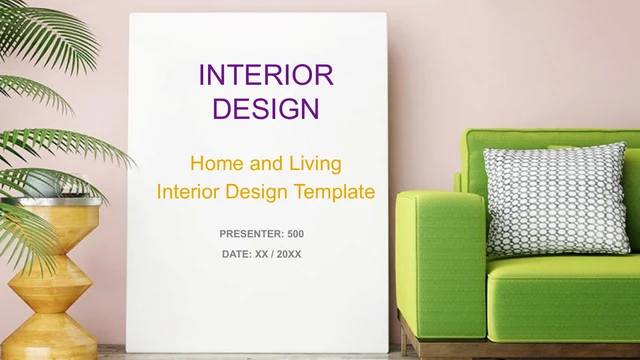
Purple Interior Design Presentation Template pairs living-room photographs with purple overlays, gold highlights and generous white areas. A green sofa and a tall white title panel introduce the deck; the final Thank You page returns to that same room. Purple Interior Design Presentation Template contains 22 widescreen slides organized around a four-item contents page and four photographic chapter dividers. Interior images appear in broad panels, diagonal strips, three-picture comparisons and a tall central view with callout lines. Purple Interior Design Presentation Template also includes location pins, numbered notes, arrows and shape-based percentage graphics. A native line chart and area chart appear near the end, alongside oil-and-gas sample illustrations that can be replaced or omitted if they do not fit your topic. Choose the room photographs and information layouts that support your own project. Replace the English placeholders, verify every sample figure and keep small labels readable when sharing the finished presentation.
Key Features of Purple Interior Design Presentation Template
Explore room photography, four chapters and purple-and-gold layouts in Purple Interior Design Presentation Template.
Photographic Chapter Dividers
Purple Interior Design Presentation Template uses four room photos with slanted purple overlays. Rename headings and keep the chapter numbers in a clear sequence.
Three-Room Comparison
Purple Interior Design Presentation Template places three room views above gold and purple panels. Compare related spaces with short, consistently written captions.
Room Detail Callouts
Purple Interior Design Presentation Template pairs a tall room photo with four callout lines. Point to details that matter and keep the nearby notes easy to read.
Two Editable Data Charts
Purple Interior Design Presentation Template includes a line chart and area chart with workbooks. Replace their data, then check separate labels and nearby notes.
Numbered Notes and Arrows
Purple Interior Design Presentation Template offers six note cards, location pins and four arrows. Choose a grouping that fits the points you need to communicate.
A Matching Closing Scene
Purple Interior Design Presentation Template returns to the green sofa photo on the Thank You page. Use that visual link to close the story you introduced earlier.
How to Use Purple Interior Design Presentation Template
Choose room views, replace the examples and check the final story.
-
Plan Four Sections
Preview the 22 pages of Purple Interior Design Presentation Template. Pick room views and layouts, then arrange four sections. Write brief captions that explain your interior design decisions.
-
Download and Add Content
Get Purple Interior Design Presentation Template with an active paid membership. Daily and repeat downloads are unlimited. Edit a copy, replace room photos as needed and rewrite the sample notes.
-
Check Charts and Captions
Update chart data in Purple Interior Design Presentation Template and check manual percentages separately. Review crops, chapter numbers and small captions, then inspect the exported file before sharing.
Questions About Purple Interior Design Presentation Template
How do I download Purple Interior Design Presentation Template?
Sign in with an active paid membership and download Purple Interior Design Presentation Template from this page. Paid members have unlimited daily downloads, including repeated downloads. The file for Purple Interior Design Presentation Template is an editable PowerPoint presentation with pictures, shapes, text and two native charts. Use the gallery to inspect Purple Interior Design Presentation Template before saving it. Keep the original and make a working copy for your project, so you can recover a page or compare spacing later. Replace the sample content in Purple Interior Design Presentation Template before presenting it to clients or colleagues.
How many pages are in Purple Interior Design Presentation Template?
Purple Interior Design Presentation Template has 22 slides in a 16:9 widescreen format. A four-item contents page introduces photographic chapter dividers on pages 3, 8, 13 and 18. The closing page of Purple Interior Design Presentation Template returns to the green sofa scene used on the cover. You can keep the full sequence of Purple Interior Design Presentation Template or select a shorter set of relevant layouts. If you remove a section from Purple Interior Design Presentation Template, update the contents and chapter numbers too. The supplied order is a starting point, not a fixed requirement for your own design story.
Can I replace the room photos in Purple Interior Design Presentation Template?
Yes. The interior photographs in Purple Interior Design Presentation Template are separate picture elements. Replace a chosen picture in PowerPoint, then check its crop and position. The diagonal strip and tall central photograph in Purple Interior Design Presentation Template require different framing from the three-room comparison page. Choose images that keep important furniture and architectural details visible. When adapting Purple Interior Design Presentation Template, inspect any nearby callout lines and move their explanations to the correct subjects if necessary. Use photographs you are authorized to share, and review all the image placements in Purple Interior Design Presentation Template at the final viewing size.
Can I preview all of Purple Interior Design Presentation Template?
All 22 pages of Purple Interior Design Presentation Template appear in the preview gallery. Move through the thumbnails and enlarge a page to compare room views, purple chapter overlays and information layouts. The previews of Purple Interior Design Presentation Template show the supplied English file, not the result of your later edits. Pay attention to small grey captions and the narrow text areas in Purple Interior Design Presentation Template. After changing fonts, images or wording, run through your own version of Purple Interior Design Presentation Template and check both readability and the order of the story before exporting or presenting.
Which graphics in Purple Interior Design Presentation Template use editable chart data?
Purple Interior Design Presentation Template contains a native line chart on page 20 and a native area chart on page 21, each with an embedded workbook. Edit their values through PowerPoint’s chart data controls. Other diagrams in Purple Interior Design Presentation Template, including rings, stacked percentage blocks and the pie-style graphic, are shapes with manual labels. They do not all update from a workbook. The oil-and-gas illustrations near the end of Purple Interior Design Presentation Template are sample material rather than interior design claims. Replace or omit them in Purple Interior Design Presentation Template when they do not support your project, and verify every number you retain.
Which fonts does Purple Interior Design Presentation Template use?
Purple Interior Design Presentation Template uses Arial, Arial Narrow, Microsoft YaHei and Verdana. Arial Narrow keeps the chapter numbers compact, while the main labels remain editable. Fonts are not embedded in Purple Interior Design Presentation Template. Install matching fonts or choose alternatives, then check the entire deck for changed spacing. The chapter numbers and cover title in Purple Interior Design Presentation Template need particular attention because their boxes are part of a fixed composition. Also inspect the small chart labels in Purple Interior Design Presentation Template. Website previews are rendered images and do not install the fonts needed for editing on your computer.
Is Purple Interior Design Presentation Template in English, and does it work in other apps?
The editable headings and sample descriptions in Purple Interior Design Presentation Template are in English, with original pictures and genuine source credits retained. The website languages describe the same English Purple Interior Design Presentation Template; they are not separate translations of the slide file. Apps that support PPTX import may open Purple Interior Design Presentation Template, although fonts, picture crops and chart appearance can vary. Use PowerPoint as the main reference. Compare an imported Purple Interior Design Presentation Template against the previews, then rewrite the sample passages with accurate information about your own rooms, materials and design decisions.
Can I use Purple Interior Design Presentation Template commercially?
Check the terms that apply to Purple Interior Design Presentation Template, its photographs and the fonts you use. Paid downloading of Purple Interior Design Presentation Template does not separately grant permission for every pictured interior or included asset. For a client project, use images you are authorized to share and preserve any required credits in Purple Interior Design Presentation Template. Confirm the relevant permissions before selling a derivative design or distributing an editable template. Replacing the sample rooms in Purple Interior Design Presentation Template with your own authorized project photographs also helps the presentation accurately represent the work you want to show.
How should I share Purple Interior Design Presentation Template?
Share the public Purple Interior Design Presentation Template page when recommending the template. Recipients can review the preview and download Purple Interior Design Presentation Template through their own eligible accounts. For a completed project presentation, export an edited Purple Interior Design Presentation Template to PDF or present it from your application after checking the output. Keep the editable file for revisions. Before sharing Purple Interior Design Presentation Template, remove unused placeholders, verify figures and captions, and inspect the room photographs on the target screen. Do not redistribute the untouched file beyond the terms that apply to the template and its assets.