Beige Home Design Portfolio Presentation Template: Warm Interior Photographs and Quiet Beige Layouts
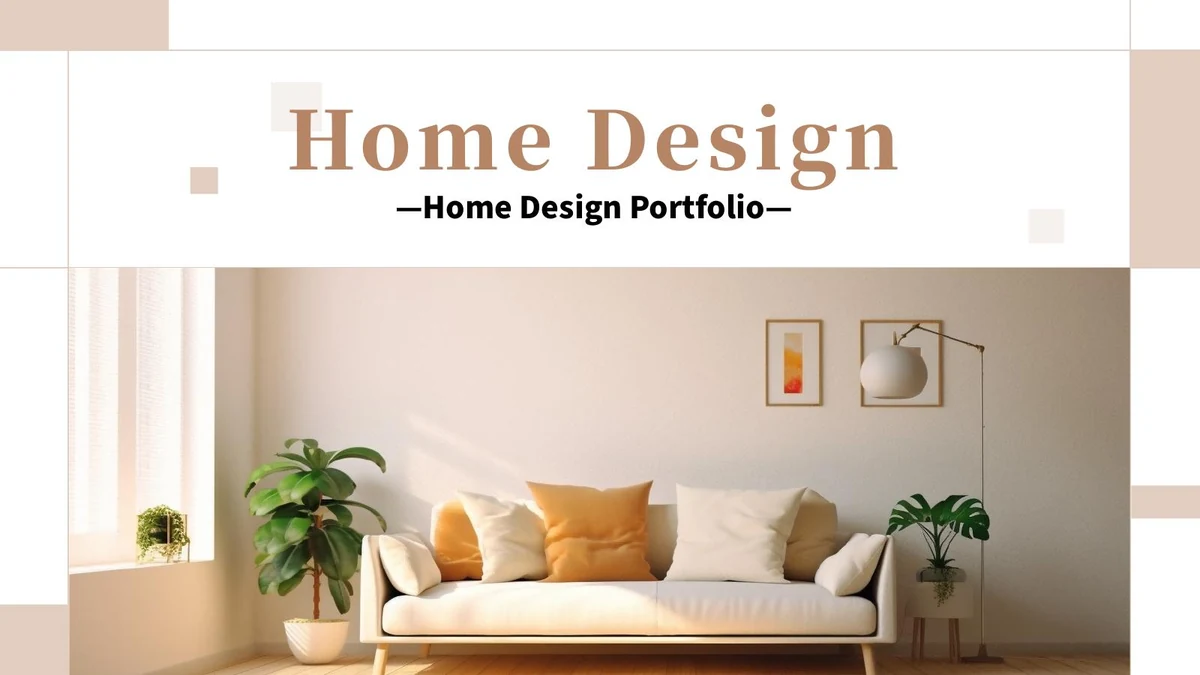
Beige Home Design Portfolio Presentation Template combines beige panels, warm white space and thin outlines with photographs of rooms and everyday objects. The sofa cover introduces a sequence of plants, tables, a guitar, coffee and small decorative details. Across 20 widescreen pages, Beige Home Design Portfolio Presentation Template offers a four-part contents page, matching numbered dividers and varied arrangements for describing your design choices. Some pages pair a tall picture with short notes; others arrange two or three images around a central text panel. Beige Home Design Portfolio Presentation Template also includes two simple progress bars and separate percentage cards as editable visual examples. Build a coherent project story by choosing photographs that belong together and writing captions about materials, atmosphere and use. Keep the visible Qianku Art Company credit and any other required attribution. Replace sample statements and figures with information that accurately represents your own work.
Key Features of Beige Home Design Portfolio Presentation Template
Beige panels, domestic photographs and four clear sections.
Warm Beige Framing
Beige Home Design Portfolio Presentation Template uses beige panels, fine rules and translucent squares. Leave space around captions to keep the photos clear.
Four Matching Dividers
Beige Home Design Portfolio Presentation Template has dividers on pages 3, 7, 12 and 16. Rename the sections and match their numbers to the contents page.
Rooms and Everyday Objects
Beige Home Design Portfolio Presentation Template pairs room views with plants, coffee and small objects. Connect the overall setting with its finer details.
Varied Photo Compositions
Beige Home Design Portfolio Presentation Template offers tall photos, rounded panels and image groups. Choose suitable proportions and check each new crop.
Manual Visual Indicators
Beige Home Design Portfolio Presentation Template has two bars and 15% and 32% cards as manual examples. Update the shapes and labels to match your own data.
Space for Design Notes
Beige Home Design Portfolio Presentation Template sets short notes beside photos and on beige panels. Explain materials and purpose without crowding the page.
How to Use Beige Home Design Portfolio Presentation Template
Select a room story, add your observations and review the details.
-
Plan the Four Sections
Review all 20 slides of Beige Home Design Portfolio Presentation Template. Plan the four sections around your rooms, materials and details, then choose photographs with a clear project connection.
-
Download and Add Your Project
Download Beige Home Design Portfolio Presentation Template with an active paid plan; daily and repeat downloads are unlimited. Work on a copy, replace sample descriptions and keep required credits.
-
Check Photos and Example Figures
Check Beige Home Design Portfolio Presentation Template at presentation size. Review photo crops, title spacing and the two manual percentage cards, then inspect the export before sharing.
Questions About Beige Home Design Portfolio Presentation Template
How do I download Beige Home Design Portfolio Presentation Template?
Sign in with an active paid plan to download Beige Home Design Portfolio Presentation Template. Daily downloads and repeat downloads are unlimited. Save the supplied Beige Home Design Portfolio Presentation Template separately from the copy you edit. For Beige Home Design Portfolio Presentation Template, select photographs from one project. Give each section a clear purpose. Beige Home Design Portfolio Presentation Template provides a visual framework, not a completed account of your design work. Replace the example descriptions with accurate observations about the spaces you show. Keep your own project names, responsibilities and dates consistent throughout Beige Home Design Portfolio Presentation Template. Choose only the pages that help explain the project, and avoid adding unrelated photographs simply to use every layout.
How many slides does Beige Home Design Portfolio Presentation Template contain?
Beige Home Design Portfolio Presentation Template contains 20 slides in a 16:9 format. The opening Home Design Portfolio cover is followed by a four-item contents page. In Beige Home Design Portfolio Presentation Template, the numbered chapter dividers appear on pages 3, 7, 12 and 16. Each uses a still-life photograph with a consistent beige composition. Beige Home Design Portfolio Presentation Template ends with a thank-you page that returns to the sofa image and framing of the cover. You can remove or reorder pages in Beige Home Design Portfolio Presentation Template, but update the contents and section numbers together. The paired photo layouts and small note panels in Beige Home Design Portfolio Presentation Template can support different parts of the same project. Give each section a clear purpose, such as introducing a room, explaining material choices or showing useful details, without treating the sample headings as mandatory.
Can I replace the photographs in Beige Home Design Portfolio Presentation Template?
Use photographs you are entitled to include when adapting Beige Home Design Portfolio Presentation Template. Several layouts use tall crops, while others depend on a wide room view or a group of smaller pictures. In Beige Home Design Portfolio Presentation Template, the guitar-and-coffee image, plant photographs and sofa scenes demonstrate these different proportions. Choose suitable proportions; avoid stretching pictures. Some lettering visible in photographs in Beige Home Design Portfolio Presentation Template belongs to the original picture and is not separate editable slide text. Check the image object before trying to change these details. Keep related lighting and color across Beige Home Design Portfolio Presentation Template so the photographs feel connected. A close view of an object should add useful information to the wider room scene rather than repeat it without explanation.
Can I view all of Beige Home Design Portfolio Presentation Template before downloading?
The gallery shows every page of Beige Home Design Portfolio Presentation Template, including the contents, all four dividers, photographic compositions and final thank-you. Use the thumbnails and arrows to compare wide room views with the smaller still-life layouts in Beige Home Design Portfolio Presentation Template. Enlarge the preview to see thin outlines, caption areas and the boundaries of overlapping panels. Compare your intended descriptions with the available space in Beige Home Design Portfolio Presentation Template; a long project report may need to be shortened into several focused notes. The gallery represents the supplied Beige Home Design Portfolio Presentation Template, not changes you make later. After editing Beige Home Design Portfolio Presentation Template, inspect the complete presentation again. Check crops and caption legibility at presentation size.
Are the charts and percentages in Beige Home Design Portfolio Presentation Template linked to data?
Beige Home Design Portfolio Presentation Template has no native charts, tables or embedded workbooks. The two visual bars on page 11 and the 15% and 32% cards on page 15 are manual examples. In Beige Home Design Portfolio Presentation Template, changing a percentage label does not automatically resize its accompanying shape. Use your own figures or another short explanation. Do not present the sample numbers in Beige Home Design Portfolio Presentation Template as measured performance, survey results or verified outcomes. Check the labels and visual proportions together when editing Beige Home Design Portfolio Presentation Template. Icons in Beige Home Design Portfolio Presentation Template organize notes; they do not verify services or results.
Which fonts does Beige Home Design Portfolio Presentation Template use?
Beige Home Design Portfolio Presentation Template uses Source Han Sans Light, Bold and Heavy; Source Han Serif Heavy and SemiBold; and Alibaba PuHuiTi Regular. Fonts are not embedded. Check font availability before editing Beige Home Design Portfolio Presentation Template. Keep short titles short where they share a page with a large photograph or vertical text band. If your editor substitutes a font in Beige Home Design Portfolio Presentation Template, inspect the width of headings, paragraph line breaks and the smaller labels. Shorten crowded sentences before reducing type size. Check divider headings in Beige Home Design Portfolio Presentation Template after font changes. Compare the exported Beige Home Design Portfolio Presentation Template with your editing view and correct missing characters or shifted lines before presenting.
Is Beige Home Design Portfolio Presentation Template in English, and can I use another editor?
The final downloadable Beige Home Design Portfolio Presentation Template is prepared with English sample headings and design notes. Translations on this website describe that same PPTX rather than a separate slide file in every language. Use Beige Home Design Portfolio Presentation Template as a starting point for concise descriptions in the language of your audience. Software that imports PPTX may open Beige Home Design Portfolio Presentation Template, but picture crops, font spacing and overlapping shapes can change. Use PowerPoint as the reference when comparing the imported presentation with the previews. Check the rounded three-panel composition, vertical text bands and framed cover of Beige Home Design Portfolio Presentation Template carefully. Check Beige Home Design Portfolio Presentation Template and its export for lost captions or picture edges.
Can I use Beige Home Design Portfolio Presentation Template commercially?
Check the terms for Beige Home Design Portfolio Presentation Template and for the photographs, fonts and other material in your finished presentation. A paid download does not independently establish permission for every possible reuse. The visible Qianku Art Company name on the divider pages of Beige Home Design Portfolio Presentation Template is retained as a source credit; do not describe it as your own company or remove required attribution. Replace project statements in Beige Home Design Portfolio Presentation Template with truthful descriptions of your work. Pictures of rooms and objects do not prove that you designed those spaces or supplied those products. Before redistributing the editable Beige Home Design Portfolio Presentation Template, confirm that the relevant terms allow redistribution as well as displaying a finished presentation. Use appropriately licensed replacement images.
How should I share Beige Home Design Portfolio Presentation Template?
Share this public page when recommending Beige Home Design Portfolio Presentation Template, allowing recipients to inspect the gallery and download through their own eligible accounts. For your completed project, present or export an edited copy of Beige Home Design Portfolio Presentation Template after checking the full sequence. Keep the working Beige Home Design Portfolio Presentation Template for later updates to photographs, labels and design notes. Match captions to images and the contents to your section order. Replace example percentages in Beige Home Design Portfolio Presentation Template or clearly explain the information they represent. Inspect the thank-you page and cover together, preserve required credits, and make sure Beige Home Design Portfolio Presentation Template contains no leftover claims that could be mistaken for your actual project experience.