Forest Portrait Portfolio Presentation Template: Outdoor Portraits, Green Frames and Layered Photos
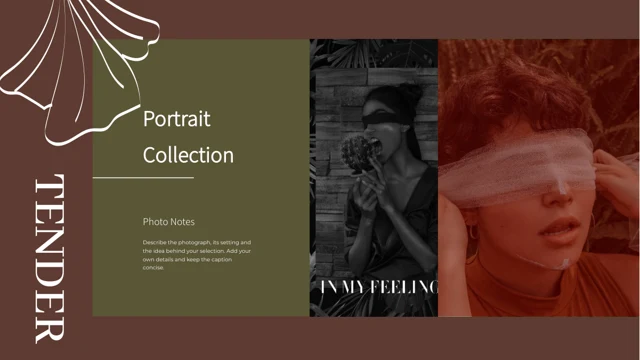
Forest Portrait Portfolio Presentation Template builds a quiet photo sequence around deep green backgrounds, taupe panels and brown accents. Water reflections, foliage, a paper boat and an apple give the outdoor portraits distinct points of interest. Across 15 widescreen slides, Forest Portrait Portfolio Presentation Template moves from a framed cover through a four-part contents page and numbered chapter dividers to a matching thank-you page. The image layouts combine wide crops, tall portraits and smaller overlapping photographs. Forest Portrait Portfolio Presentation Template also provides rounded note panels and restrained labels, leaving room for a short project introduction or a precise observation about each image. Keep captions brief, preserve the balance between faces and empty space, and choose photographs you are permitted to use. The supplied images illustrate the layout; they do not identify your subjects or establish that the source photographs are your own work.
Key Features of Forest Portrait Portfolio Presentation Template
Deep green frames, outdoor portrait sequences and short photo notes.
Water Portrait Cover
Forest Portrait Portfolio Presentation Template opens with a water portrait and paper boat. Green framing and a taupe field give the image a calm setting.
Four Numbered Chapters
Forest Portrait Portfolio Presentation Template has four numbered dividers. Rename their headings and align them with the four-part contents page.
Overlapping Photo Panels
Forest Portrait Portfolio Presentation Template layers wide and tall photographs. Check faces and useful details where one picture overlaps another.
Rounded Notes and Small Labels
Forest Portrait Portfolio Presentation Template pairs photos with rounded note panels. Use short captions that explain the image without crowding its edges.
Leaves, Reflections and Quiet Details
Forest Portrait Portfolio Presentation Template includes foliage, water and an apple among the portraits. Build your sequence around specific visual details.
Matching Thank-You Page
Forest Portrait Portfolio Presentation Template returns to the cover composition at the end. Add a brief closing line that suits your selected image sequence.
How to Use Forest Portrait Portfolio Presentation Template
Choose a sequence, replace the sample notes and review every crop.
-
Plan the Portrait Sequence
Preview all 15 pages of Forest Portrait Portfolio Presentation Template. Choose a clear order for your portraits, then match the four chapter headings to the contents and selected images.
-
Download and Add Your Material
Get Forest Portrait Portfolio Presentation Template with an active paid plan; daily and repeat downloads are unlimited. Work on a copy and replace sample notes with your own photo captions.
-
Check Crops and Readability
Review Forest Portrait Portfolio Presentation Template at presentation size. Check faces, overlapping photos and small labels, then compare the exported version with your editable copy.

Questions About Forest Portrait Portfolio Presentation Template
How do I download Forest Portrait Portfolio Presentation Template?
Sign in with an active paid plan to download Forest Portrait Portfolio Presentation Template. Daily and repeat downloads are unlimited. Save the supplied Forest Portrait Portfolio Presentation Template before editing, then work on a separate copy. Start by selecting the photographs and notes you want to present. Forest Portrait Portfolio Presentation Template offers a sequence of related portrait compositions rather than a requirement to fill every text area. Decide which images deserve a full page and which work better as smaller supporting pictures. Use Forest Portrait Portfolio Presentation Template to establish a clear visual rhythm, with short explanations where they add context. Replace sample text in Forest Portrait Portfolio Presentation Template with accurate information about your own project. A paid download of Forest Portrait Portfolio Presentation Template gives access to the file; it does not verify ownership of the source photographs or remove conditions attached to their reuse.
How many slides are in Forest Portrait Portfolio Presentation Template?
Forest Portrait Portfolio Presentation Template contains 15 slides in a 16:9 format. A framed water portrait opens Forest Portrait Portfolio Presentation Template, followed by a four-part contents page. The numbered chapter dividers in Forest Portrait Portfolio Presentation Template appear on slides 3, 6, 9 and 12. Each combines a wide photograph with a concise heading area. Between them, Forest Portrait Portfolio Presentation Template alternates tall portraits, overlapping images and short note layouts. The last page of Forest Portrait Portfolio Presentation Template echoes the cover and supplies a thank-you ending. You can shorten the sequence or rearrange pages to suit your project. After doing so, check the numbering and contents in Forest Portrait Portfolio Presentation Template together. The supplied order is a visual structure, not a verified chronology of the people, places or photographic sessions shown. Give your own selected images a clear sequence.
Can I replace the photographs in Forest Portrait Portfolio Presentation Template?
You can adapt Forest Portrait Portfolio Presentation Template with photographs you are permitted to use. Choose replacements by their composition as well as their subject. A tall portrait in Forest Portrait Portfolio Presentation Template leaves a different area for notes than a wide photograph of someone near water. Inspect the crop after each replacement. Keep eyes, hands and important objects clear of overlapping panels in Forest Portrait Portfolio Presentation Template. Some pages combine a large image with two or three smaller pictures; select photographs that work together without implying a relationship you cannot support. The source portraits in Forest Portrait Portfolio Presentation Template do not become your own photography simply because you edit the presentation. Preserve required attribution and check image permissions. Before exporting Forest Portrait Portfolio Presentation Template, review each replacement at full size, including rounded corners and the narrow photo strips near headings.
Can I preview every page of Forest Portrait Portfolio Presentation Template?
The gallery shows all 15 pages of Forest Portrait Portfolio Presentation Template. Use the thumbnails and arrow controls to compare the chapter dividers, note panels and overlapping photo arrangements. Enlarge Forest Portrait Portfolio Presentation Template to inspect small brown labels and the spacing around dark green frames. Look at how much of each face or object remains visible where photographs overlap. These previews show the supplied Forest Portrait Portfolio Presentation Template rather than later edits to your own copy. Before downloading Forest Portrait Portfolio Presentation Template, consider whether its quiet colors and short text areas fit your material. After editing Forest Portrait Portfolio Presentation Template, compare the complete sequence with the gallery and check every changed crop. Review the contents and divider headings as well as the photographs. A balanced cover does not guarantee that the smaller captions or layered pictures on the following pages remain readable.
Does Forest Portrait Portfolio Presentation Template include charts or data tables?
Forest Portrait Portfolio Presentation Template does not contain native charts, data tables or linked workbooks. Its numbered dividers, small labels and layered panels organize photographs and explanatory text. Do not mistake the four-part contents in Forest Portrait Portfolio Presentation Template for a chart or assume that decorative numbering represents measured data. The visual details in Forest Portrait Portfolio Presentation Template include water reflections, leaves, a paper boat and an apple; they support the portrait compositions rather than a statistical argument. If you add factual information to Forest Portrait Portfolio Presentation Template, verify it and make its purpose clear. Avoid turning the compact note areas in Forest Portrait Portfolio Presentation Template into dense reports. A concise observation about framing, light or the project brief is usually easier to place beside a photograph. Use a different layout when your information requires a substantial table or a fully explained data graphic.
Which fonts does Forest Portrait Portfolio Presentation Template use?
Forest Portrait Portfolio Presentation Template uses Source Han Serif SC Regular. An original Source Han Serif CN font attachment is retained, but the new SC font is not embedded; matching fonts may still be needed. Check matching fonts before editing Forest Portrait Portfolio Presentation Template. The large divider headings and small brown labels need different amounts of space, even when they use related letterforms. Inspect any font substitution reported by your editor. Keep a short heading short in Forest Portrait Portfolio Presentation Template, especially beside a wide crop or inside a narrow label. When translating Forest Portrait Portfolio Presentation Template, review each note panel rather than assuming that a sentence will occupy the same number of lines. Compare Forest Portrait Portfolio Presentation Template with the gallery after changing titles and captions. Check the editable file and an exported copy separately for missing characters, clipped words and shifted line breaks. The muted colors in Forest Portrait Portfolio Presentation Template also need enough contrast for small text. A file opening successfully does not guarantee that every caption in Forest Portrait Portfolio Presentation Template has kept its intended spacing.
Is Forest Portrait Portfolio Presentation Template in English, and can I use another editor?
The downloadable Forest Portrait Portfolio Presentation Template uses English headings and sample guidance. Website translations describe the same Forest Portrait Portfolio Presentation Template file rather than separate native decks for each language. Replace the example notes with concise explanations of your own portraits, while retaining any required source credits. Other presentation software may import Forest Portrait Portfolio Presentation Template, but font substitutions, rounded image corners and overlapping panels can render differently. Use PowerPoint as the layout reference and compare an imported Forest Portrait Portfolio Presentation Template with the gallery. Keep an editable copy before making broad style changes. If you translate Forest Portrait Portfolio Presentation Template, inspect narrow chapter headings, short brown labels and the thank-you page individually. Review the exported version of Forest Portrait Portfolio Presentation Template on the intended screen, checking both the largest photograph and the smallest caption rather than relying only on the editor view.
Can I use Forest Portrait Portfolio Presentation Template commercially?
Check the applicable conditions for Forest Portrait Portfolio Presentation Template, its photographs, fonts and any material you add. A paid download does not settle every permission for reuse or redistribution. The people pictured in Forest Portrait Portfolio Presentation Template should not be presented as your clients, collaborators or endorsers without an appropriate basis. Preserve required source credits when adapting Forest Portrait Portfolio Presentation Template, and verify permissions for any replacement photographs separately. Using Forest Portrait Portfolio Presentation Template to show a finished project and redistributing the editable source file are different activities. Before including Forest Portrait Portfolio Presentation Template in another downloadable collection, check the relevant terms. If your work involves recognizable people, consider the permissions appropriate to that use. Describe your own contribution accurately when presenting Forest Portrait Portfolio Presentation Template, distinguishing the photographs you created from any credited source material or example imagery that remains.
How should I share Forest Portrait Portfolio Presentation Template?
Share this public page when recommending Forest Portrait Portfolio Presentation Template, so others can preview the full gallery and download through their own eligible accounts. Keep an editable copy of Forest Portrait Portfolio Presentation Template for later updates to image order, captions and chapter names. Before presenting Forest Portrait Portfolio Presentation Template, confirm that the four-part contents still matches the selected dividers. Inspect faces and small objects at the edges of overlapping photographs. Test Forest Portrait Portfolio Presentation Template on the intended display, paying attention to dark green areas, taupe note panels and small brown text. Compare your export of Forest Portrait Portfolio Presentation Template with the editable file to catch shifted crops, broken lines or missing type. Keep the final thank-you page brief. Share a finished presentation only under the conditions that apply to its images and content, and leave required credits intact.