Tender Portrait Portfolio Presentation Template: Brown Panels and Portrait Collages
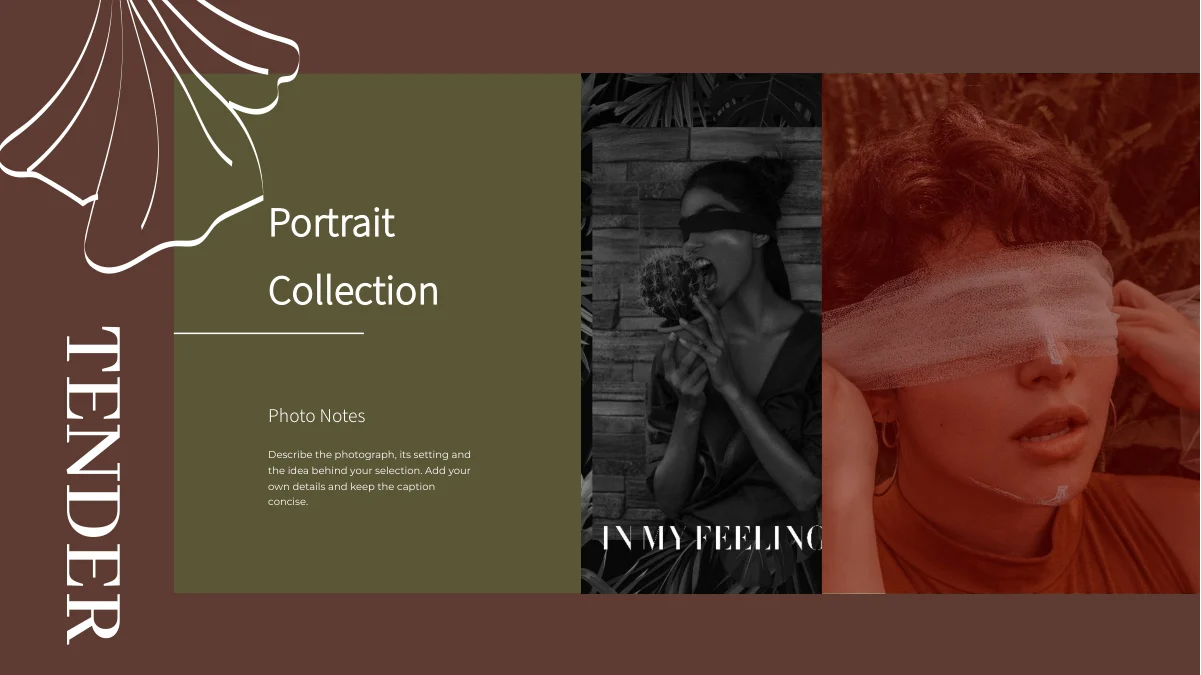
Tender Portrait Portfolio Presentation Template combines warm brown and olive panels with white ginkgo leaf outlines. Portrait photographs, quiet interiors and landscape views connect 16 widescreen slides. Tender Portrait Portfolio Presentation Template moves through single-image notes, layered picture groups and tall portrait strips in a photo sequence. A six-image collage gives one page entirely to photography. Tender Portrait Portfolio Presentation Template also places a portrait on a brown panel over a mountain-road background and pairs other images with short olive note boxes. The cover and thanks page retain the TENDER name and related portrait arrangement. Replace the English sample guidance with concise descriptions of your own work. Select images and layouts that belong together, check each image crop and keep notes clear of the leaf outlines. Review the opening, picture sequence and closing page as one portfolio, then compare the export with the editable file.
Key Features of Tender Portrait Portfolio Presentation Template
Warm panels, white leaf outlines and varied portrait arrangements.
Brown and Olive Color Blocks
Tender Portrait Portfolio Presentation Template balances brown fields with olive panels. Keep notes readable on both colors after palette changes.
White Ginkgo Leaf Outlines
Tender Portrait Portfolio Presentation Template repeats white leaf outlines around photographs. Keep key details and captions clear of these decorative lines.
Portrait and Landscape Pairings
Tender Portrait Portfolio Presentation Template pairs portraits with interior and landscape views. Choose related photos and explain their connection with short notes.
Six-Image Photography Collage
Tender Portrait Portfolio Presentation Template includes a six-image collage on page 10. Use the picture sizes to build a photo sequence and check each crop.
Tall Portrait Strips
Tender Portrait Portfolio Presentation Template offers three narrow portrait strips on page 11. Keep the subject visible and keep nearby descriptions concise.
Layered Notes and Matching Thanks
Tender Portrait Portfolio Presentation Template overlays short notes on olive panels and closes with the cover’s portrait theme. Update captions for a consistent finish.
How to Use Tender Portrait Portfolio Presentation Template
Choose a photo sequence, replace the notes and inspect each crop.
-
Choose Your Photo Sequence
Preview all 16 pages of Tender Portrait Portfolio Presentation Template. Select portraits, landscapes and collage layouts that belong together, then arrange the sequence around your own work.
-
Download and Replace the Notes
Download Tender Portrait Portfolio Presentation Template with an active paid plan; daily and repeat downloads are unlimited. Edit a copy and replace sample guidance with accurate photo captions.
-
Inspect Crops and Leaf Details
Check Tender Portrait Portfolio Presentation Template at full size. Review tall crops, olive note panels and leaf outlines, then compare the exported pages with the editable PowerPoint copy.
Questions About Tender Portrait Portfolio Presentation Template
How do I download Tender Portrait Portfolio Presentation Template?
Sign in with an active paid plan to download Tender Portrait Portfolio Presentation Template. Daily and repeat downloads of Tender Portrait Portfolio Presentation Template are unlimited. Tender Portrait Portfolio Presentation Template is supplied as an editable PowerPoint file. Save an untouched copy of Tender Portrait Portfolio Presentation Template before changing pictures, captions or titles.
What is included in Tender Portrait Portfolio Presentation Template?
Tender Portrait Portfolio Presentation Template contains 16 slides in a 16:9 format. Tender Portrait Portfolio Presentation Template includes a cover, portrait-and-text layouts, layered picture groups, a six-image collage, tall photo strips and a thanks page. The gallery previews every page of Tender Portrait Portfolio Presentation Template. Choose the Tender Portrait Portfolio Presentation Template layouts that suit your own photographs rather than using every sample automatically.
Does Tender Portrait Portfolio Presentation Template follow a fixed chapter order?
Tender Portrait Portfolio Presentation Template follows a photographic sequence rather than numbered chapter dividers. Arrange the selected Tender Portrait Portfolio Presentation Template pages around your own subjects, projects or locations. Keep the Tender Portrait Portfolio Presentation Template captions consistent with that order. The cover and thanks page in Tender Portrait Portfolio Presentation Template provide a matching beginning and ending for the sequence.
Can I replace the portrait photographs in Tender Portrait Portfolio Presentation Template?
Tender Portrait Portfolio Presentation Template uses sample portraits, interior scenes and landscape photographs. Replace the pictures in Tender Portrait Portfolio Presentation Template with relevant work and preserve their proportions. Check faces and other important details near the edges of Tender Portrait Portfolio Presentation Template crops. Review adjacent panels and captions after changing a Tender Portrait Portfolio Presentation Template image, because a replacement does not automatically reposition the surrounding layout.
How is the photo collage in Tender Portrait Portfolio Presentation Template arranged?
Page 10 of Tender Portrait Portfolio Presentation Template uses six images without a separate text column. Tender Portrait Portfolio Presentation Template combines a large portrait, stacked smaller photographs and a tall scene within this collage. Choose related pictures for the Tender Portrait Portfolio Presentation Template grid and check the crop of each one individually. Other Tender Portrait Portfolio Presentation Template pages offer paired images and three narrow strips for different viewing rhythms.
What should I do with the names in Tender Portrait Portfolio Presentation Template?
Tender Portrait Portfolio Presentation Template retains the TENDER name and the MUYUESHOP design credit from the source. These Tender Portrait Portfolio Presentation Template names do not identify the owner of your photographs or establish an affiliation. Preserve original naming and attribution in Tender Portrait Portfolio Presentation Template, and describe your own role accurately in the editable text. Sample portraits in Tender Portrait Portfolio Presentation Template are not evidence of a project you completed.
Which fonts does Tender Portrait Portfolio Presentation Template use?
Tender Portrait Portfolio Presentation Template uses Abhaya Libre Medium, Brush Script MT, Lato Black, Montserrat Regular and Source Han Sans SC Light. Tender Portrait Portfolio Presentation Template does not embed fonts. Install matching fonts if Tender Portrait Portfolio Presentation Template opens with substitutions, then review headings, script lettering and small notes. Check the Tender Portrait Portfolio Presentation Template export again for changed spacing or clipped text.
Can I change the panels and leaf decoration in Tender Portrait Portfolio Presentation Template?
Tender Portrait Portfolio Presentation Template combines brown and olive areas with white ginkgo leaf outlines. Adjust the Tender Portrait Portfolio Presentation Template editable colors and text to suit your work while retaining readable contrast. Review Tender Portrait Portfolio Presentation Template after changing an image or panel so that decorative leaf lines do not obscure important details. Keep short notes within the intended Tender Portrait Portfolio Presentation Template text areas.
What should I check before sharing Tender Portrait Portfolio Presentation Template?
Review the cover, photo sequence and thanks page in Tender Portrait Portfolio Presentation Template. Check Tender Portrait Portfolio Presentation Template tall portrait strips and the six-image collage for awkward crops. Make sure each Tender Portrait Portfolio Presentation Template caption accurately describes its photograph and that olive panels do not crowd the text. Compare the exported Tender Portrait Portfolio Presentation Template file with the editable copy at full size before sharing.