Blue Alpine Annual Report Presentation Template: a year in view, a direction ahead
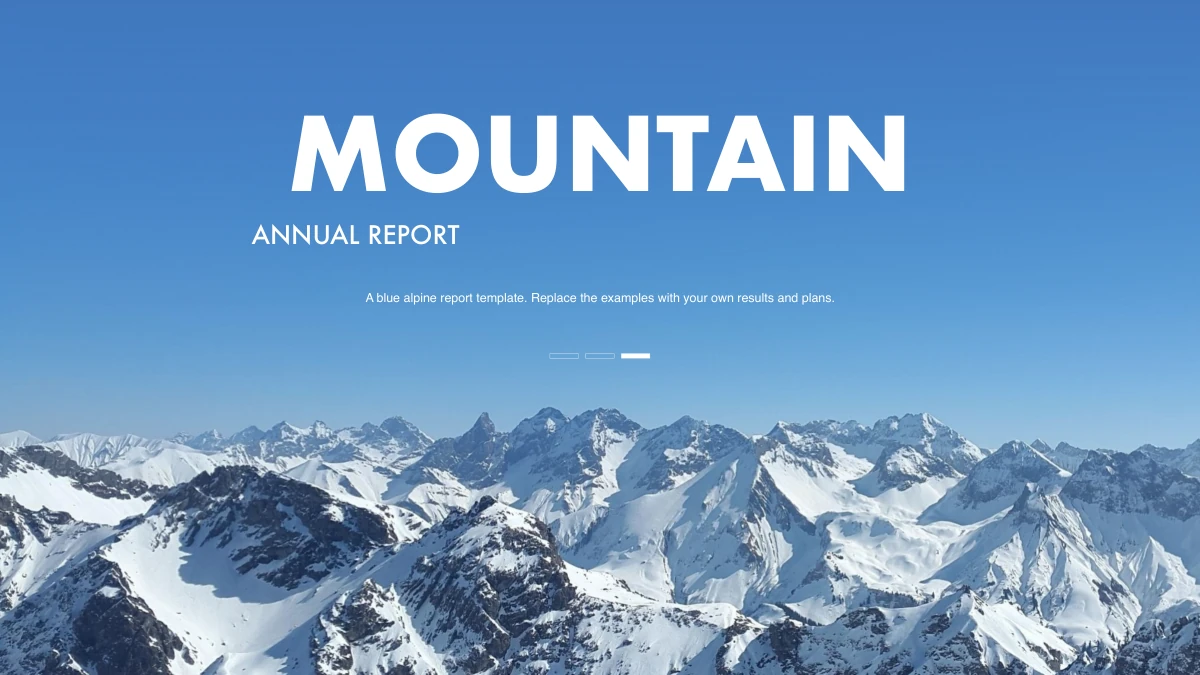
Blue Alpine Annual Report Presentation Template opens above a snow-covered mountain range, with blue sky behind the report title. Blue gradients carry that atmosphere into white pages, pale grey panels and simple line icons. Across 48 widescreen slides, Blue Alpine Annual Report Presentation Template moves through three chapters: looking back, looking ahead and highlighting important work. Photo-led pauses sit between charts, comparisons and short summaries. Blue Alpine Annual Report Presentation Template gives you ten worksheet-backed charts alongside manually drawn maps, timelines and progress graphics. Pick the layouts that explain your own year, then replace examples with checked results and clear next steps. Use the mountain photographs in Blue Alpine Annual Report Presentation Template to create breathing room around dense information, while keeping each page focused on one point.
Key Features of Blue Alpine Annual Report Presentation Template
Mountain imagery and blue detail connect results, plans and projects.
Mountain-led visual rhythm
Blue Alpine Annual Report Presentation Template alternates snowy photographs with white space. Blue gradients link the cover, chapter breaks and closing page.
Three report chapters
Blue Alpine Annual Report Presentation Template separates the year in review, future direction and key work. Keep these divisions or rename them for your report.
Ten editable charts
Blue Alpine Annual Report Presentation Template includes bars, rings, lines and pies with embedded worksheets. Separate percentage labels need manual updates.
Project and device layouts
Blue Alpine Annual Report Presentation Template pairs project cards with laptop and phone frames. Choose images that show your work and fit the original crops.
Maps and milestones
Blue Alpine Annual Report Presentation Template offers a world map, timelines and progress graphics. Edit these shapes and labels to reflect your own milestones.
Space for a clear message
Blue Alpine Annual Report Presentation Template includes broad photo panels and concise text areas. Use them to pause between figures and explain what matters.
How to Use Blue Alpine Annual Report Presentation Template
Build the story of your year, then check the figures and final view.
-
Choose your reporting sequence
Preview all 48 pages of Blue Alpine Annual Report Presentation Template. Select chapters and layouts that explain your results, the decisions ahead and the projects your audience needs to understand.
-
Download and keep a clean copy
Download Blue Alpine Annual Report Presentation Template with an active paid membership. Save a clean original, then make a working copy. Paid members can download again without a daily limit.
-
Update data and review the deck
Edit Blue Alpine Annual Report Presentation Template with your text and chart data. Update separate labels and manual graphics, then check photo crops, fonts and the exported slideshow.
Questions about Blue Alpine Annual Report Presentation Template
How do I download Blue Alpine Annual Report Presentation Template?
Sign in as an active paid member to download Blue Alpine Annual Report Presentation Template. Save the PPTX before opening it. Paid members can download Blue Alpine Annual Report Presentation Template repeatedly without a daily limit. Keep a clean original of Blue Alpine Annual Report Presentation Template to recover layouts after editing.
How many slides does Blue Alpine Annual Report Presentation Template contain?
Blue Alpine Annual Report Presentation Template has 48 slides in a 16:9 format. Three chapters organize photo pages, charts and project layouts. Blue Alpine Annual Report Presentation Template ends with a blue thank-you page. You can shorten Blue Alpine Annual Report Presentation Template to the pages your audience needs.
Which charts can I edit in Blue Alpine Annual Report Presentation Template?
Blue Alpine Annual Report Presentation Template contains ten native charts with ten embedded Excel workbooks. Types include columns, bars, lines, doughnuts and pies. Change data through the chart worksheet in Blue Alpine Annual Report Presentation Template. The separate percentage labels, maps, timeline markers and other drawn graphics do not update automatically. When editing Blue Alpine Annual Report Presentation Template, check labels and visual proportions against your data.
Can I preview every page of Blue Alpine Annual Report Presentation Template?
The gallery shows all 48 pages of Blue Alpine Annual Report Presentation Template in file order. Review the cover, narrow comparison panels, chart labels and device frames. Some layouts in Blue Alpine Annual Report Presentation Template use full photographs; others emphasize figures. Use the preview of Blue Alpine Annual Report Presentation Template to plan your sequence.
Can I open Blue Alpine Annual Report Presentation Template in another editor?
Blue Alpine Annual Report Presentation Template is supplied as a PowerPoint PPTX. Other editors may alter gradients, photo crops and worksheet-backed charts. After importing Blue Alpine Annual Report Presentation Template, compare previews and check text spacing. Keep a PowerPoint copy of Blue Alpine Annual Report Presentation Template for chart editing; test exports before sharing.
Which fonts does Blue Alpine Annual Report Presentation Template use?
Blue Alpine Annual Report Presentation Template uses Futura and Helvetica. Your editing computer needs these fonts; otherwise, the editor may substitute them. If you choose different fonts for Blue Alpine Annual Report Presentation Template, review headings, chart labels and narrow text areas. Preserve the spacing and hierarchy of Blue Alpine Annual Report Presentation Template, shortening text if the new font needs more space.
Is Blue Alpine Annual Report Presentation Template in English?
Yes. The downloadable Blue Alpine Annual Report Presentation Template contains English headings and sample text. The language menu translates this page, not the English file or previews. The figures, dates and claims in Blue Alpine Annual Report Presentation Template are illustrative examples. Before presenting Blue Alpine Annual Report Presentation Template, replace them with verified information and state the reporting period.
Can I use Blue Alpine Annual Report Presentation Template commercially?
Access to Blue Alpine Annual Report Presentation Template grants no additional rights to source photographs, fonts or assets. Check the permissions relevant to Blue Alpine Annual Report Presentation Template and any images or logos you add. This page grants no editable-file resale or redistribution rights. Share work made with Blue Alpine Annual Report Presentation Template only when you have the necessary permissions.
How should I share Blue Alpine Annual Report Presentation Template?
Send colleagues this public page so they can preview Blue Alpine Annual Report Presentation Template. Share your report as PPTX for editing or PDF for a fixed layout. Review exported charts and photographs from Blue Alpine Annual Report Presentation Template, remove private information and save your editable copy separately. Share only material you are entitled to distribute.