Circular diagram: bring related ideas into one clear view
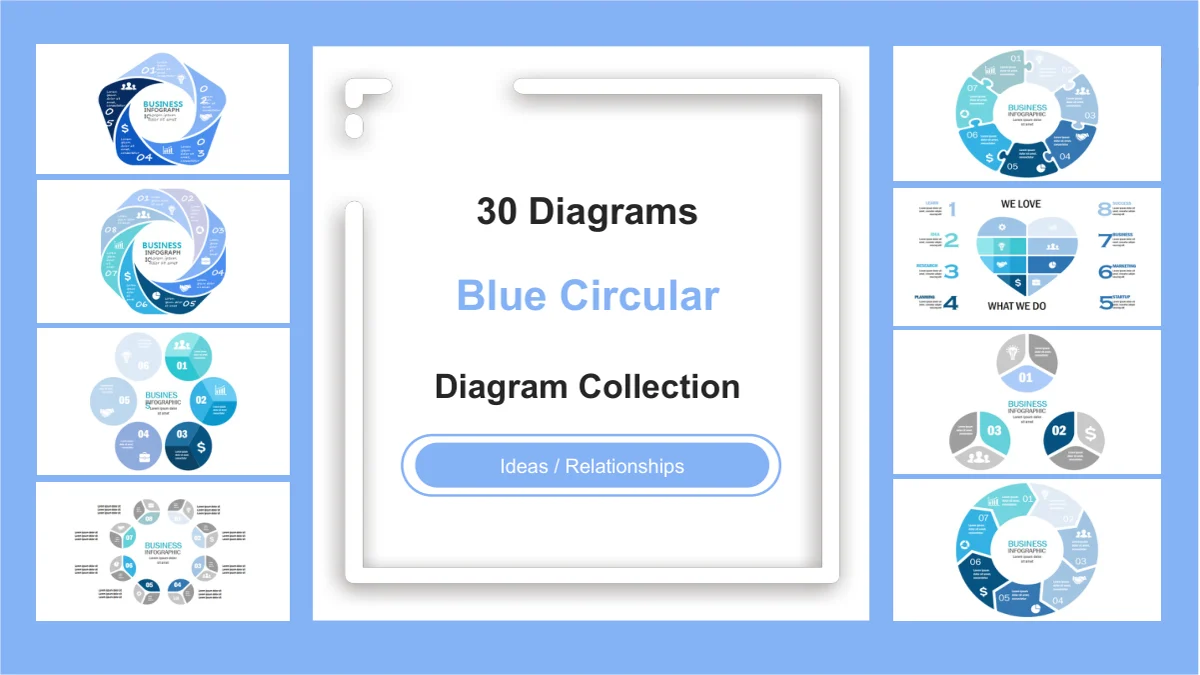
A circular diagram helps an audience see how separate ideas belong together. Blue Circular Diagrams Presentation Template offers 31 widescreen slides: one cover and 30 diagram pages built from editable drawing shapes. Blue and cyan rings, small circular clusters, interlocking pieces and a heart arrangement give you several ways to organize a message. Choose a circular diagram by the number of parts you need and the space available for each explanation. Numbered layouts range from three to eight components, with labels inside the shapes or notes placed around them. Use a circular diagram to introduce related topics, describe a cycle where the arrows support that reading, or compare the parts of a whole. Replace the sample labels with your own ideas and explain their relationship. These drawings do not calculate values or change size from a dataset; the meaning of every segment comes from your content.
Key Features of This Circular Diagram Collection
Blue shapes, numbered parts and room for short explanations.
A Circular Diagram in Blue and Cyan
Blue and cyan give each circular diagram a consistent visual theme. Use the separate segments to distinguish ideas, then add concise labels that explain their roles.
Circular Diagram Part Counts
Choose a circular diagram with the right number of components. The collection includes three- to eight-part arrangements, so each idea can have its own position.
Arrows, Folds and Puzzle Pieces
A circular diagram can use arrow segments, folded corners or interlocking pieces. Compare the shapes and select the relationship that best fits your explanation.
Circular Diagram Notes Inside or Outside
Keep a circular diagram readable with short labels inside its segments or notes around the edge. Check that each explanation clearly belongs to the intended part.
Editable Circular Diagram Shapes
Edit circular diagram text, colors and shape objects in PowerPoint. Interior diagrams are native drawings; they are not data charts linked to a spreadsheet workbook.
Compare the Full Circular Diagram Collection
Preview the circular diagram pages, including clusters and a heart arrangement. Compare related layouts with different part counts before selecting your slides.
How to Use a Circular Diagram
Choose the parts, name their relationship and check the layout.
-
Choose a Circular Diagram Layout
Preview all 31 pages and select a circular diagram with enough parts for your message. Decide whether the shapes show related topics or a sequence, then draft a short label for each.
-
Download and Add Your Ideas
Download the English PPTX with an active paid membership. Replace the circular diagram examples with your own labels and notes, adapt the colors, and keep an editable working copy.
-
Review Your Circular Diagram
View the circular diagram at presentation size. Check the smallest labels and the link between each shape and its note, then export or share the edited file as your permissions allow.
Questions about the Circular Diagram Collection
How do I download this circular diagram collection?
An active paid membership provides the English circular diagram PPTX, with unlimited daily and repeat downloads. Save a working copy before changing the sample text.
How many circular diagram slides are included?
The circular diagram file has 31 widescreen slides in 16:9 format: a cover and 30 diagram pages. Several arrangements recur with different numbers of parts.
Can I edit the circular diagram shapes?
Yes. Edit circular diagram drawing objects, text and colors in PowerPoint. The cover thumbnails remain images; the file has no native data charts or linked workbooks.
Can I preview every circular diagram before downloading?
The gallery shows all 31 pages in file order. Compare each circular diagram, its component count and the space for notes before selecting your layouts.
Will the circular diagram work in Google Slides or Keynote?
This circular diagram PPTX has not been tested in other editors. After import, check grouped objects, text wrapping, segment placement, colors and animations.
Which font does the circular diagram file use?
The English circular diagram release uses Arial without embedded fonts. Keep labels brief and check the smaller segments after replacing the sample wording.
Is the circular diagram PPTX translated into every site language?
All localized pages offer the same English circular diagram PPTX. Translate its editable text if needed, then check spacing and the fit of labels inside the shapes.
What permissions apply to commercial use?
Membership grants download access, not additional third-party rights. Review source terms for your circular diagram use and obtain permissions for materials you add.
How can I share a finished circular diagram?
Share this page for previewing. Where permitted, share your edited circular diagram or an export after checking the labels and removing confidential information.