Logistics Operations Presentation Template: Illustrated Layouts for Your Process
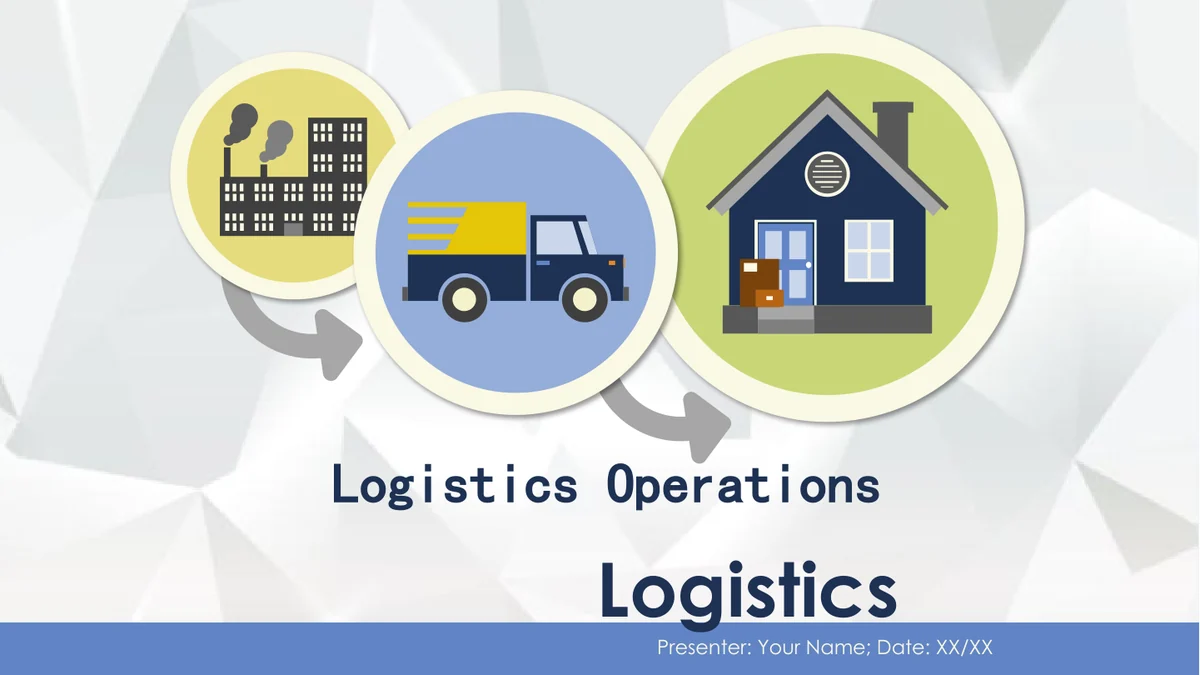
Logistics Operations Presentation Template opens with a factory, delivery truck and parcel-filled home in colored circles over a pale faceted background. Navy text and blue, gray, lime and teal footer bands organize the pages. Logistics Operations Presentation Template moves from three icon columns to a barcode illustration, a stopwatch and delivery truck, four vehicle rows, circular arrows and a parcel scale. A transport diagram links a person with factory, ship, airplane and truck symbols. Logistics Operations Presentation Template uses editable shapes and grouped artwork rather than photographs or native data charts. The sample barcode, dial and 24/7 marking do not measure shipments or establish service hours. Plan Logistics Operations Presentation Template around your actual process, responsibilities and verified information. Replace the sample headings, presenter name, date and repeated text. Select the layouts you need and test any existing animations in the editor you will use.
Key Features of Logistics Operations Presentation Template
Factory, vehicles and manual diagrams in Logistics Operations Presentation Template.
Factory-to-Delivery Illustrations
Logistics Operations Presentation Template connects factory, truck and home circles with arrows. Use these illustrations to introduce your process or section.
Three Logistics Icon Columns
Logistics Operations Presentation Template places a stopwatch, cargo container and hand truck above three note columns. Keep each explanation short and focused.
Barcode and Magnifier Layout
Logistics Operations Presentation Template pairs notes with a drawn barcode and magnifier. Treat this artwork as an example, not a functioning scanning tool.
Four Colored Truck Rows
Logistics Operations Presentation Template arranges four trucks in gray horizontal rows. Replace the notes; the 24/7 artwork is a sample, not a service promise.
Manual Arrows and Parcel Scale
Logistics Operations Presentation Template uses circular arrows and a parcel-scale illustration. Edit these shapes manually; they do not calculate shipment data.
Transport Connections Diagram
Logistics Operations Presentation Template links a person to factory, ship, airplane and truck icons. Use the diagram to explain roles or transport options.
How to Use Logistics Operations Presentation Template
Preview the layouts, download a copy and add your verified notes to Logistics Operations Presentation Template.
-
Preview the Ten Layouts
Browse all 10 slides of Logistics Operations Presentation Template. Compare the icon columns, truck rows and transport diagram, then choose pages that explain your own process clearly.
-
Download an English Working Copy
Download Logistics Operations Presentation Template with an active paid plan. Save a working copy, replace the presenter and date, then add verified notes instead of the repeated sample text.
-
Check the File and Share
Review Logistics Operations Presentation Template in your chosen editor. Check font substitution, grouped artwork and existing animations, then share your edited PPTX or an exported PDF.
Questions About Logistics Operations Presentation Template
How do I download Logistics Operations Presentation Template?
Sign in with an active paid plan and choose Download PPTX on the Logistics Operations Presentation Template page. Paid members have unlimited daily downloads, including repeat downloads. Save a working copy of Logistics Operations Presentation Template before editing. Keep an untouched Logistics Operations Presentation Template file to compare the illustrated scenes and existing animation settings.
How many slides does Logistics Operations Presentation Template contain?
Logistics Operations Presentation Template contains 10 slides in 16:9. The deck has a cover, an introductory layout, three icon columns, barcode artwork, vehicle scenes, circular arrows, a parcel scale, a transport diagram and a thank-you page. Select Logistics Operations Presentation Template pages around your outline. The layouts illustrate ideas rather than a finished report or a verified operating process.
Can I edit text and colors in Logistics Operations Presentation Template?
Text boxes, colored shapes and grouped illustrations in Logistics Operations Presentation Template can be edited. The trucks, factory, arrows and scale use manual shapes, with no native charts or embedded workbooks. Logistics Operations Presentation Template barcode digits and the 24/7 marking are drawn paths rather than ordinary text. Change that artwork by editing or replacing its shapes. Edit Logistics Operations Presentation Template labels alongside the figures, and review group alignment.
Can I preview all of Logistics Operations Presentation Template?
Yes. The Logistics Operations Presentation Template gallery includes all 10 slides. Use the thumbnails or arrows to inspect the three-column notes, vehicle rows and transport links before downloading. The Logistics Operations Presentation Template web images are static previews. Selected slides in the PPTX contain existing animations, so test a working copy in your presentation editor before relying on those effects.
Can another presentation editor open Logistics Operations Presentation Template?
An editor with PPTX support may open Logistics Operations Presentation Template, but fonts, groups, shadows and animations can behave differently. Test a copy of Logistics Operations Presentation Template in your intended editor. Check the barcode paths, circular arrows and truck scenes. Compare Logistics Operations Presentation Template with the page previews, then run through the file and inspect an exported PDF before sharing.
Which fonts does Logistics Operations Presentation Template use?
The visible English text in Logistics Operations Presentation Template uses Century Gothic in regular and bold styling, plus SimHei on selected titles. Fonts are not embedded. If those families are unavailable, your editor may substitute others. Check Logistics Operations Presentation Template headings and narrow vehicle notes after substitution. Review the presenter strip and footer labels in Logistics Operations Presentation Template for unwanted line breaks or clipping.
Are the slides in Logistics Operations Presentation Template translated?
The downloadable Logistics Operations Presentation Template file is in English, including the cover, placeholder headings, closing and default editing text. Choosing another website language changes the description, not the downloaded slide language. Logistics Operations Presentation Template still contains repeated sample notes and presenter/date placeholders. Replace the examples with your own material, then translate the finished Logistics Operations Presentation Template content for your audience.
Can I use Logistics Operations Presentation Template commercially?
Check the applicable terms and permissions before using Logistics Operations Presentation Template in a commercial project or redistributing it. Confirm the rights to any company logos, photographs or other materials you add. Paid membership and an English file do not grant extra artwork rights. Use Logistics Operations Presentation Template with content you can lawfully share. The sample barcode, scale and 24/7 mark provide no verified service or measurement claim.
How should I share Logistics Operations Presentation Template?
Share the Logistics Operations Presentation Template page URL so others can view the complete gallery and download through their own eligible accounts. Send your edited PPTX for further changes or a PDF for reading. Before distributing your Logistics Operations Presentation Template version, remove unused sample text, check names and dates, and confirm permissions for any operational information. Test animations for the intended presentation setup.