Botanical Paper Lesson Presentation Template: watercolor leaves around a paper-textured lesson
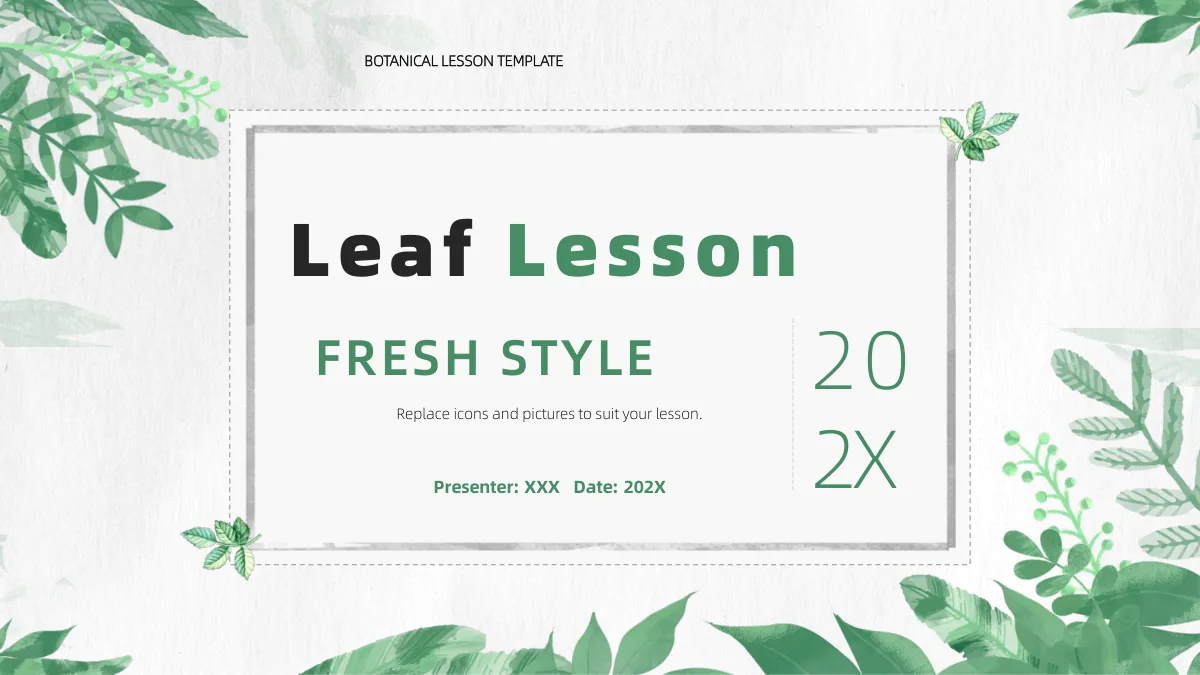
Botanical Paper Lesson Presentation Template gives classroom notes a pale paper background edged with watercolor foliage. A grey rectangular frame holds the opening title, while a wreath anchors the contents. Four numbered chapter dividers in Botanical Paper Lesson Presentation Template lead from an introduction through detail and explanation to reflection. White lilies, olive-like branches and a cactus accompany different text layouts. Some layouts hold two short points; others arrange four or six notes, a winding sequence or three connected stages. Botanical Paper Lesson Presentation Template also includes a native stacked bar chart with sample data. Separate circular percentage illustrations are manually drawn, so their shapes should not be treated as verified measures. A wreath-centred reflection page and three brush-mark labels provide space to bring ideas together. The framed cover returns at the end. Choose a sequence, replace the example text and keep the leaf borders clear.
Key Features of Botanical Paper Lesson Presentation Template
Paper textures, leafy borders and room for your lesson.
Watercolor leaves on paper
Botanical Paper Lesson Presentation Template frames pale paper with watercolor leaves. Keep titles inside the grey border so the foliage remains visible.
Four teaching chapters
Botanical Paper Lesson Presentation Template separates four chapters with dividers and paired leaf clusters. Rename the contents entries to match your teaching plan.
A stacked bar chart
Botanical Paper Lesson Presentation Template includes a stacked bar chart with three series. Replace sample data and explain what the categories represent.
Short notes in flexible groups
Botanical Paper Lesson Presentation Template offers paired notes, six text areas and leaf-led columns. Give each group a clear purpose before adding explanations.
Numbered sequences
Botanical Paper Lesson Presentation Template offers a winding four-point line and a three-node layout. Use either for an ordered explanation without a time scale.
A botanical reflection page
Botanical Paper Lesson Presentation Template places four notes around a wreath. Use this chapter to revisit ideas and gather questions before the framed ending.
How to Use Botanical Paper Lesson Presentation Template
Choose a sequence, add your lesson and review the file.
-
Map your four chapters
Use the contents of Botanical Paper Lesson Presentation Template to outline four sections. Select a few note layouts, decide whether the chart helps, and leave time for reflection.
-
Download a working copy
Get Botanical Paper Lesson Presentation Template with an active paid account. Save an untouched copy, then create a lesson file with your own name, date and chapter labels before editing.
-
Check text, data and sound
Fill Botanical Paper Lesson Presentation Template with short explanations. Update the chart data, review any audio settings and rehearse the full sequence on your classroom screen.
Questions About Botanical Paper Lesson Presentation Template
How do I download Botanical Paper Lesson Presentation Template?
Sign in with an active paid plan, then choose the download button for Botanical Paper Lesson Presentation Template. Paid members can download Botanical Paper Lesson Presentation Template repeatedly without a daily limit. Save the file somewhere you can find it, and make a separate copy for the lesson you are preparing. Before filling Botanical Paper Lesson Presentation Template with text, use its contents page to decide which chapters you need. A short class may use only a few of the note layouts. Keep an untouched Botanical Paper Lesson Presentation Template so you can start another lesson without old names, comments or examples. Check the downloaded Botanical Paper Lesson Presentation Template in PowerPoint before taking it into the classroom, especially if you intend to use the chart or sound.
How many slides does Botanical Paper Lesson Presentation Template contain?
Botanical Paper Lesson Presentation Template contains 24 slides in a 16:9 layout. After the cover and contents, Botanical Paper Lesson Presentation Template starts its four chapters on pages 3, 8, 13 and 19. The chapter layouts include small groups of notes, numbered explanations, diagram pages and reflection prompts. The last page of Botanical Paper Lesson Presentation Template returns to the framed cover design. It can be adapted as a closing page with your lesson details. You do not have to use every page of Botanical Paper Lesson Presentation Template or keep the chapter names from the examples. Select a sequence that makes sense for your subject. The slide count in Botanical Paper Lesson Presentation Template describes the available layouts, not a prescribed class length or a completed teaching programme.
Can I edit the text, pictures and chart in Botanical Paper Lesson Presentation Template?
Text boxes and native shapes in Botanical Paper Lesson Presentation Template can be adapted in PowerPoint. Start by naming the four chapters, then give each note a concise heading. The chart in Botanical Paper Lesson Presentation Template has an underlying workbook with three series across four categories; replace its example labels and values together. Check the resulting chart rather than changing only the surrounding explanation. Botanical artwork in Botanical Paper Lesson Presentation Template may remain a picture when selected, so a theme colour change will not necessarily recolour every leaf. The circular percentage examples in Botanical Paper Lesson Presentation Template are manually drawn graphics with separate labels. Their appearance is not a reliable calculation. Keep text within its space in Botanical Paper Lesson Presentation Template and shorten paragraphs before reducing type size.
Can I preview all of Botanical Paper Lesson Presentation Template before downloading?
Yes. The gallery shows all 24 pages from the English Botanical Paper Lesson Presentation Template file. When reviewing Botanical Paper Lesson Presentation Template, compare the contents with the four dividers and the layouts that follow them. Enlarge pages with narrow headings, the stacked bar chart and the four percentage illustrations. The preview of Botanical Paper Lesson Presentation Template helps you choose a layout, but it cannot show how your longer notes will fit. Check your edited copy separately. Read the small text in Botanical Paper Lesson Presentation Template at the distance your learners will see it. Rehearse Botanical Paper Lesson Presentation Template from the opening frame through the reflection chapter and final cover before presenting.
Will Botanical Paper Lesson Presentation Template work in another presentation editor?
Botanical Paper Lesson Presentation Template uses the PowerPoint (.pptx) format. Some other editors can import this format, but Botanical Paper Lesson Presentation Template has not been tested in every application. After importing, compare the paper background, leaf pictures, font spacing and chart with the preview. The source Botanical Paper Lesson Presentation Template also contains an embedded MP3; audio handling can vary between editors and exports. Inspect the playback settings in the application you will use rather than assuming the sound will behave the same everywhere. A PDF export of Botanical Paper Lesson Presentation Template will not reproduce interactive audio playback. Keep the original PowerPoint file while testing alternatives. Review any exported Botanical Paper Lesson Presentation Template pages for shifted headings, clipped labels or changes to the stacked bars before sharing them.
Which fonts are used in Botanical Paper Lesson Presentation Template?
Rendered text in Botanical Paper Lesson Presentation Template uses Alibaba PuHuiTi Light, Medium, Heavy and Bold, Source Han Sans CN Regular and Medium, and Arial. Botanical Paper Lesson Presentation Template also retains original embedded font data; that does not guarantee coverage for every newly translated character. Open Botanical Paper Lesson Presentation Template on the device you plan to use and compare the large cover title, narrow note headings and small chart labels. Similar font names do not guarantee identical spacing. If a font is substituted in Botanical Paper Lesson Presentation Template, inspect every affected page for new line breaks. Review a PDF exported from Botanical Paper Lesson Presentation Template before distributing it, and retain the editable file for later corrections.
Is the downloadable Botanical Paper Lesson Presentation Template in English?
Yes. Botanical Paper Lesson Presentation Template is supplied in English, including the cover, contents, chapter headings, chart labels and slide-layout text. Its previews show the same English file. Localised web pages for Botanical Paper Lesson Presentation Template describe that download, not separate decks in each language. The sample notes in Botanical Paper Lesson Presentation Template are prompts for editing rather than a finished lesson. Replace them with your own subject explanations, verified information and suitable reflection questions. Before sharing a presentation based on Botanical Paper Lesson Presentation Template, check the contents, date fields, percentage labels and closing page for example wording you did not intend to retain. Keep an untouched Botanical Paper Lesson Presentation Template for future lessons.
Can I use Botanical Paper Lesson Presentation Template for commercial teaching or training?
Review the applicable terms and permissions before using Botanical Paper Lesson Presentation Template in paid teaching, training or client work. A paid account provides download access; it does not by itself grant unrestricted redistribution rights for every element of Botanical Paper Lesson Presentation Template. Check the relevant artwork, font and audio permissions for your intended use. The source Botanical Paper Lesson Presentation Template includes an MP3, and the presence of that file is not proof that its music is licensed for your event or distribution. Remove or replace material when its rights are uncertain. The same applies to any photographs, logos or recordings you add to Botanical Paper Lesson Presentation Template. Do not sell or redistribute Botanical Paper Lesson Presentation Template as a template unless an express licence permits it.
How should I share Botanical Paper Lesson Presentation Template?
Share the public page for Botanical Paper Lesson Presentation Template when colleagues need to view the design or download it with their own accounts. The sharing options on the Botanical Paper Lesson Presentation Template page can copy the address or open a supported social service. For an edited lesson, keep your working PowerPoint and inspect any PDF before sending it. Verify the chart labels and data in Botanical Paper Lesson Presentation Template, remove personal information you do not want to distribute and check the reflection prompts. Decide whether the embedded audio belongs in the version you share. Confirm the necessary permissions for that material. Preview the final Botanical Paper Lesson Presentation Template file on the intended device so that recipients receive the version you actually checked.