Claude Monet Art Exhibition Presentation Template: Green Brushstrokes Around Painting Galleries
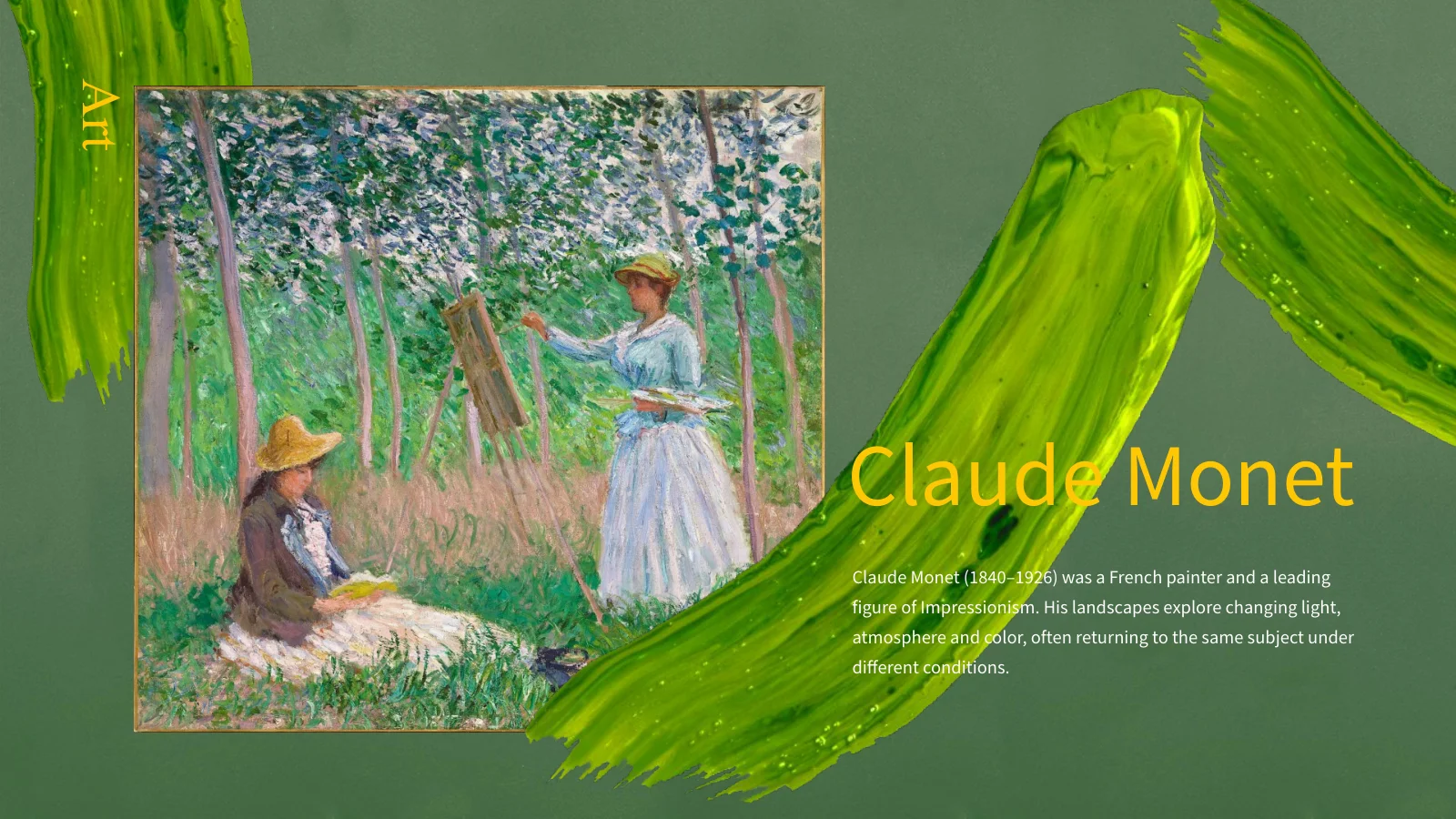
Claude Monet Art Exhibition Presentation Template sets painting reproductions against textured green backgrounds, sweeping yellow-green brushstrokes and yellow headings. The 14 widescreen slides move from an artist introduction and seven-topic contents page into water, fields, grainstacks, figures and landscape galleries. Claude Monet Art Exhibition Presentation Template pairs a long pond panorama with a smaller bridge image, places three grainstack views in a row and gives portrait-shaped works room beside short commentary. Later pages assemble trees, gardens and coastal scenes in varied collages. Use Claude Monet Art Exhibition Presentation Template to build a focused visual discussion: compare color, light or composition, then support each observation with the image on screen. Keep artwork labels brief and verify specific titles and dates before adding them. The final page continues the gallery rather than ending with a generic thank-you slide.
Key Features of Claude Monet Art Exhibition Presentation Template
Painting galleries with a brushstroke frame.
Textured Green Setting
Claude Monet Art Exhibition Presentation Template pairs green textures with painted accents and yellow headings. Keep labels short so paintings remain prominent.
Seven-Topic Contents
Claude Monet Art Exhibition Presentation Template has a seven-topic contents page after the opening. Rename the entries to match the images chosen for discussion.
Water and Reflections
Claude Monet Art Exhibition Presentation Template pairs a wide pond image with a bridge view. Discuss pond reflections, brushwork and changing color.
Grainstack Comparisons
Claude Monet Art Exhibition Presentation Template sets three grainstack images in a row. Describe visible changes in light and color while keeping comparisons clear.
Figure Study Layouts
Claude Monet Art Exhibition Presentation Template places tall figure paintings beside commentary. Preserve their proportions with room for captions and headings.
Landscape Collages
Claude Monet Art Exhibition Presentation Template mixes broad views, narrow tree studies and small garden images. Guide attention with brief notes on visible details.
How to Use Claude Monet Art Exhibition Presentation Template
Choose images, shape a discussion, check the screen.
-
Review the Gallery
Browse all 14 pages of Claude Monet Art Exhibition Presentation Template. Select paintings that support your discussion, then plan an order around a visual question rather than every image.
-
Download and Adapt
Download Claude Monet Art Exhibition Presentation Template with an active paid plan. Open a copy in PowerPoint, update the contents and replace commentary with observations and checked labels.
-
Present and Check
Review Claude Monet Art Exhibition Presentation Template at presentation size. Check painting crops, contrast and caption spacing, then inspect the export before sharing it with your audience.
Questions About Claude Monet Art Exhibition Presentation Template
How do I download Claude Monet Art Exhibition Presentation Template?
Open the download option for Claude Monet Art Exhibition Presentation Template and sign in with an active paid plan. Paid members can download Claude Monet Art Exhibition Presentation Template without a daily limit and repeat a download when needed. Save a working copy of Claude Monet Art Exhibition Presentation Template before changing its commentary or image arrangement. Claude Monet Art Exhibition Presentation Template is supplied as PowerPoint (.pptx), so keep that editable copy of Claude Monet Art Exhibition Presentation Template alongside any PDF you prepare for an audience. Review the preview of Claude Monet Art Exhibition Presentation Template first to decide whether the painting galleries suit your topic. Downloading Claude Monet Art Exhibition Presentation Template does not translate or research any new labels you add; prepare those as part of your own presentation.
How many slides are in Claude Monet Art Exhibition Presentation Template?
Claude Monet Art Exhibition Presentation Template contains 14 slides in a 16:9 format. An opening painting introduces the theme, followed by an artist introduction and a seven-topic contents page. The remaining pages of Claude Monet Art Exhibition Presentation Template combine individual works, image comparisons and broader galleries. Claude Monet Art Exhibition Presentation Template does not have four repeated chapter dividers or a final thank-you page: its last slide continues the landscape selection. Use fewer pages from Claude Monet Art Exhibition Presentation Template if a short comparison serves your purpose. When removing pages from Claude Monet Art Exhibition Presentation Template, update the contents as well, and make sure references in your notes still point to the intended images.
Can I edit Claude Monet Art Exhibition Presentation Template?
You can change editable text and layout elements in Claude Monet Art Exhibition Presentation Template. Painting reproductions and textured decorative artwork are images; their internal brushwork is not a collection of editable PowerPoint strokes. Adapt Claude Monet Art Exhibition Presentation Template with short observations that fit the existing text boxes. In Claude Monet Art Exhibition Presentation Template, green backgrounds and yellow headings already establish a strong visual frame, so a restrained set of new accents is usually enough. Keep the original proportions when resizing paintings, and avoid covering important details with captions. Claude Monet Art Exhibition Presentation Template has no native charts, tables or embedded chart workbooks; the image comparisons are visual arrangements, not data tools.
Can I preview every slide in Claude Monet Art Exhibition Presentation Template?
The complete gallery shows all 14 pages of Claude Monet Art Exhibition Presentation Template. Review both full-page compositions and smaller labels before downloading. In Claude Monet Art Exhibition Presentation Template, the long pond image, three-image grainstack row and later collages use different scales, which may suit different parts of your discussion. Enlarge Claude Monet Art Exhibition Presentation Template to judge whether the audience can see the details you intend to mention. A subtle reflection or small figure can disappear on a distant screen even when it is clear on your laptop. Use the preview of Claude Monet Art Exhibition Presentation Template to choose useful layouts, then check the actual presentation again after replacing text or changing crops.
What can I discuss with Claude Monet Art Exhibition Presentation Template?
Claude Monet Art Exhibition Presentation Template offers a visual starting point for an art lesson, exhibition talk or a focused discussion of painting. You might compare repeated subjects, look at reflections or examine how a portrait-shaped composition differs from a landscape. Build your version of Claude Monet Art Exhibition Presentation Template around a question the selected images can answer. Claude Monet Art Exhibition Presentation Template includes sample commentary, but your own observations should be tied to details that are actually visible. Avoid assigning an exact location, date or sitter from appearance alone. When preparing Claude Monet Art Exhibition Presentation Template, check the relevant museum record before adding an attribution, and keep longer background explanations in your speaker notes.
Which fonts does Claude Monet Art Exhibition Presentation Template use?
Claude Monet Art Exhibition Presentation Template uses Times New Roman and Source Han Sans CN. Fonts are not embedded in Claude Monet Art Exhibition Presentation Template. Ensure that the required fonts are available, or choose replacements and inspect every page. The yellow headings and light commentary in Claude Monet Art Exhibition Presentation Template need enough contrast against the green background, especially when projected. Keep long painting titles brief in the layout and place supporting details in your notes. After changing a font in Claude Monet Art Exhibition Presentation Template, look for extra line breaks, clipped letters and captions that crowd the images. Compare your working copy with the preview before exporting.
Is Claude Monet Art Exhibition Presentation Template translated, and can other editors open it?
The downloadable Claude Monet Art Exhibition Presentation Template uses English headings and commentary. The translated website pages describe Claude Monet Art Exhibition Presentation Template; they are not separate decks in each site language. If you translate Claude Monet Art Exhibition Presentation Template for your audience, keep labels concise and check line breaks throughout the presentation. Other software that imports PPTX may open the file, but image crops, fonts and spacing can vary. Use the previews of Claude Monet Art Exhibition Presentation Template as a reference when comparing results with PowerPoint. Before presenting Claude Monet Art Exhibition Presentation Template in another editor, inspect the wide pond image, paired figure paintings and tightly arranged gallery pages, then check any exported PDF.
Can I use Claude Monet Art Exhibition Presentation Template commercially?
Check the applicable template terms and the rights attached to the material you plan to use before including Claude Monet Art Exhibition Presentation Template in a commercial project. Access to a downloadable layout does not by itself establish rights to every reproduced image or a newly added photograph. Keep genuine credits and any required attribution. If you adapt Claude Monet Art Exhibition Presentation Template for a public exhibition, publication or paid presentation, verify the relevant image source and intended use rather than assuming all reproductions have identical conditions. Claude Monet Art Exhibition Presentation Template can organize your material, but it does not supply a blanket rights clearance or museum endorsement.
How should I share Claude Monet Art Exhibition Presentation Template?
Share the page for Claude Monet Art Exhibition Presentation Template so another person can inspect the full preview and use their own eligible download access. For a completed talk, choose an output that suits the audience and the permissions for your images. A PDF preserves a fixed reading sequence; an editable PPTX lets collaborators revise text and placement. Keep your working version of Claude Monet Art Exhibition Presentation Template separately, and confirm that comments, captions and speaker notes are ready for others to see. Review the exported gallery from Claude Monet Art Exhibition Presentation Template at a useful size. Before sending Claude Monet Art Exhibition Presentation Template, check that the contents and artwork labels match the pages you retained.