Diagonal Portfolio Presentation Template: diagonal photographs and black-and-white contrasts
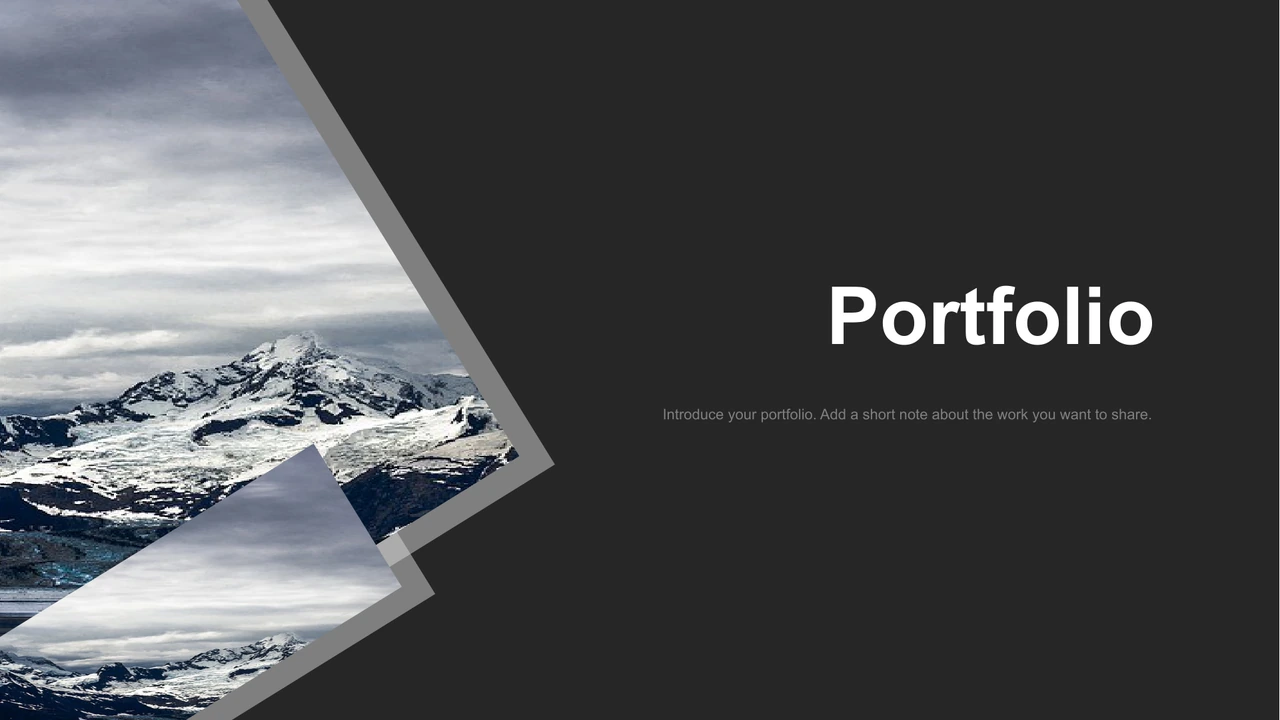
Diagonal Portfolio Presentation Template combines ten widescreen pages with black, white and grey surfaces, sharp photo cuts and generous dark areas. The cover pairs angled mountain photographs. Diagonal Portfolio Presentation Template moves into office and storefront photographs, arranging a large picture beside two smaller images and repeating one photo across a divided grid. A triangle mosaic uses stationery photographs. Diagonal Portfolio Presentation Template then switches to five narrow columns alternating city and workspace images with short captions and sample dates. A pale stationery photograph sits behind a translucent text panel. Later pages place architecture and planning pictures along diagonal borders; the closing page pairs desk and waterfront photographs with a thank-you message. Diagonal Portfolio Presentation Template has no contents page or data charts. English prompts guide editing. Replace photos, captions and dates with your work; check contrast and every crop.
Key Features of Diagonal Portfolio Presentation Template
Angled photographs, contrasting surfaces and compact image groups.
Dark and Light Surfaces
Diagonal Portfolio Presentation Template pairs dark and pale surfaces. Check text contrast on each page, including the light photo layout and grey caption cards.
Diagonal Photo Cuts
Diagonal Portfolio Presentation Template has diagonal mountain, building and map photos. Keep key details inside each crop and check the grey borders after changes.
Three-Image Arrangements
Diagonal Portfolio Presentation Template pairs a large picture with two smaller photos. Choose related images and keep the brief explanation focused on one project.
Triangle Photo Mosaic
Diagonal Portfolio Presentation Template uses a triangle photo mosaic. Review each crop and choose related images, keeping the native calendar symbol clear.
Five-Column Date Grid
Diagonal Portfolio Presentation Template has five columns of photos, captions and dates. Keep titles short, update sample dates and check contrast on the grey cards.
Closing Photo Blocks
Diagonal Portfolio Presentation Template closes with desk and waterfront photos in angled blocks. Write a short final message and choose images related to your work.
How to Use Diagonal Portfolio Presentation Template
Choose related photographs, write short captions and review the sequence.
-
Select Images and Pages
Review all ten pages of Diagonal Portfolio Presentation Template. Compare the photos, triangle mosaic and dated grid. Select useful layouts and prepare images with short project notes.
-
Download a Working Copy
Use an active paid account to download Diagonal Portfolio Presentation Template. Daily and repeat downloads are unlimited. Save a working copy, then gather authorized photos and project dates.
-
Replace and Check
Open Diagonal Portfolio Presentation Template in PowerPoint. Replace photos, headings, captions and sample dates. Check crops and text contrast, review the PDF and keep an editable copy.
Questions about Diagonal Portfolio Presentation Template
How do I download Diagonal Portfolio Presentation Template?
Sign in with an active paid plan and use the download button beside the preview. Diagonal Portfolio Presentation Template is an editable English PowerPoint PPTX file. Paid members can download without a daily limit and repeat the download when needed. Save Diagonal Portfolio Presentation Template on your device before editing. Keep an original copy of Diagonal Portfolio Presentation Template so you can compare the angled photo layouts while replacing the samples.
How many pages are in Diagonal Portfolio Presentation Template?
There are ten slides in Diagonal Portfolio Presentation Template, all in a 16:9 format. The sequence includes a mountain cover, office and storefront image groups, a triangle mosaic, a five-column photo-and-date grid, a pale photo page and a closing composition. Diagonal Portfolio Presentation Template has no contents page or native data chart. Use the pages of Diagonal Portfolio Presentation Template that support your work, then check their order and update any page labels after rearranging them.
Can I change the pictures and colors in Diagonal Portfolio Presentation Template?
Yes. Diagonal Portfolio Presentation Template retains native text, shapes and picture objects for editing in PowerPoint. Replace the photos with images you may use and check the subject inside each diagonal or triangular crop. Diagonal Portfolio Presentation Template combines dark and pale areas, so a color change needs a text-contrast check. The photographs themselves remain picture assets. Keep the geometry of Diagonal Portfolio Presentation Template intact until you have reviewed how each image frame and decorative border works.
Can I inspect all of Diagonal Portfolio Presentation Template before downloading?
Yes. The gallery includes every page of Diagonal Portfolio Presentation Template. Use thumbnails or arrows to compare photo groups, the triangle mosaic and the five-column layout. Enlarge Diagonal Portfolio Presentation Template to judge the available caption space and the small date labels. The preview of Diagonal Portfolio Presentation Template matches the same English PowerPoint offered for download. Check that the selected layouts suit your image proportions before preparing long descriptions.
Does Diagonal Portfolio Presentation Template work in another presentation editor?
The file for Diagonal Portfolio Presentation Template uses the PowerPoint PPTX format. A compatible editor may import it, but highlighted title words, translucent text areas and angled image arrangements can change. Compare the imported Diagonal Portfolio Presentation Template with the preview, including triangle edges, small captions and the closing blocks. PowerPoint is the recommended place to start editing Diagonal Portfolio Presentation Template. Keep an editable native copy and check the exported version on your intended screen before sharing.
Which fonts are used in Diagonal Portfolio Presentation Template?
The English copy of Diagonal Portfolio Presentation Template uses Arial after Chinese-bound headings and sample text are adapted for English. Original Source Sans Pro complex-script references remain in the file. No font files are embedded. Install the fonts you need or choose suitable replacements before editing Diagonal Portfolio Presentation Template. Large headings and small grid captions have different space budgets. Check line breaks and alignment throughout Diagonal Portfolio Presentation Template after changing fonts.
Is the wording in Diagonal Portfolio Presentation Template now English?
Yes. The native Chinese headings in Diagonal Portfolio Presentation Template are translated into English, and meaningless Latin filler is replaced with short editing prompts. Hidden Chinese master prompts are also English. The source photographs and sample dates remain unchanged. All website languages describe this same English Diagonal Portfolio Presentation Template, rather than separate translated slide files. The original author entry is retained. Replace the guidance in Diagonal Portfolio Presentation Template with specific project information and update dates without treating them as verified facts about your work.
May I use Diagonal Portfolio Presentation Template commercially?
The source of Diagonal Portfolio Presentation Template has no verified commercial or redistribution grant. Its original author entry names Dedi Juniadi and remains in the file. A paid membership permits downloading, without adding rights to the design or stock photographs. Confirm the permissions required for your intended use of Diagonal Portfolio Presentation Template and preserve original credits. Do not imply that the sample photographs depict your own work. Add only material you may share when adapting Diagonal Portfolio Presentation Template.
How should I share Diagonal Portfolio Presentation Template?
Send a preview link to Diagonal Portfolio Presentation Template through the share controls. For a finished project, export and inspect a PDF or presentation containing photographs and text you may distribute. Check the dates, title labels and final message before sending it. Keep the editable version of Diagonal Portfolio Presentation Template separately for later updates. Anyone who needs the original Diagonal Portfolio Presentation Template must download it using their own eligible paid account.