Forest Floral Portfolio Presentation Template: Flower Photography with Dark Green Frames
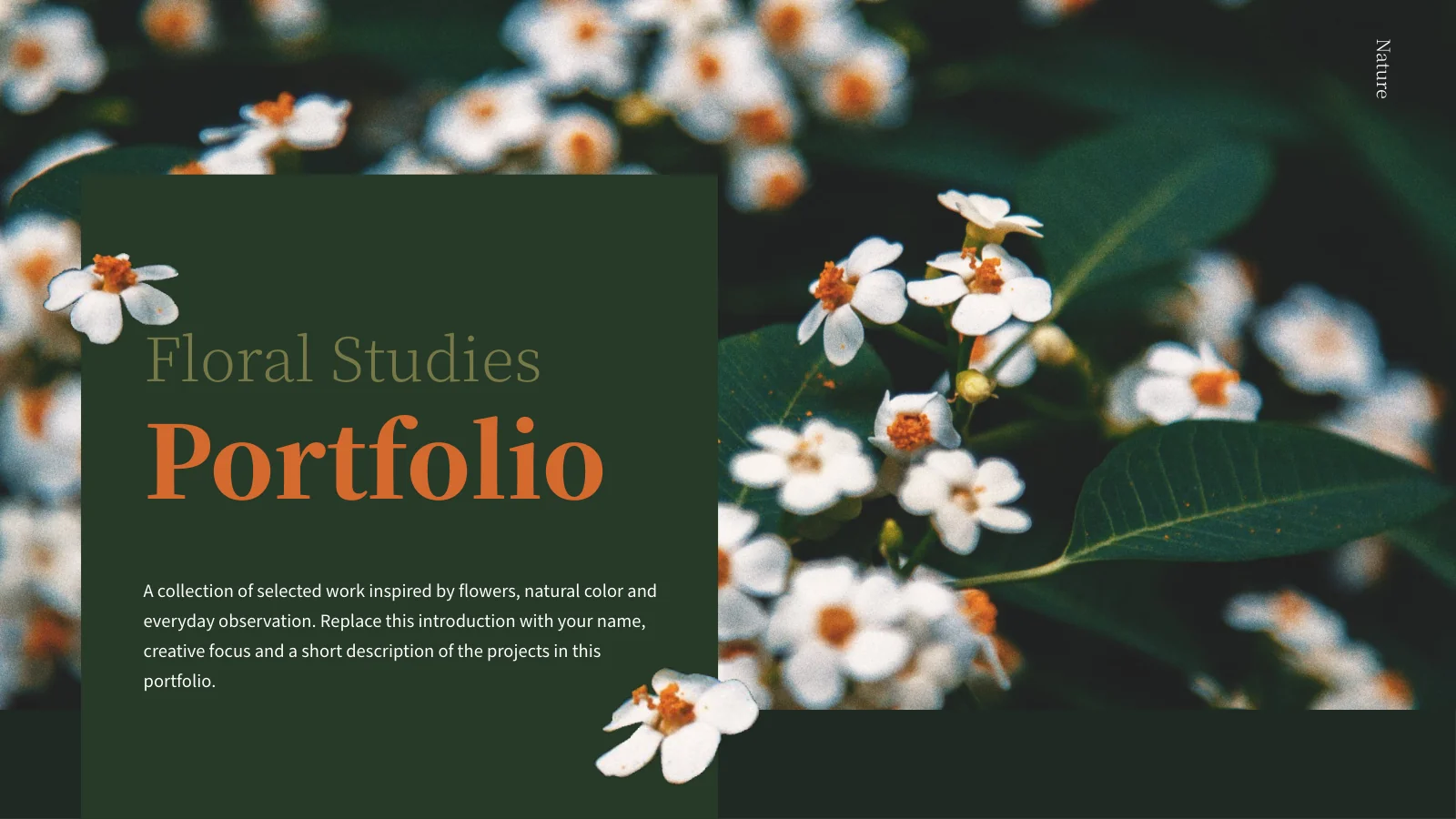
Forest Floral Portfolio Presentation Template brings flower photography into a deep green setting with olive panels and warm orange headings. Small white flower accents overlap the edges of text blocks and photographs, linking the cover to the project pages. The 16 widescreen slides in Forest Floral Portfolio Presentation Template include a portrait introduction, a four-item contents page and four numbered project dividers. Close views of roses and daisies alternate with a basket of flowers, paired photographs and a centered bloom. Two- and three-column notes provide places to explain choices without turning each page into a long essay. Use Forest Floral Portfolio Presentation Template to present your own photographs, floral studies or related design work. Select a coherent series, describe your role and replace the sample copy with observations tied to the images. Keep the delicate flower details visible when cropping, and let the closing Thank You page bring the sequence back to its white-flower opening.
Key Features of Forest Floral Portfolio Presentation Template
Flower-led layouts with dark panels and warm accents.
Forest Green and Olive
Forest Floral Portfolio Presentation Template uses green and olive panels with orange headings. Keep new labels readable beside delicate flower details.
Four Project Sections
Forest Floral Portfolio Presentation Template has four numbered dividers and matching contents. Name each section for its work and update the order together.
White Flower Accents
Forest Floral Portfolio Presentation Template repeats small white flower accents. Keep nearby labels short to leave room for decoration and photographs.
Tall and Paired Photographs
Forest Floral Portfolio Presentation Template uses tall photos, image pairs and a centered bloom. Keep petals, stems and key details visible when cropping.
Two- and Three-Column Notes
Forest Floral Portfolio Presentation Template offers two- and three-column notes. Give each block a distinct observation instead of repeating one description.
Coordinated Closing Page
Forest Floral Portfolio Presentation Template returns to white flowers on its Thank You page. Match the closing to your introduction and retain photo credits.
How to Use Forest Floral Portfolio Presentation Template
Choose a series, explain the details and check the final view.
-
Select a Related Photo Series
Review all 16 pages of Forest Floral Portfolio Presentation Template. Group related photographs into four sections, choose useful image layouts and decide what each short note should explain.
-
Download and Add Your Work
Get Forest Floral Portfolio Presentation Template with an active paid plan. Daily and repeat downloads are unlimited. Edit a copy, replace the portrait and add captions about your own work.
-
Check Flowers, Type and Contrast
Inspect Forest Floral Portfolio Presentation Template at presentation size. Check flower crops, orange headings and short notes against dark panels, then review the export before sharing.
Questions About Forest Floral Portfolio Presentation Template
How do I download Forest Floral Portfolio Presentation Template?
Sign in with an active paid membership to download Forest Floral Portfolio Presentation Template. Daily downloads of Forest Floral Portfolio Presentation Template are unlimited, and you may download the same file again. Save an untouched copy of Forest Floral Portfolio Presentation Template before preparing a working version. Collect your photographs and project notes first so that each layout has a clear purpose. The introduction in Forest Floral Portfolio Presentation Template should explain your role and the work that follows, rather than describing the person shown in the sample portrait. Use the preview of Forest Floral Portfolio Presentation Template to choose an opening image and a small set of pages that support your presentation.
How many slides are in Forest Floral Portfolio Presentation Template?
Forest Floral Portfolio Presentation Template contains 16 slides in a 16:9 format. A floral cover, portrait introduction and four-item contents page lead into four project sections. The numbered dividers in Forest Floral Portfolio Presentation Template appear on pages 4, 7, 10 and 13. The last page of Forest Floral Portfolio Presentation Template returns to the white-flower background with a Thank You message. You can shorten Forest Floral Portfolio Presentation Template when fewer examples make a clearer portfolio. Keep the contents and section numbers consistent after removing or rearranging pages. Before presenting Forest Floral Portfolio Presentation Template, read the headings in order and check that each project has enough context to stand on its own.
Can I replace the photos in Forest Floral Portfolio Presentation Template?
Replace picture objects in Forest Floral Portfolio Presentation Template with photographs that you are entitled to use. Choose a suitable orientation before changing the crop: a tall stem may need more vertical space than a close view of petals. Forest Floral Portfolio Presentation Template includes single photographs, image pairs and a centered flower composition, so select the layout that suits the photograph rather than forcing every image into the same shape. When adapting Forest Floral Portfolio Presentation Template, check the borders where flowers overlap a panel. Details inside a photo are not separate editable objects. Review all image changes in Forest Floral Portfolio Presentation Template at presentation size before exporting.
Can I preview every page of Forest Floral Portfolio Presentation Template?
The gallery displays all 16 pages of Forest Floral Portfolio Presentation Template. Enlarge the previews to inspect the portrait introduction, project dividers, roses, daisies and bouquet layouts. The two- and three-column note areas in Forest Floral Portfolio Presentation Template are especially worth checking if your presentation will be projected. Small text that reads well on a laptop may be difficult to follow from the back of a room. The preview shows the supplied Forest Floral Portfolio Presentation Template, not the edits you make locally. After replacing photographs or captions in Forest Floral Portfolio Presentation Template, inspect the complete sequence again and look for clipped text, unexpected line breaks or important details lost in a crop.
What can I explain in the short note columns of Forest Floral Portfolio Presentation Template?
Use the note columns in Forest Floral Portfolio Presentation Template for specific choices: the framing of a photograph, the relationship between two images or the role of a detail within a project. Each short block should add something that the audience cannot learn from the heading alone. Forest Floral Portfolio Presentation Template does not need the same description repeated in every column. Keep longer background information in your speaker notes and let the images carry the main visual evidence. If you use Forest Floral Portfolio Presentation Template for floral design work, distinguish your own contribution from the sample photography. Forest Floral Portfolio Presentation Template contains no native charts, tables or embedded workbooks; its columns are text layouts rather than data displays.
Which fonts does Forest Floral Portfolio Presentation Template use?
Forest Floral Portfolio Presentation Template uses Source Han Sans SC and Source Han Serif CN. Fonts are not embedded in Forest Floral Portfolio Presentation Template. Make sure the required families are available, or select suitable replacements and inspect every page. The serif headings in Forest Floral Portfolio Presentation Template need enough room to remain clear beside the flower accents. Light text and small notes in Forest Floral Portfolio Presentation Template also require careful contrast checks against the forest green and olive panels. If a new title becomes too long, shorten it before reducing its size. Compare your edited Forest Floral Portfolio Presentation Template with the preview, checking the opening, dividers and closing as well as the content pages.
Is Forest Floral Portfolio Presentation Template in English, and will other editors open it?
The downloadable Forest Floral Portfolio Presentation Template contains English editable headings and sample descriptions. The website translations describe the same English Forest Floral Portfolio Presentation Template rather than different slide files for each language. If you translate Forest Floral Portfolio Presentation Template for your audience, keep headings concise and check line breaks in every note column. Other applications that import PPTX may open Forest Floral Portfolio Presentation Template, but fonts, picture crops and spacing can differ. Use PowerPoint as the reference when comparing the result with the previews. Before presenting Forest Floral Portfolio Presentation Template in another editor, inspect the paired photographs, overlapping flower accents and narrow text areas, then check any exported PDF separately.
Can I use Forest Floral Portfolio Presentation Template commercially?
Check the applicable terms for Forest Floral Portfolio Presentation Template, its photographs and any fonts or images added to your version. A paid download does not independently grant every possible use of the supplied photographs. Preserve genuine credits and obtain the permissions relevant to your intended audience. Do not present the sample portrait in Forest Floral Portfolio Presentation Template as your staff or client without a factual basis. If Forest Floral Portfolio Presentation Template is used for client work, verify both the text and the rights attached to the final image selection. Confirm the relevant conditions before redistributing the editable Forest Floral Portfolio Presentation Template itself, rather than assuming that presentation use and template redistribution are identical.
How should I share Forest Floral Portfolio Presentation Template?
Share the public page for Forest Floral Portfolio Presentation Template so another person can view the full gallery and download through their own eligible account. For finished work, present or export your edited Forest Floral Portfolio Presentation Template after checking the result. Keep a separate editable copy of Forest Floral Portfolio Presentation Template for later changes to images or project descriptions. Before sharing Forest Floral Portfolio Presentation Template, replace all sample text, check the introduction and make sure the four contents entries match the sections you retained. Review the final Thank You page as part of the same sequence. Export Forest Floral Portfolio Presentation Template in a format that suits the audience, and inspect the output for missing fonts, cropped captions or image shifts.