Terracotta Album Presentation Template: warm photographs, cream shapes and three clear chapters
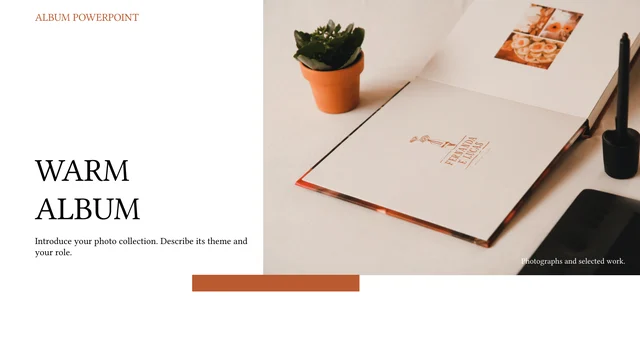
Terracotta Album Presentation Template opens with an album beside a small plant, balancing the photograph against a white title area. Fourteen widescreen pages use terracotta panels, cream shapes and serif headings. Terracotta Album Presentation Template has a three-part contents page and dividers on pages 3, 7 and 11. Each divider repeats the opening photo in three stepped frames. Terracotta Album Presentation Template moves through record-shop pictures, warm interiors, a piano with a yellow rose and a sunlit cat. Broad images alternate with tall views, circles, outlined panels and short notes. The thanks page returns to the album photograph. Terracotta Album Presentation Template is a starting sequence for your photographs, rather than a finished project account. Choose permitted pictures, name each chapter and explain your role. Printed names and record covers are inside photographs. Replace the sample notes, inspect crops and give appropriate image credits.
Key Features of Terracotta Album Presentation Template
Terracotta panels, cream shapes and warm photographic layouts.
Warm Accent Panels
Terracotta Album Presentation Template combines terracotta blocks with cream and white areas. Keep notes brief so the warm backgrounds frame your pictures clearly.
Three Connected Chapters
Terracotta Album Presentation Template has three contents entries and matching dividers. Name the chapters around your collection and keep their order consistent.
Stepped Picture Dividers
Terracotta Album Presentation Template repeats one album picture in three stepped frames. Use a related image to connect each divider with the opening and ending.
Cream Circles and Fine Curves
Terracotta Album Presentation Template places a tall interior photo beside cream circles and a short note. Keep headings compact and inspect the rounded keyword label.
Broad Views and Small Notes
Terracotta Album Presentation Template alternates broad photos with outlined notes and offset panels. Explain one visual detail rather than filling the open areas.
A Three-Picture Story
Terracotta Album Presentation Template groups a sunlit cat and two room photos near the end. Replace them with related views and explain how the images fit together.
How to Use Terracotta Album Presentation Template
Group the pictures, replace the notes and inspect the final album.
-
Plan the Three Chapters
Preview all 14 pages of Terracotta Album Presentation Template. Compare the contents, stepped dividers and picture arrangements, then choose permitted photos and plan three concise chapter names.
-
Download and Personalize
Download Terracotta Album Presentation Template with an active paid plan; daily and repeat downloads are unlimited. Save the original, replace pictures and add short notes and credits.
-
Check the Finished Album
Review Terracotta Album Presentation Template at your display size. Inspect crops, compact serif headings and text contrast, export a PDF and reopen every page before sharing the photo collection.
Terracotta Album Presentation Template FAQs
How do I download Terracotta Album Presentation Template?
Sign in with an active paid plan and use the download control on Terracotta Album Presentation Template. Eligible members have unlimited daily and repeat downloads. Save an untouched Terracotta Album Presentation Template and edit a working copy. Review the full gallery before choosing Terracotta Album Presentation Template. The download supplies a file; permissions for photographs and design must be checked separately.
How many slides are in Terracotta Album Presentation Template?
Terracotta Album Presentation Template contains 14 widescreen slides in 16:9: a cover, contents page, three dividers, eight picture-and-note pages and a thanks page. The dividers in Terracotta Album Presentation Template appear on pages 3, 7 and 11. You can select or rearrange Terracotta Album Presentation Template pages to suit your collection. The three chapter names are sample labels, rather than required subjects.
What is editable in Terracotta Album Presentation Template?
Terracotta Album Presentation Template includes native headings, text, panels, circles, curves and picture frames. Replace short notes and photographs in Terracotta Album Presentation Template while checking the original frame edges. Furniture, the piano, cat, plants and record artwork are inside images, rather than separate slide objects. Terracotta Album Presentation Template contains no native charts or embedded Excel workbooks.
Can I preview every page of Terracotta Album Presentation Template?
Every page of Terracotta Album Presentation Template can be viewed without purchasing a download. Browse the thumbnails or arrow controls, then enlarge a page to check headings and crops. The gallery displays static previews of the English Terracotta Album Presentation Template supplied in the file. Compare the three dividers, large photographs and shorter notes before selecting Terracotta Album Presentation Template.
Can other editors open Terracotta Album Presentation Template?
Terracotta Album Presentation Template is supplied as a PowerPoint .pptx. Other applications may import Terracotta Album Presentation Template, but serif substitution, line breaks, curves and picture effects can appear differently. Open a copy, compare the three-part contents and stepped photo dividers with the preview, and inspect your exported PDF. Terracotta Album Presentation Template uses original text frames, so long replacements may overlap neighbouring objects.
Which fonts does Terracotta Album Presentation Template use?
Terracotta Album Presentation Template references Source Han Sans Light, Source Han Serif Heavy, Microsoft YaHei, SimSun, PangMenZhengDao brush lettering, Arial, Calibri and theme fonts. Terracotta Album Presentation Template has no embedded font files. Original family declarations and point sizes are retained; preview rendering uses available substitutes. Check the large cover title, compact chapter headings and short notes when opening Terracotta Album Presentation Template on your own device.
Are the slides in Terracotta Album Presentation Template translated?
The website explains Terracotta Album Presentation Template in 15 languages, while all versions download one English PPTX. Chinese sample titles in Terracotta Album Presentation Template are translated, Latin filler becomes brief photo-writing prompts and the misspelled keyword label is corrected. Existing photographs and text printed inside them remain unchanged. To use Terracotta Album Presentation Template in another language, replace native text and inspect glyph support and line breaks.
Can I use Terracotta Album Presentation Template commercially?
Commercial and redistribution permissions for the photographs and design of Terracotta Album Presentation Template are unverified. Paid access to Terracotta Album Presentation Template provides the file, not an additional licence for images, printed album artwork or depicted objects. Confirm the rights and attribution requirements before publishing an adapted Terracotta Album Presentation Template. Use your own or appropriately licensed photographs, retain necessary credits and check any font permissions.
How should I share Terracotta Album Presentation Template?
Send the public page link or use the share control for Terracotta Album Presentation Template so others can inspect the free gallery. Each recipient needs eligible paid access to download Terracotta Album Presentation Template. Before sharing an edited collection, check photograph and design permissions, remove private notes and review credits. Export Terracotta Album Presentation Template to PDF, reopen it and inspect the chapter sequence, picture crops and every note.