Global Trade Presentation Template: A Blue Company Overview
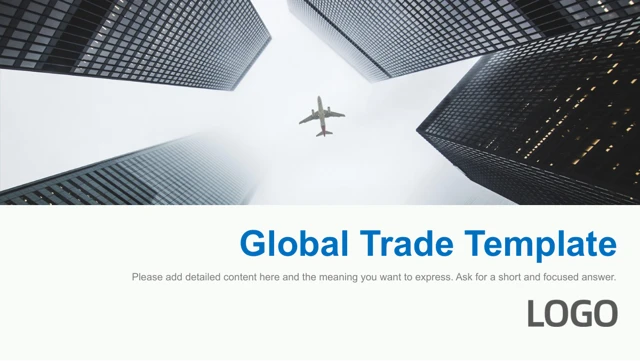
Global Trade Presentation Template opens with an airplane seen between tall buildings. Blue blocks and white pages give Global Trade Presentation Template a consistent visual rhythm. The 16 slides in Global Trade Presentation Template include a five-part contents page: introduction, team, product, service case and future plan. Global Trade Presentation Template preserves the original sequence and photographs in a widescreen PPTX. Company layouts in Global Trade Presentation Template move from a dollar photograph to three-column and five-card pages. Germany and Italy are sample headings in Global Trade Presentation Template, not verified company locations. A portrait and a group photo support the team section of Global Trade Presentation Template. Global Trade Presentation Template then places three product images beside short text areas; replace those examples with your own products and captions. Global Trade Presentation Template offers a seven-position logistics diagram with payment, warehousing, review and check labels, some repeated. Rewrite each stage of Global Trade Presentation Template to match your actual process. Five manually drawn bars show 20%, 30%, 40%, 35% and 70% in Global Trade Presentation Template. The figures in Global Trade Presentation Template are illustrative, not live data; adjust each bar when changing its value. A three-block arrow sequence in Global Trade Presentation Template provides another planning layout. A laptop mockup, analytics photo, airplane image and globe graphic complete Global Trade Presentation Template. Replace the website, email, telephone and WeChat placeholders on the contact page of Global Trade Presentation Template. Keep a short message beside each large photo in Global Trade Presentation Template, and check the small process labels on your intended screen. Select the pages you need from Global Trade Presentation Template and update the contents to match.
Key Features of Global Trade Presentation Template
A company story in blue and white.
Airplane opening
Global Trade Presentation Template starts with an aircraft and tall buildings.
Five-part contents
Global Trade Presentation Template separates the team, products and plans.
Product cards
Global Trade Presentation Template displays three images with captions.
Logistics flow
Global Trade Presentation Template includes seven linked process positions.
Manual comparisons
Global Trade Presentation Template has five shape bars with example values.
Contact closing
Global Trade Presentation Template ends with a globe and contact fields.
How to Use Global Trade Presentation Template
Choose the layouts and add your details.
-
Review the sequence
Browse Global Trade Presentation Template and select relevant pages.
-
Download the file
Get Global Trade Presentation Template with an active paid membership.
-
Replace the examples
Update Global Trade Presentation Template and check figures, photos and process labels.
Questions about Global Trade Presentation Template
How can I download Global Trade Presentation Template?
Sign in with an active paid membership, then use the download button on Global Trade Presentation Template. Paid members can download every day without a daily limit, including repeat downloads. The PPTX is supplied through a private link that expires after a short period.
How many slides are in Global Trade Presentation Template?
Global Trade Presentation Template contains 16 slides in the original widescreen sequence. The contents lists five areas, followed by company, team, product, process, planning and contact layouts. The full preview shows the exact downloadable pages; remove unused layouts from your working copy.
Can I edit the diagrams in Global Trade Presentation Template?
Yes. The bars, process boxes and their labels in Global Trade Presentation Template are slide shapes and text. The file has no native chart parts or embedded workbooks. Changing a percentage will not automatically resize its bar, so update both the label and the shape.
Can I see all pages of Global Trade Presentation Template before downloading?
The gallery shows all 16 pages of Global Trade Presentation Template. Use its thumbnails or arrow controls to compare the product cards, logistics flow, team pages and mockup. Enlarge the process slide to check its smaller labels and duplicated stage names before adapting it.
Does Global Trade Presentation Template work in another presentation editor?
Global Trade Presentation Template is a PowerPoint (.pptx) file. Software that imports PPTX may change line breaks, image crops or effects. Check the imported deck and any exported PDF before sharing it. An identical appearance across editors is not guaranteed.
Which fonts are used in Global Trade Presentation Template?
Global Trade Presentation Template uses Arial, with former Arial Black title frames set to Arial bold so they render correctly. Source references to Arial Unicode MS, Calibri, Calibri Light, Lato Light, 宋体 and 微软雅黑 remain. Check font availability and line breaks, especially in smaller process labels.
Is the slide text in Global Trade Presentation Template in English?
The slide content in Global Trade Presentation Template is English; generic master prompts were translated and source promotional notes removed. The website has 15 language versions, while the downloadable PPTX remains one English file. Text that is part of a photograph stays in the image.
Can I use Global Trade Presentation Template commercially?
The download of Global Trade Presentation Template does not establish permission to reuse every source photo, graphic or asset commercially. Check the permissions that apply to your intended project and replace uncertain assets. Paid access does not itself grant a right to resell or distribute the original template.
How should I share Global Trade Presentation Template?
Share the public page for Global Trade Presentation Template by copying its URL or using the sharing controls. For a finished presentation, share an appropriate export of your own edited copy. The short-lived private download address is not a permanent public link to the source file.