Navy Business Presentation Template: Office Photos, SWOT and Planning Diagrams
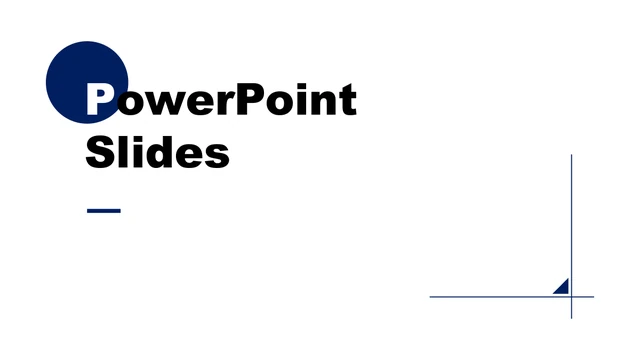
Navy Business Presentation Template uses white pages, navy headings and office photographs to organize a four-part business presentation. The cover in Navy Business Presentation Template pairs bold lettering with a navy circle and fine corner lines. A contents page introduces the four parts, followed by simple section dividers. Navy Business Presentation Template includes four-column introductions, paired photo layouts and a page for company information. The third part of Navy Business Presentation Template brings together a photo collage, a SWOT diagram and percentage indicators. Later pages in Navy Business Presentation Template show a phone mockup, a five-node route and a six-category mountain comparison. These different page types let Navy Business Presentation Template support both short explanations and visual comparisons. All labels and figures are editable examples, rather than verified results. Review Navy Business Presentation Template in full before selecting pages for your outline. Replace sample headings and photographs, define the measures behind each percentage and remove layouts you do not need. Navy Business Presentation Template contains text and shape-based diagrams; it does not include a native data chart or an embedded spreadsheet.
Key Features of Navy Business Presentation Template
A four-part outline with office photos and navy diagrams.
Four clear parts
Navy Business Presentation Template uses a contents page and four section dividers.
Office photographs
Laptop photos appear as pairs, columns and a collage.
SWOT comparisons
Use the cube diagram and four indicators for your own SWOT review.
Planning route
A five-node path connects strategy, management and targets.
Mountain indicators
Six mountain shapes provide a separate comparison layout.
Shape-based editing
Edit the text and diagrams; replace the separate photographs.
How to Use Navy Business Presentation Template
Preview the full file, download a copy and adapt the examples.
-
Preview Navy Business Presentation Template
Review all 22 pages before choosing layouts.
-
Download Navy Business Presentation Template
Sign in with an active paid plan. Daily downloads are unlimited.
-
Edit Navy Business Presentation Template
Replace examples and verify the finished PowerPoint or PDF.
Questions about Navy Business Presentation Template
How do I download Navy Business Presentation Template?
Sign in with an active paid plan and use the download button. Navy Business Presentation Template is supplied as a PPTX through a temporary private link. Paid members can download Navy Business Presentation Template again without a daily limit. Save Navy Business Presentation Template and make a working copy before editing.
How many pages does Navy Business Presentation Template contain?
Navy Business Presentation Template contains 22 slides in a 16:9 format. The sequence includes a cover, contents, four dividers and a closing page, alongside photo and comparison layouts. Choose pages from Navy Business Presentation Template that support your message. Removing a page from your copy of Navy Business Presentation Template does not alter the original download.
Can I edit text and colors in Navy Business Presentation Template?
Text boxes and native shapes in Navy Business Presentation Template can be changed in PowerPoint. Adjust navy fills, lines and labels together so they stay consistent. Photographs in Navy Business Presentation Template remain images; text or details inside a photo require replacement or image editing. Check contrast and spacing throughout Navy Business Presentation Template after making changes.
Can I preview every page of Navy Business Presentation Template?
Yes. The gallery shows all 22 pages of Navy Business Presentation Template in file order. Select a thumbnail, use the arrows or enlarge a page to inspect the labels. Compare the photo crops and available text space with your outline. The previews help you choose which layouts in Navy Business Presentation Template to keep.
Will Navy Business Presentation Template work in another editor?
A presentation editor that supports PPTX may open Navy Business Presentation Template, but fonts, grouped diagrams, shadows and image crops can render differently. Compare the result with the preview, particularly the SWOT cubes and phone mockup. Keep a PowerPoint copy of Navy Business Presentation Template and check any PDF exported from another application.
Which fonts does Navy Business Presentation Template use?
The download of Navy Business Presentation Template uses Arial and Arial Black in its actual slide text. Some unavailable source fonts in Navy Business Presentation Template were replaced with Arial. Install the required fonts or choose substitutes, then inspect the bold cover, small captions and section labels in Navy Business Presentation Template for changed line breaks.
Is the text in Navy Business Presentation Template translated?
Navy Business Presentation Template now contains English example text. Promotional credits and mixed-language placeholders were removed or rewritten as brief editing instructions. The website description of Navy Business Presentation Template is available in other languages; changing the website language does not translate the PPTX. Edit the downloaded text in Navy Business Presentation Template if you need another slide language.
Can I use Navy Business Presentation Template commercially?
A paid download of Navy Business Presentation Template does not establish a separate commercial license for the original design, photos or fonts. Check the permissions for your intended use. Replace any material whose rights are unclear before publishing Navy Business Presentation Template or sending a finished presentation to a client.
How do I share Navy Business Presentation Template?
Use the share button to send the public page for Navy Business Presentation Template through social media or copy its link. Visitors can inspect the previews without receiving the private PPTX. Before sharing an edited copy of Navy Business Presentation Template, remove unused examples and check the content and permissions.