Gloria Vintage Portrait Presentation Template: Warm Photographs with Muted Green and Beige
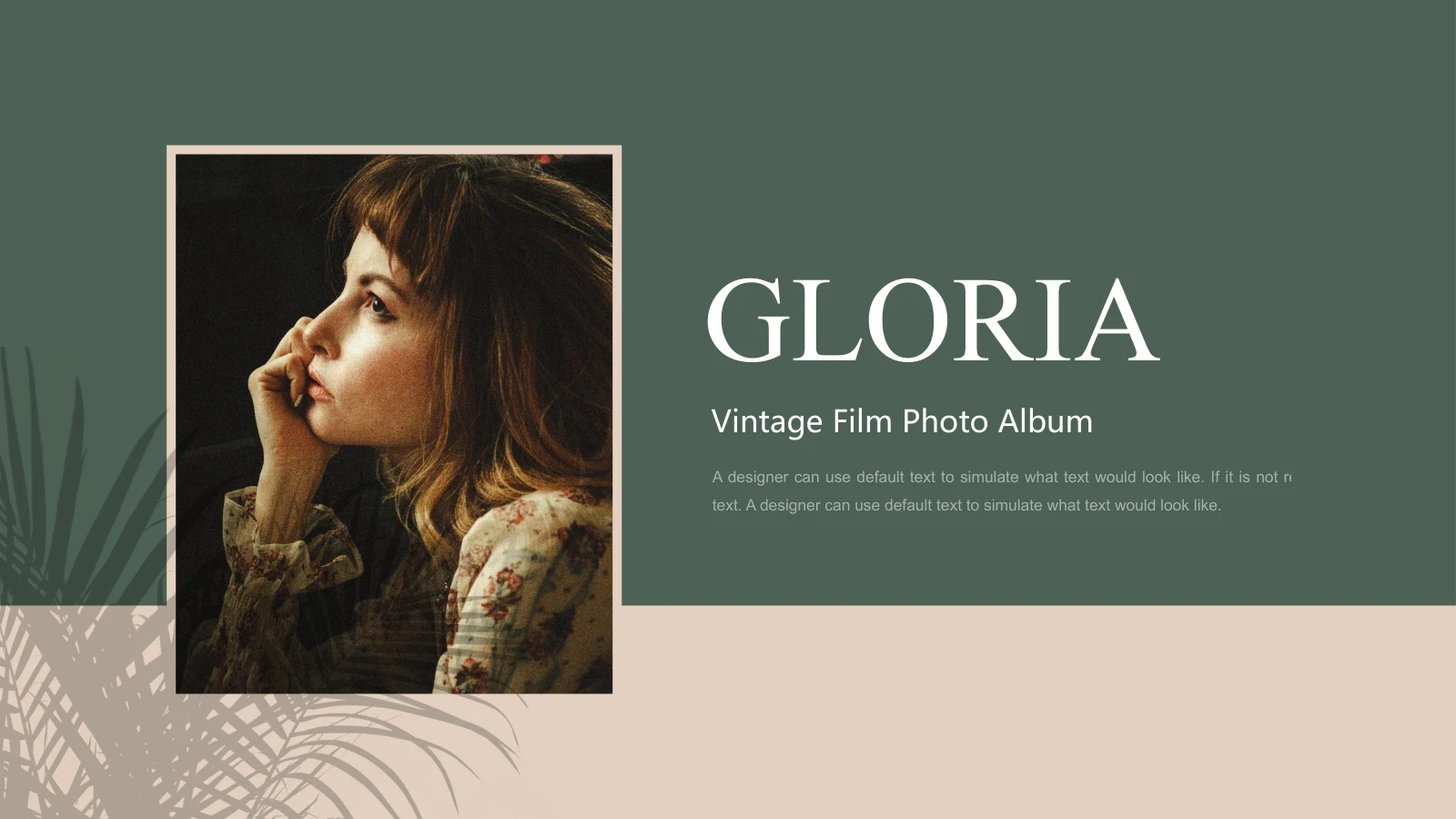
Gloria Vintage Portrait Presentation Template gives portrait photography room to lead. Muted green panels and warm beige backgrounds frame the images, with pale gold accents and soft leaf shadows adding depth. The 16 widescreen pages of Gloria Vintage Portrait Presentation Template move between single portraits, offset pairs and tall photographs beside short passages. Some titles cross a picture edge, while another page places a translucent green text panel over a flower-filled portrait. Gloria Vintage Portrait Presentation Template also includes a window-shadow background and a Thanks page that echoes the opening frame. Select images with compatible light and color, then write captions that explain your own work. The supplied passages are layout samples, not biographies of the pictured people. Keep faces clear when cropping, check text against both light and dark areas, and preserve any credits required for the photographs you choose.
Key Features of Gloria Vintage Portrait Presentation Template
Portrait-led pages with warm neutrals, green panels and quiet shadows.
Muted Green and Beige
Gloria Vintage Portrait Presentation Template pairs muted green with warm beige and pale gold. Match your photos to the palette while preserving their natural colors.
Single and Paired Portraits
Gloria Vintage Portrait Presentation Template offers single images and offset pairs. Choose photos that work together and leave space for a brief explanation.
Leaf and Window Shadows
Gloria Vintage Portrait Presentation Template uses soft leaf shadows and a window-shadow page. Keep captions readable wherever light and darker areas meet.
Tall Photographic Layouts
Gloria Vintage Portrait Presentation Template places tall portraits beside open text areas. Check faces, hands and clothing details before accepting a new crop.
Overlapping Text Panels
Gloria Vintage Portrait Presentation Template includes a translucent green panel over a photograph. Adjust your text length and check contrast against the picture.
Coordinated Opening and Close
Gloria Vintage Portrait Presentation Template begins with a framed portrait and ends with a matching Thanks page. Keep the opening and closing focused on your work.
How to Use Gloria Vintage Portrait Presentation Template
Select a photo sequence, replace the captions and inspect each crop.
-
Select a Coherent Photo Sequence
Review all 16 pages of Gloria Vintage Portrait Presentation Template. Choose photos with compatible light and color, then arrange single and paired layouts to tell a clear story about your work.
-
Download and Add Your Captions
Get Gloria Vintage Portrait Presentation Template with an active paid membership. Daily and repeat downloads are unlimited. Edit a copy, replace sample passages and retain required photo credits.
-
Check Crops and Readability
Inspect Gloria Vintage Portrait Presentation Template at presentation size. Check faces, picture edges, fonts and text over translucent panels, then review the exported file before sharing.
Questions About Gloria Vintage Portrait Presentation Template
How do I download Gloria Vintage Portrait Presentation Template?
Sign in with an active paid membership to download Gloria Vintage Portrait Presentation Template. Downloads are unlimited each day, including repeated downloads of the same file. Save an untouched copy of Gloria Vintage Portrait Presentation Template before editing. Start by choosing a small set of photographs and writing a short note about the purpose of each image. The repeated Gloria headings in Gloria Vintage Portrait Presentation Template are part of the supplied design, not a requirement to use one title everywhere. Give the pages of Gloria Vintage Portrait Presentation Template labels that help your audience understand the sequence without overwhelming the pictures.
How many slides are in Gloria Vintage Portrait Presentation Template?
Gloria Vintage Portrait Presentation Template contains 16 slides in a 16:9 format. The opening cover and final Thanks page use related framed-portrait compositions. Between them, Gloria Vintage Portrait Presentation Template includes single images, offset pairs, tall photographs and short text arrangements. There is no need to use every page of Gloria Vintage Portrait Presentation Template if a smaller selection tells your story more clearly. A paired layout can introduce a contrast, while a single portrait can give one image more attention. After rearranging Gloria Vintage Portrait Presentation Template, read the captions in order and remove repetitions that do not add context.
Can I replace the portraits in Gloria Vintage Portrait Presentation Template?
You can replace picture objects in Gloria Vintage Portrait Presentation Template with photographs you are entitled to use. Choose an image with a suitable orientation before adjusting its crop; a tall portrait may not work in a wide frame without losing important details. Gloria Vintage Portrait Presentation Template also layers pictures with colored panels and titles. After replacing a photograph in Gloria Vintage Portrait Presentation Template, check where the picture edge meets each overlapping element. Avoid covering a face or cutting off an important gesture. Compare the result across Gloria Vintage Portrait Presentation Template so changes in lighting and color feel intentional rather than distracting.
Can I preview all of Gloria Vintage Portrait Presentation Template before downloading?
The gallery shows all 16 pages of Gloria Vintage Portrait Presentation Template. Open the larger view to compare the photo pairs, tall images and window-shadow background. The preview of Gloria Vintage Portrait Presentation Template shows the supplied file and will not update when you edit a local copy. Small passages in Gloria Vintage Portrait Presentation Template should be checked at the size your audience will see, especially over a translucent panel or near a shadow. Once you have edited Gloria Vintage Portrait Presentation Template, review the full sequence in presentation view and inspect any exported PDF for cropped text, missing characters and changes in image positioning.
Does Gloria Vintage Portrait Presentation Template include charts or data tables?
Gloria Vintage Portrait Presentation Template contains no native charts, tables or embedded workbooks. Its green blocks, pale gold accents and numbered 01 and 02 text entries are layout elements rather than data visualizations. Use Gloria Vintage Portrait Presentation Template for photographs and concise explanations without treating decorative shapes as measurements. If your project needs numerical evidence, add a properly labeled chart of your own and verify its source. Keep any new material visually consistent with Gloria Vintage Portrait Presentation Template and distinguish actual results from examples. Remove unused sample passages in Gloria Vintage Portrait Presentation Template instead of presenting them as finished project descriptions.
Which fonts does Gloria Vintage Portrait Presentation Template use?
Gloria Vintage Portrait Presentation Template uses Times New Roman, Arial and Microsoft YaHei. Fonts are not embedded in Gloria Vintage Portrait Presentation Template, so install the matching families or choose suitable alternatives before editing. Times New Roman supplies the serif Gloria and Thanks headings in the English file. After a font change in Gloria Vintage Portrait Presentation Template, check the vertical titles, narrow captions and passages placed over photographs. The existing text frames have limited space; shorten a passage rather than letting it cross a face or picture edge. Compare your edited Gloria Vintage Portrait Presentation Template with the gallery and check both presentation view and the exported file.
Is Gloria Vintage Portrait Presentation Template in English, and will it work in another editor?
The supplied Gloria Vintage Portrait Presentation Template includes English editable labels and the existing English sample passages. Website translations describe the same Gloria Vintage Portrait Presentation Template PPTX rather than separate translated slide decks. Other applications that import PPTX may open Gloria Vintage Portrait Presentation Template, although fonts, transparency and picture positioning can differ. PowerPoint is the main reference for editing. After importing Gloria Vintage Portrait Presentation Template, compare the vertical headings, overlapping titles and translucent green panel with the gallery. Keep a working copy before export, and inspect the finished output instead of assuming it is identical to the editing view.
Can I use Gloria Vintage Portrait Presentation Template for commercial work?
Check the terms that apply to Gloria Vintage Portrait Presentation Template, its photographs and the fonts in your version. A paid download of Gloria Vintage Portrait Presentation Template does not independently grant every right relating to a portrait or pictured person. Use photographs you are authorized to present and keep any required credits. The people in Gloria Vintage Portrait Presentation Template should not be described as your clients, staff or collaborators without a factual basis. Before sharing client work made with Gloria Vintage Portrait Presentation Template, check both the text claims and asset permissions. Confirm the relevant conditions before redistributing the editable template itself.
What is the best way to share Gloria Vintage Portrait Presentation Template?
Share this public page when recommending Gloria Vintage Portrait Presentation Template so others can preview the complete file and download through their own eligible accounts. For finished work, export an edited Gloria Vintage Portrait Presentation Template or present it in your chosen application after checking the result. Keep an editable version for later changes. Before distributing Gloria Vintage Portrait Presentation Template, verify captions, photograph permissions and credits, and remove any unused sample text. Make sure the opening and closing pages of Gloria Vintage Portrait Presentation Template belong to the same story and that the final image leaves a clear impression of your work.