Graduation Design Presentation Template: gold artwork and an ultra-wide study grid
Graduation Design Presentation Template opens with gold brush artwork and a graduation-project title. Its 14 ultra-wide pages use white and grey grids, slim rules and large number graphics. Graduation Design Presentation Template starts with student, adviser, class and year fields and a four-topic catalogue. Three study overviews cover context, current issues, and content, methods and process. Graduation Design Presentation Template pairs numbered notes and two-column pages with sculpture and room photographs. The wire-mesh picture is not an editable 3D model. Graduation Design Presentation Template ends with a graphic thank-you page. Conclusions appear in the catalogue, but there is no separate completed chapter. Select pages and replace the English guidance with your study. The supplied photographs, dates and footer labels are examples, not proof of your results. Review image permissions and retain required credits before sharing.
Key Features of Graduation Design Presentation Template
A bold cover, study outlines and wide space for your evidence.
Ultra-Wide Study Pages
Graduation Design Presentation Template uses a 2.27:1 canvas and slim sidebars. Test the wide format on your screen and keep captions within the original page guides.
Gold Brush Cover
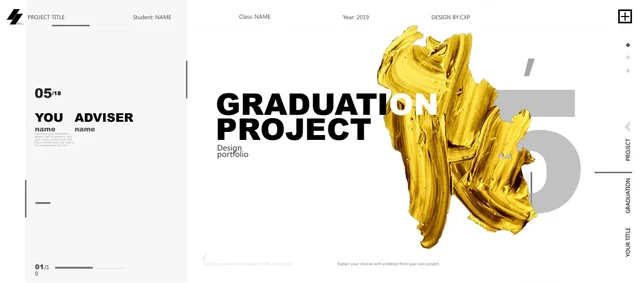
Graduation Design Presentation Template places gold brush artwork beside the title. This is a picture; add your project name in the native cover text boxes.
Three Study Overviews
Graduation Design Presentation Template has a four-topic catalogue and three study overviews. Use numbered blocks to explain context, issues and process with evidence.
Two-Column Notes
Graduation Design Presentation Template has two-column notes and grey page numbers. Write a focused study summary and inspect small captions before adding detail.
Sculpture and Room Pictures
Graduation Design Presentation Template pairs sculpture and room photos with a mesh picture. These are static images; use relevant replacements with suitable rights.
Student and Adviser Prompts
Graduation Design Presentation Template has student, adviser, class and year prompts. Use the cover fields for your details and check the original footer examples.
How to Use Graduation Design Presentation Template
Plan your study, replace the examples and review every page.
-
Select Your Study Pages
Review the 14 pages of Graduation Design Presentation Template. Select study overviews and note layouts for your question, then plan brief captions and images supported by your own evidence.
-
Download and Edit
Get Graduation Design Presentation Template with an active paid plan; daily and repeat downloads are unlimited. Save a copy, replace cover and study examples, then add suitable project images.
-
Review and Share
Check Graduation Design Presentation Template on your screen. Verify captions, credits and sample footer labels; export a PDF and reopen it to inspect every wide page before sharing your study.
Questions about Graduation Design Presentation Template
How do I download Graduation Design Presentation Template?
Sign in with an active paid plan and use the download button for Graduation Design Presentation Template. Eligible members can download daily and repeatedly without limit. Graduation Design Presentation Template is an English PowerPoint (.pptx); save the original and edit a copy. Access to Graduation Design Presentation Template supplies the file, not photograph permissions. Review image rights and replace the sample project details.
How many pages are in Graduation Design Presentation Template?
Graduation Design Presentation Template contains 14 slides on an approximately 2.27:1 canvas. Graduation Design Presentation Template includes a cover, four-topic catalogue, three study overviews, note pages and a closing. Conclusions are listed, but there is no separate completed chapter. The original /10 footer labels, 2019 year and date prompts are samples, not the file count. Select pages of Graduation Design Presentation Template for your study and update the placeholders.
Can I edit the text and colours in Graduation Design Presentation Template?
Edit native titles, study notes, rules, panels and number text in Graduation Design Presentation Template using PowerPoint. The brush artwork, sculpture and room photos, and mesh in Graduation Design Presentation Template are static pictures; the mesh is not an editable 3D model. Change appropriate shape colours and text, then review crops. Graduation Design Presentation Template has no data charts or linked Excel workbook. Photograph watermarks and credits remain pixel lettering.
Can I preview the whole Graduation Design Presentation Template before downloading?
The gallery shows all 14 pages of Graduation Design Presentation Template without purchase. Use thumbnails or arrows to compare the cover, study overviews and picture layouts of Graduation Design Presentation Template. Enlarge narrow captions to assess the ultra-wide frame. Previews for Graduation Design Presentation Template are static images from the final English PPTX, not live editing controls. Choose pages that fit your evidence and photographs.
Can other presentation editors open Graduation Design Presentation Template?
PowerPoint importers may open Graduation Design Presentation Template, but line breaks, crops and groups can differ. Compare imported Graduation Design Presentation Template with the gallery, checking bold titles, sidebars and small numbered notes. Keep the 2.27:1 canvas instead of stretching it to 16:9. Export and reopen a PDF to inspect every page. Importing Graduation Design Presentation Template does not guarantee identical display.
Which fonts does Graduation Design Presentation Template use?
Graduation Design Presentation Template retains Arial Black, Microsoft YaHei (including Light), and Xiaomi Lanting Light references, plus theme fonts such as Calibri. No fonts are embedded in Graduation Design Presentation Template. The preview uses available Arial Black and Microsoft YaHei; missing families can be substituted. Check Graduation Design Presentation Template on your device, especially small labels and bold titles. A font name does not grant permission to distribute font software.
Are the slides in Graduation Design Presentation Template translated?
All 15 site versions describe one English PowerPoint for Graduation Design Presentation Template. Editable Chinese labels and master prompts in Graduation Design Presentation Template are English; sample paragraphs now show short study-page guides. Source project titles, numbers and genuine credits remain. Photograph watermarks, including Chinese characters, are still image pixels. Translate editable wording in Graduation Design Presentation Template for your audience and replace the guide examples with your own project evidence.
Can I use Graduation Design Presentation Template commercially?
Whole-template commercial or redistribution rights for Graduation Design Presentation Template remain unverified. Access to Graduation Design Presentation Template is not a blanket asset licence. CXP, ZAOZHU ART&DESIGN and Thomas Zhuang photo metadata remain. A Saint Matthew photo is credited to Marie-Lan Nguyen / Wikimedia Commons under CC BY 2.5: https://creativecommons.org/licenses/by/2.5/ . Its source, crop and grayscale notice are in the slide notes; other assets have separate rights. Before publishing or selling adapted Graduation Design Presentation Template, confirm permissions and retain required credits.
How can I share Graduation Design Presentation Template?
Share the public URL or page controls for Graduation Design Presentation Template. Others can browse previews; their downloads require eligible paid access. Before sending edited Graduation Design Presentation Template, remove private details, check image rights and retain credits. Open an exported PDF to inspect captions, wide framing and sample labels; carry required photo notices into shared versions. For Graduation Design Presentation Template as PPTX, test fonts and keep an editable copy.