Soul Presentation Template: Deer Imagery and Monochrome Service Layouts
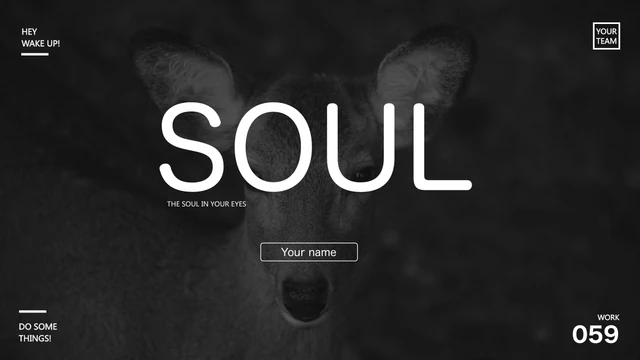
Soul Presentation Template pairs a close-up deer photograph with large SOUL lettering. The dark cover in Soul Presentation Template leads into 25 black, white and grey pages, with turquoise icons appearing in the service diagrams. Soul Presentation Template includes four doughnut charts, a radar chart, a phone mockup and circular portrait frames. Diagonal panels, overlapping circles and six-point diagrams give the interior pages different ways to explain a service. The closing page of Soul Presentation Template returns to the same deer image. Review the contrast between the dark opening and the light comparison pages in Soul Presentation Template before selecting your sequence. English example text replaces the original filler paragraphs, while the native charts and their five embedded workbooks remain editable. The pictures in Soul Presentation Template remain separate images. Sample percentages, dates and prices in Soul Presentation Template need your own verified replacements. Keep the visual sequence where it helps your portfolio, then replace every example that does not belong to your work.
Key Features of Soul Presentation Template
Deer imagery, dark panels and turquoise details.
Deer portrait cover
Soul Presentation Template opens and closes with a dark deer photograph.
Monochrome pages
Black, grey and white backgrounds separate the page styles.
Five native charts
Four doughnut charts and one radar chart retain editable source data.
Service diagrams
Circular nodes and diamond arrangements explain relationships.
Phone mockup
A phone frame places a screen image beside the text.
Original picture assets
Portraits, icons and photos keep their original image quality.
How to Use Soul Presentation Template
Choose your pages and replace the examples.
-
Preview Soul Presentation Template
Compare all 25 pages with the story of your portfolio.
-
Download Soul Presentation Template
Sign in with an active paid plan. Daily downloads are unlimited.
-
Edit Soul Presentation Template
Update text and chart values, then check the final slide show.
Questions about Soul Presentation Template
How can I download Soul Presentation Template?
Sign in and use the download button with an active paid membership. Soul Presentation Template downloads as a PPTX through a temporary link. Your membership allows unlimited daily downloads, including repeat downloads of Soul Presentation Template. Keep an untouched copy before you begin editing.
How many pages does Soul Presentation Template contain?
Soul Presentation Template contains 25 widescreen slides in a 16:9 ratio. The sequence includes the deer cover, contents, service comparisons, circular diagrams and a closing page. You may shorten Soul Presentation Template for a specific portfolio. Review the retained sections so the final sequence still makes sense.
Can I change the text and colors in Soul Presentation Template?
You can edit the text boxes, shape fills and native charts in Soul Presentation Template. Change the monochrome palette carefully so labels remain readable on each background. Photographs and decorative icons in Soul Presentation Template remain image assets. Replace an image when you need to change details inside it.
Does the preview show every page of Soul Presentation Template?
Yes. All 25 pages of Soul Presentation Template appear in the gallery in the file order. Use the arrows or select a thumbnail to inspect a page. Enlarge the narrow labels and smaller chart details in Soul Presentation Template before deciding whether a layout can hold your material.
Will Soul Presentation Template open in another presentation app?
PPTX-compatible apps may open Soul Presentation Template, but grouped objects, fonts and chart displays can differ. Check the five native charts and the phone mockup after importing. Compare the result with this preview. Keep a PowerPoint working copy of Soul Presentation Template when moving between editors.
Which fonts appear in Soul Presentation Template?
Soul Presentation Template uses Arial alongside Microsoft YaHei, Source Han Sans CN Light and Heavy, 三极能量黑 简体, Alcubierre, Kano regular and Calibri. Install the required fonts or review a substitute. The preview uses local substitutes for unavailable faces. Check the cover and tight labels when changing fonts in Soul Presentation Template.
Is the slide text in Soul Presentation Template translated?
The file in Soul Presentation Template uses English example text. The original Latin filler has been replaced, and Chinese chart labels have been translated. Source creator credits and promotional notes are cleared. Choosing a different website language changes the detail page for Soul Presentation Template, rather than creating another PPTX language version.
Can I use Soul Presentation Template for commercial work?
A paid download of Soul Presentation Template gives access to the file and does not establish broader rights to its photographs, fonts or other source assets. Confirm those rights for your intended use. Replace material you cannot authorize before including Soul Presentation Template in commercial or client work.
How do I share Soul Presentation Template?
Use the share button to copy the public link for Soul Presentation Template or open an available social sharing option. This sends the preview page. Anyone downloading the PPTX still needs an active paid membership. Review image and font permissions before distributing your edited version of Soul Presentation Template.