Green Gradient Book Sharing Presentation Template: layered green paper, gradient cards and book-picture layouts
Green Gradient Book Sharing Presentation Template combines pale diagonal stripes with layered green paper, circles and gradient panels. Its 25 pages retain the original 16:9 format. Green Gradient Book Sharing Presentation Template has an index and four section breaks at 3, 8, 14 and 20 for reading purpose, book types, a reading plan and sharing. Book scenes with miniature figures appear beside strips, rings, branches and a quotation panel. Green Gradient Book Sharing Presentation Template uses static visual organisers. Sample numbers and 2021 do not record reading results; there are no native charts or workbooks. Ordinary editable titles and prompts are independently written in English; original words stay in same-page reference notes. Green Gradient Book Sharing Presentation Template preserves picture words, source credits and recording, without verifying all picture creators. Add passages and open questions, compare interpretations and finish with the thank-you page.
Key Features of Green Gradient Book Sharing Presentation Template
Layered green paper, gradient panels and clear prompts for a reading exchange.
Layered Green Paper
Green Gradient Book Sharing Presentation Template pairs pale stripes, layered green paper and circles. Keep cover artwork distinct from editable notes.
Four Reading Parts
Green Gradient Book Sharing Presentation Template has an index and four breaks. Arrange purpose, book types, a reading plan and responses around your book.
Gradient Cards and Branches
Green Gradient Book Sharing Presentation Template links gradient cards with branches. Add related ideas and explain connections; the drawings are static.
Book Pictures and Circles
Green Gradient Book Sharing Presentation Template puts book pictures in strips and circles. Check crops without identifying pictured people as verified authors.
Rings and Numbered Notes
Green Gradient Book Sharing Presentation Template has rings and numbered note groups. Add different observations; the original sample figures are manual labels.
Quotation Panel and Thanks
Green Gradient Book Sharing Presentation Template offers a quotation panel and thank-you ending. Cite your short excerpt and invite a final group response.
How to Use Green Gradient Book Sharing Presentation Template
Choose a reading route, write supported notes and test the saved presentation.
-
Plan the Reading Route
Preview 25 pages of Green Gradient Book Sharing Presentation Template. Choose sections, cards and pictures that fit the book, then plan a route from an opening question to shared responses.
-
Get a Working Presentation
Get Green Gradient Book Sharing Presentation Template with an active paid plan. Daily downloads are unlimited and repeatable. Keep the original while editing passages and questions in a copy.
-
Check Text, Pictures and Sound
Add your reading material to Green Gradient Book Sharing Presentation Template. Check card text, crops, fonts, sample labels and audio, then reopen the saved file before the meeting.
Questions about Green Gradient Book Sharing Presentation Template
What visual setting does Green Gradient Book Sharing Presentation Template provide?
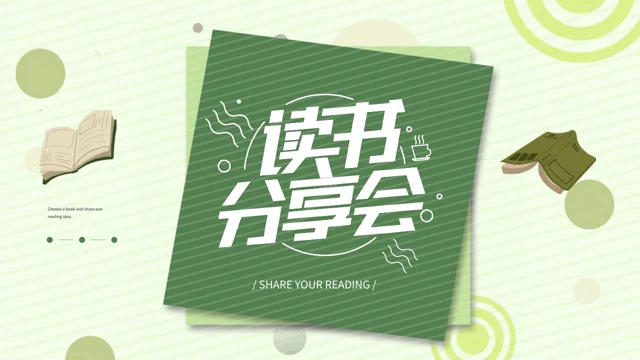
Green Gradient Book Sharing Presentation Template uses pale striped backgrounds and stacked green paper for its reading cover and section pages. Gradient cards, circles and darker green accents in Green Gradient Book Sharing Presentation Template connect the content layouts to that opening. The book pictures in Green Gradient Book Sharing Presentation Template contain miniature figures and are supplied visual material, not evidence of a real reading event. Choose Green Gradient Book Sharing Presentation Template for its green visual setting while deciding which book, readers and conversation it should serve. The artwork preserved in Green Gradient Book Sharing Presentation Template may contain original printed lettering, which is separate from the ordinary editable English notes. These pictures do not verify an author, organisation, location or recommendation for the book you choose.
What are the four parts of Green Gradient Book Sharing Presentation Template?
Green Gradient Book Sharing Presentation Template starts with a four-item index and places section breaks on pages 3, 8, 14 and 20. The English guide in Green Gradient Book Sharing Presentation Template follows reading purpose, book types, a reading plan and sharing. In the first part of Green Gradient Book Sharing Presentation Template, explain what interests you in a book and introduce a question rather than claiming a fixed outcome from reading. Use later parts of Green Gradient Book Sharing Presentation Template to compare forms of writing, select passages and hear different interpretations. If you choose only some pages of Green Gradient Book Sharing Presentation Template, rename or shorten the index so that it matches the route. The supplied categories organise a sample presentation, not an established curriculum or proof that every participant has completed a reading programme.
Do the figures and year in Green Gradient Book Sharing Presentation Template measure reading progress?
Green Gradient Book Sharing Presentation Template retains manual sample figures beside book pictures and a 2021 label on a later layout. Those labels in Green Gradient Book Sharing Presentation Template do not report how many people read a book, how much they learned or when your own meeting took place. The file of Green Gradient Book Sharing Presentation Template contains no native data charts, tables or embedded workbooks for calculating such results. Before sharing Green Gradient Book Sharing Presentation Template, replace unrelated labels with information you can explain or select a layout without them. Keep decorative rings and numerical examples in Green Gradient Book Sharing Presentation Template distinct from any measured information you supply from a separate verified source. Changing a label does not calculate a result, validate a date or change the artwork beside it.
How can I use the ring and branch layouts of Green Gradient Book Sharing Presentation Template?
Green Gradient Book Sharing Presentation Template has numbered circles, rings around pictures, branching note panels and curved arrows. Use different areas of Green Gradient Book Sharing Presentation Template for a passage, its context, an interpretation and a question that invites another view. Explain the relationships you introduce in Green Gradient Book Sharing Presentation Template instead of treating a line or arrow as an automatically generated link. The rings of Green Gradient Book Sharing Presentation Template are visual organisers, not live progress meters or native percentage charts. The icons in Green Gradient Book Sharing Presentation Template are also static design elements rather than working buttons for shopping, messaging or collecting responses. Select the layout that helps your discussion and leave enough room for a short, readable observation.
How should I work with the supplied pictures in Green Gradient Book Sharing Presentation Template?
Green Gradient Book Sharing Presentation Template combines book scenes, a portrait, reading-space material and rounded or circular crops. A pictured person in Green Gradient Book Sharing Presentation Template is not a verified author of your book or a confirmed participant in your meeting. Choose a relevant replacement for Green Gradient Book Sharing Presentation Template when needed, and give an accurate source or caption instead of inventing the identity or history of the supplied image. Recheck the crops of Green Gradient Book Sharing Presentation Template so that important details remain visible within the original frames. Picture lettering in Green Gradient Book Sharing Presentation Template stays part of the image, including the large original Chinese reading artwork on the cover. Editing a text box does not translate the words printed in a picture or establish permission for another use.
What do the source labels and quotation panel in Green Gradient Book Sharing Presentation Template mean?
Green Gradient Book Sharing Presentation Template keeps visible source labels, including supplied IBAOTU and TANGFENG markings, separate from the new reading guidance. A retained mark in Green Gradient Book Sharing Presentation Template does not identify the writer of your new notes or verify the creator of every picture. The large quotation-style panel in Green Gradient Book Sharing Presentation Template can hold a short passage with its page reference and a clear source. Distinguish a quotation in Green Gradient Book Sharing Presentation Template from your own response and from another reader’s comment, since quotation symbols do not authenticate the words you enter. Keep relevant provenance details when reusing material from Green Gradient Book Sharing Presentation Template and check the permissions appropriate to your intended use. Receiving the file does not provide additional rights to its supplied artwork or recording.
How can I download and inspect Green Gradient Book Sharing Presentation Template?
Green Gradient Book Sharing Presentation Template has a gallery of 25 page previews covering the cover, four sections, ring layouts and thank-you ending. Inspect the small cards and later picture arrangements of Green Gradient Book Sharing Presentation Template before selecting pages for your meeting. Sign in with an active paid plan to download the PPTX of Green Gradient Book Sharing Presentation Template. Daily downloads of Green Gradient Book Sharing Presentation Template are unlimited and repeatable, so you can retrieve another copy when needed. Open Green Gradient Book Sharing Presentation Template in your chosen editor to check the actual text, images and recording, because the gallery is a collection of static page pictures. Retain a reference copy and test the saved working version rather than assuming a page preview behaves like the presentation file.
What should I check about fonts in Green Gradient Book Sharing Presentation Template?
Green Gradient Book Sharing Presentation Template uses Source Han Sans SC Regular and Bold for ordinary editable letters and reading guidance. These font files are not embedded in Green Gradient Book Sharing Presentation Template, so install suitable fonts or choose an available alternative in your editor. After changing fonts in Green Gradient Book Sharing Presentation Template, check the small source labels, compact numbered areas, narrow captions and text inside green gradient cards for unexpected wrapping. Printed picture words in Green Gradient Book Sharing Presentation Template remain part of the images and are not changed by selecting a text font. Reopen Green Gradient Book Sharing Presentation Template after saving to inspect missing characters, spacing and text extending beyond its allotted area. Choose a display size that keeps your brief notes readable without covering the picture frames or retained source markings.
Which languages and recording remain in Green Gradient Book Sharing Presentation Template?
Green Gradient Book Sharing Presentation Template supplies independently written English prompts for ordinary editable titles and note areas. The original visible text of Green Gradient Book Sharing Presentation Template remains in reference notes on the same pages, and supplied picture words or source credits may still include Chinese. The fifteen website languages describing Green Gradient Book Sharing Presentation Template lead to the same presentation file rather than fifteen translated slide decks or an entirely English package. The original recording in Green Gradient Book Sharing Presentation Template stays with the supplied material, but its presence does not establish a verified performer or grant new music rights. Test the audio of Green Gradient Book Sharing Presentation Template in the editor and meeting format you choose, then use the thank-you page for final responses or a next-reading suggestion. A PDF or static page preview does not play the recording; keep the working slides and check the format you intend to share.