Holographic Fashion Portfolio Presentation Template: Iridescent Spheres and Graphic Fashion Borders
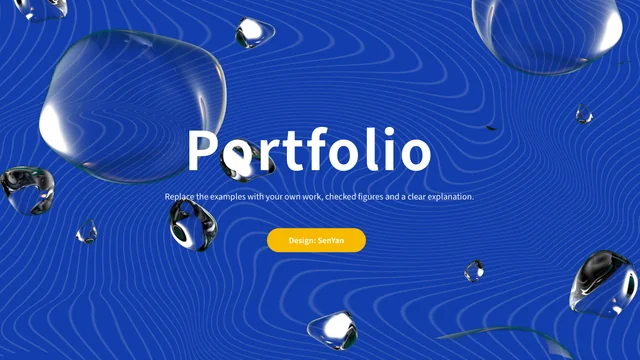
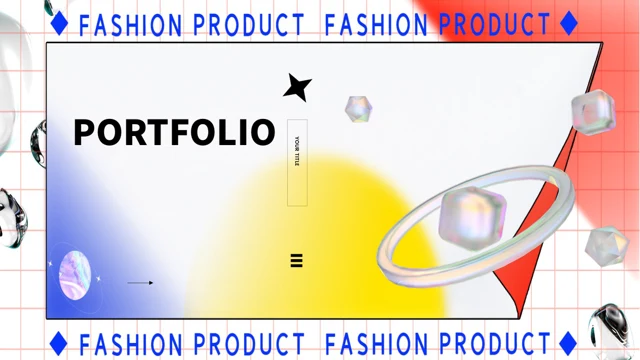
Holographic Fashion Portfolio Presentation Template surrounds its cover and four section dividers with repeated Fashion Product lettering, a red grid and folded white panel. Iridescent spheres, metallic hearts and sculptural figures contrast with blue-and-yellow gradients throughout 20 widescreen slides. Holographic Fashion Portfolio Presentation Template combines these images with icon-led notes, numbered lists, comparison checks and a three-stage sequence. Holographic Fashion Portfolio Presentation Template also includes a native column chart with an embedded workbook, plus a schedule table with manually entered times. The sample amount, year and times are placeholders, not a current offer or event announcement. Replace English guidance with project details and check both chart data and nearby captions. Spheres and figures are pictures, not editable 3D models. Keep your headings short, preserve the four-part order in the contents and review the exported file before presenting.
Key Features of Holographic Fashion Portfolio Presentation Template
Metallic imagery, graphic borders and four portfolio sections.
Graphic Fashion Borders
Holographic Fashion Portfolio Presentation Template repeats Fashion Product lettering around key pages. Red grids and folded white panels frame the main headings.
Four Numbered Sections
Holographic Fashion Portfolio Presentation Template uses four numbered dividers with iridescent spheres. Match the section labels to the contents and your project order.
Metallic Picture Accents
Holographic Fashion Portfolio Presentation Template includes metallic hearts and sculptural figures. These are pictures, so keep their proportions when resizing.
Editable Column Chart
Holographic Fashion Portfolio Presentation Template retains a native column chart and its workbook. Replace the example values and check the chart labels together.
Checklists and Stage Layouts
Holographic Fashion Portfolio Presentation Template provides comparison checks and a three-stage row. Edit each note to explain your own decisions and sequence.
Manual Schedule and Examples
Holographic Fashion Portfolio Presentation Template has a schedule table. Replace sample times, year and amount with accurate information for your project.
How to Use Holographic Fashion Portfolio Presentation Template
Choose a sequence, update chart data and review the sample labels.
-
Choose Your Four Sections
Preview all 20 pages of Holographic Fashion Portfolio Presentation Template. Select layouts for your projects, arrange four sections and make the contents match the chosen sequence.
-
Download and Update the Content
Get Holographic Fashion Portfolio Presentation Template with an active paid plan; daily and repeat downloads are unlimited. Edit a copy, replace sample text and update the chart workbook.
-
Check Numbers and Image Proportions
Review Holographic Fashion Portfolio Presentation Template at full size. Check chart labels, sample times and metallic image proportions, then compare the export with your editable copy.
Questions About Holographic Fashion Portfolio Presentation Template
How do I download Holographic Fashion Portfolio Presentation Template?
Sign in with an active paid plan to download Holographic Fashion Portfolio Presentation Template. Daily and repeat downloads of Holographic Fashion Portfolio Presentation Template are unlimited. Holographic Fashion Portfolio Presentation Template is supplied as an editable PowerPoint file. Keep an untouched copy of Holographic Fashion Portfolio Presentation Template before replacing project text, pictures or chart values.
What does Holographic Fashion Portfolio Presentation Template contain?
Holographic Fashion Portfolio Presentation Template includes 20 slides in a 16:9 format. Holographic Fashion Portfolio Presentation Template provides a cover, contents, four numbered section dividers, content layouts and a thanks page. The gallery shows all pages of Holographic Fashion Portfolio Presentation Template. Select the Holographic Fashion Portfolio Presentation Template layouts that support your projects rather than assuming every example belongs in the final presentation.
Where are the four sections in Holographic Fashion Portfolio Presentation Template?
Holographic Fashion Portfolio Presentation Template introduces its four parts on pages 3, 8, 13 and 17. The dividers in Holographic Fashion Portfolio Presentation Template repeat an iridescent sphere within the graphic Fashion Product border. Rename the Holographic Fashion Portfolio Presentation Template parts and update the contents together. The numbering in Holographic Fashion Portfolio Presentation Template is an organizational example, not a required project workflow.
Does Holographic Fashion Portfolio Presentation Template include an editable chart?
Holographic Fashion Portfolio Presentation Template retains a native column chart on page 6 with its embedded Excel workbook. Update the workbook values in Holographic Fashion Portfolio Presentation Template and check that categories, labels and nearby notes still agree. The chart is distinct from the decorative images in Holographic Fashion Portfolio Presentation Template. Keep a Holographic Fashion Portfolio Presentation Template backup before changing the data and inspect the result in presentation view.
Are all the figures in Holographic Fashion Portfolio Presentation Template linked to the workbook?
No. The amount, year and schedule times in Holographic Fashion Portfolio Presentation Template are manual examples; page 18 holds the times in a native table, separate from the Holographic Fashion Portfolio Presentation Template chart. Holographic Fashion Portfolio Presentation Template does not calculate a project price or maintain a live timetable. Replace these labels in Holographic Fashion Portfolio Presentation Template with verified information and do not present the sample amount as a PPT AI price or a confirmed project budget.
Can I edit the metallic objects in Holographic Fashion Portfolio Presentation Template as 3D models?
The spheres, hearts and sculptural figures in Holographic Fashion Portfolio Presentation Template are static pictures, not editable 3D models. Use ordinary picture controls to move or resize them in Holographic Fashion Portfolio Presentation Template, keeping proportions intact. Review the Holographic Fashion Portfolio Presentation Template picture crops and contrast against the gradients. Check any replacement image in Holographic Fashion Portfolio Presentation Template beside nearby text before exporting.
Which fonts does Holographic Fashion Portfolio Presentation Template use?
Holographic Fashion Portfolio Presentation Template uses Source Han Sans SC Light and Heavy, Poppins SemiBold and Calibri. Holographic Fashion Portfolio Presentation Template retains some original font attachments, but not every visible font is embedded. Install matching fonts for Holographic Fashion Portfolio Presentation Template if Holographic Fashion Portfolio Presentation Template opens with substitutions. Check Holographic Fashion Portfolio Presentation Template headings and chart labels again after exporting, because different fonts can change line breaks and spacing.
How can I use the checklists in Holographic Fashion Portfolio Presentation Template?
Holographic Fashion Portfolio Presentation Template includes paired comparison checks, numbered notes and a three-stage row. Use these layouts in Holographic Fashion Portfolio Presentation Template to explain decisions or a sequence with concise English captions. The checks in Holographic Fashion Portfolio Presentation Template are manual visual elements, not interactive controls. Replace the Holographic Fashion Portfolio Presentation Template sample guidance rather than treating it as verified product features or project results.
What should I review before sharing Holographic Fashion Portfolio Presentation Template?
Check the contents, four section labels and closing page in Holographic Fashion Portfolio Presentation Template. Replace sample text, the amount, year and schedule times in Holographic Fashion Portfolio Presentation Template with accurate details. Review the Holographic Fashion Portfolio Presentation Template column chart alongside its workbook, and preserve picture proportions. Compare the exported Holographic Fashion Portfolio Presentation Template with the editable file to catch altered labels or crowded headings.