Space Book Adventure Presentation Template: books, stars and a journey through ideas
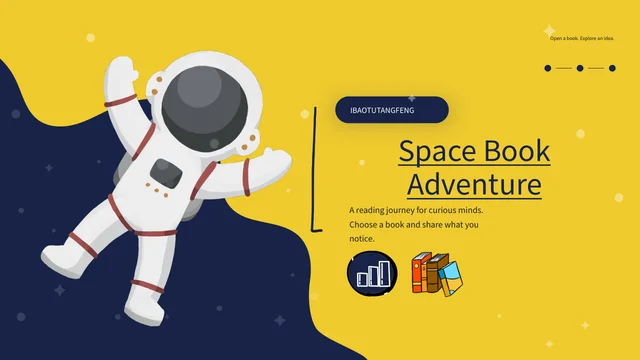
Space Book Adventure Presentation Template takes a book-sharing conversation into yellow, navy and white illustrated scenes. An astronaut opens the 25-slide, 16:9 deck; a girl reads on a crescent moon, a child climbs book steps and another looks through a telescope. Space Book Adventure Presentation Template offers six numbered sections on pages 3, 8, 12, 15, 18 and 22. Speech bubbles, paired text cards and short numbered prompts make room for different responses. Space Book Adventure Presentation Template also includes manually drawn percentage and dot examples alongside timeline dates; these do not calculate reading progress. Ordinary editable headings and prompts are now independent English guidance, with original visible wording retained in notes for the same pages. Space Book Adventure Presentation Template keeps the supplied illustrations, audio and source labels. Pick a passage, ask a specific question and use the closing thank-you page to invite the next reading conversation.
Key Features of Space Book Adventure Presentation Template
Space illustrations and clear places for a shared reading journey.
Yellow and Navy Space Artwork
Space Book Adventure Presentation Template uses yellow, navy and white with stars and astronauts. Write briefly so the large illustrations remain part of the story.
Six Numbered Reading Sections
Space Book Adventure Presentation Template has six astronaut section breaks. Organise book choice, characters, close reading, comparisons, links and discussion.
Readers, Books and a Telescope
Space Book Adventure Presentation Template pairs readers with moons, book steps and a telescope. Use a scene to introduce a question, without claiming a real event.
Paired Views and Speech Bubbles
Space Book Adventure Presentation Template uses speech bubbles and paired cards. Compare two interpretations and give the passage that supports each reader’s view.
Manual Dots, Percentages and Dates
Space Book Adventure Presentation Template includes manual dots, percentages and dates. Replace the labels; they are visual examples rather than calculated scores.
Questions to Carry Forward
Space Book Adventure Presentation Template includes numbered takeaways and a thank-you page. Keep an idea, revisit a disagreement and choose the next question.
How to Use Space Book Adventure Presentation Template
Choose a book, prepare your questions and review the finished slides.
-
Plan Your Reading Journey
Browse the 25 pages of Space Book Adventure Presentation Template. Choose a book and mark passages to discuss, then select sections and paired views that help readers follow your questions.
-
Download a Working Copy
Get Space Book Adventure Presentation Template with an active paid plan. Daily downloads are unlimited and repeatable. Keep the file as a reference and write book notes in a separate copy.
-
Fill the Frames and Reopen
Add notes to Space Book Adventure Presentation Template. Replace sample dates and labels, check light and dark text areas, then reopen the saved file to inspect fonts, pictures and audio.
Questions about Space Book Adventure Presentation Template
How can I get Space Book Adventure Presentation Template for a reading group?
Space Book Adventure Presentation Template is available through the template download button after you sign in with an active paid plan. Open the previews of Space Book Adventure Presentation Template first and decide whether its six-part sequence suits the book and meeting. Daily downloads of Space Book Adventure Presentation Template are unlimited, and you may download the file again when needed. Keep an untouched copy of Space Book Adventure Presentation Template so you can return to a layout after experimenting. Edit another copy of Space Book Adventure Presentation Template with the group’s chosen book, quotations and questions. A download gives access to the presentation file; it does not create separate permissions for every supplied illustration or recording.
What reading journey does Space Book Adventure Presentation Template offer?
Space Book Adventure Presentation Template has 25 widescreen slides and a six-item contents page. The section pages in Space Book Adventure Presentation Template appear at 3, 8, 12, 15, 18 and 22, using repeated astronaut and book panels. Start Space Book Adventure Presentation Template with book choice, then introduce a character, examine a passage, compare views, make connections and share the group’s responses. You can select fewer pages from Space Book Adventure Presentation Template when the meeting is short; check that the contents still describes the sequence you keep. The last slide of Space Book Adventure Presentation Template says Thank you and includes an editable invitation to keep reading. These prompts guide discussion, without providing a finished review of a specific book.
Can the space scenes in Space Book Adventure Presentation Template be edited like drawings?
Space Book Adventure Presentation Template combines ordinary editable text and layout shapes with supplied picture assets. The astronauts, reading girl, telescope and book scenes in Space Book Adventure Presentation Template are illustrations; changing a caption does not turn a pictured character into an editable model. Use the writing areas of Space Book Adventure Presentation Template to explain why a passage matters, and keep the illustration’s role separate from your own interpretation. The large yellow and navy backgrounds of Space Book Adventure Presentation Template provide contrasting writing spaces, so check both dark and light areas after editing. Replace a picture in Space Book Adventure Presentation Template only when the new image works with its frame and crop. Review the full composition before moving to the next slide.
Do the percentages in Space Book Adventure Presentation Template measure reading ability?
Space Book Adventure Presentation Template contains a manually arranged ring with 75% and 25% examples, plus rows of dots. These objects in Space Book Adventure Presentation Template are not native data charts or a linked reading assessment. The package of Space Book Adventure Presentation Template has no embedded chart workbook or table object that calculates the figures. Use the dot rows of Space Book Adventure Presentation Template as visual prompts for actions such as choosing, noticing and asking, or replace the sample labels with your own clearly explained values. Dates in the timeline layouts of Space Book Adventure Presentation Template are also examples rather than a verified record of a reader’s life. Cite the book when making an observation and distinguish measured information from decorative labels.
Where should I put quotations in Space Book Adventure Presentation Template?
Space Book Adventure Presentation Template offers short numbered groups, speech bubbles and paired writing cards rather than one continuous essay area. Choose a compact frame in Space Book Adventure Presentation Template for a short quotation and give the chapter or page that lets another reader find it. Use a paired layout in Space Book Adventure Presentation Template when you want to compare two interpretations of the same passage. The telescope page of Space Book Adventure Presentation Template gives more vertical space for a closer reading and a wider connection, while the later numbered circles suit takeaways. Keep the supplied book artwork visible in Space Book Adventure Presentation Template and avoid extending text into decorative objects. Separate the quoted words from the explanation you write around them.
What should I check in the previews of Space Book Adventure Presentation Template?
Space Book Adventure Presentation Template has a preview for each of its 25 final pages. Look through Space Book Adventure Presentation Template from the opening astronaut to the closing thank-you scene, paying attention to the repeated section panels and the different amounts of writing space. In Space Book Adventure Presentation Template, a short bubble and a tall text card need different lengths of notes; select the frame after choosing the point you want to make. Static previews of Space Book Adventure Presentation Template show the page design but do not play the original audio. Download Space Book Adventure Presentation Template to check playback and editing in your own presentation software. After saving your changes, reopen the file and look for covered words, altered crops and missing characters.
Which language and fonts are supplied in Space Book Adventure Presentation Template?
Space Book Adventure Presentation Template uses Source Han Sans SC Regular and Bold for its ordinary editable text, with no font files embedded. The editable reading prompts in Space Book Adventure Presentation Template are independent English guidance, while original visible wording is kept in reference notes for the corresponding slide. Source labels in Space Book Adventure Presentation Template remain with their original material and do not credit a source person as the author of these new prompts. Website language versions of Space Book Adventure Presentation Template describe this same download rather than separate translated decks. Open Space Book Adventure Presentation Template with suitable installed fonts or choose a replacement, then inspect the compact labels and broad cover heading. Original material and notes remain distinct from the English discussion you add.
How should I handle the supplied sound and source labels in Space Book Adventure Presentation Template?
Space Book Adventure Presentation Template retains its original audio and the visible IBAOTUTANGFENG source labels. Those labels in Space Book Adventure Presentation Template indicate the supplied material’s provenance, without identifying the creator of every illustration or the performer of the recording. Listen to the audio in Space Book Adventure Presentation Template within your editor and choose whether it helps the group focus on the book. A download of Space Book Adventure Presentation Template does not establish a new music or image licence, so preserve relevant source information and check permissions for the material you plan to distribute. When you add a review to Space Book Adventure Presentation Template, describe your contribution accurately. Keep quotations, original assets and your own reading comments distinguishable.
How do I finish and share Space Book Adventure Presentation Template?
Space Book Adventure Presentation Template works best when each selected frame carries one clear reading point. Before presenting Space Book Adventure Presentation Template, replace example dates, give accurate book details and check that the six section names match the pages you kept. Inspect the narrow labels and dark cards of Space Book Adventure Presentation Template after changing a font; a saved file may wrap differently in another editor. Export Space Book Adventure Presentation Template to PDF when the group only needs a static copy, then check the exported pages in order. Keep a working PPTX copy of Space Book Adventure Presentation Template for future discussion and test the original audio separately if you share the slide file. End with a question or a next book rather than leaving placeholder guidance in the thank-you scene.