Mint Botanical Portfolio Presentation Template: Mint Cards and Botanical Pictures
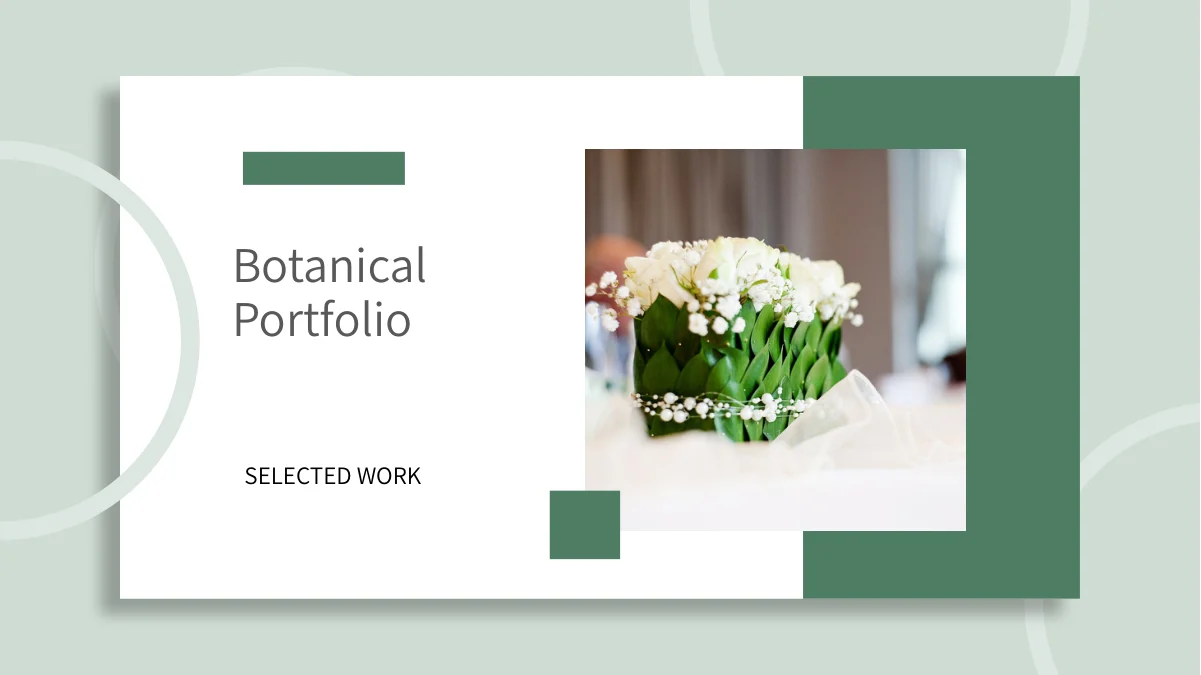
Mint Botanical Portfolio Presentation Template places white cards on green backgrounds, with dark green strips, circular outlines and soft shadows. Bouquets, leaves, feathers and illustrated figures give its 25 widescreen pages a calm rhythm. Mint Botanical Portfolio Presentation Template organizes the sequence with a four-item contents page and laptop dividers. Mint Botanical Portfolio Presentation Template alternates circular pictures, tall illustrations and small photo groups, leaving room for captions and project notes. Quotation cards and icon labels offer compact ways to explain a chosen image. A later page pairs two sample percentages with an illustration, while the final content layout combines a starry sky, a laptop picture and three notes. Select the arrangements that suit your own work, replace example text with clear descriptions and keep each note close to its picture. Review white text on pale panels and check circular crops before exporting the cover-to-thanks sequence.
Key Features of Mint Botanical Portfolio Presentation Template
Green cards, round pictures and a four-part portfolio sequence.
Mint and White Card Layouts
Mint Botanical Portfolio Presentation Template pairs white cards with pale green backgrounds. Keep titles legible when changing colors and shadows.
Four Laptop Section Dividers
Mint Botanical Portfolio Presentation Template places laptop dividers on pages 3, 8, 14 and 19. Rename the four contents entries to match your project sequence.
Circular Botanical Pictures
Mint Botanical Portfolio Presentation Template frames feathers, beans and a potted plant in circles. Check each crop and keep notes clear of the picture edges.
Photo Groups and Illustrations
Mint Botanical Portfolio Presentation Template pairs bouquets, a cat and plant photos with illustrations. Add short captions that describe the selected images.
Quotation and Icon Note Cards
Mint Botanical Portfolio Presentation Template puts quotation panels and icon notes beside pictures. Replace the sample statements and keep the cards easy to scan.
Sample Figures and Closing Views
Mint Botanical Portfolio Presentation Template pairs 14% and 35% samples with an illustration. Update the values and review the starry laptop page and thanks.
How to Use Mint Botanical Portfolio Presentation Template
Select layouts, personalize the examples and check every crop.
-
Choose a Portfolio Sequence
Preview all 25 pages of Mint Botanical Portfolio Presentation Template. Select round crops, photo groups and note cards for your work, then align the four contents labels with your projects.
-
Download and Personalize
Download Mint Botanical Portfolio Presentation Template with an active paid plan; daily and repeat downloads are unlimited. Save a copy, replace sample text and check the manual figures.
-
Review Crops and Contrast
Inspect Mint Botanical Portfolio Presentation Template at full size. Check round picture crops, card shadows and pale panels, then compare the exported pages with your editable copy.
Questions About Mint Botanical Portfolio Presentation Template
How do I download Mint Botanical Portfolio Presentation Template?
Sign in with an active paid plan to download Mint Botanical Portfolio Presentation Template. Daily and repeat downloads of Mint Botanical Portfolio Presentation Template are unlimited. Mint Botanical Portfolio Presentation Template is supplied as an editable PowerPoint file. Save an untouched copy of Mint Botanical Portfolio Presentation Template before replacing the example wording, changing picture crops or adjusting the green-and-white palette.
What is included in Mint Botanical Portfolio Presentation Template?
Mint Botanical Portfolio Presentation Template contains 25 slides in a 16:9 format. Mint Botanical Portfolio Presentation Template includes a bouquet cover, four-item contents page, four laptop section dividers and a matching thanks page. The Mint Botanical Portfolio Presentation Template content layouts combine circular images, tall illustrations, small photo groups and compact note cards. Preview every Mint Botanical Portfolio Presentation Template page in the gallery before choosing the layouts for your portfolio.
How are the sections in Mint Botanical Portfolio Presentation Template arranged?
Mint Botanical Portfolio Presentation Template places its four matching dividers on pages 3, 8, 14 and 19. Each Mint Botanical Portfolio Presentation Template divider combines a green diagonal panel, open circles and a laptop image showing flowers. Rename the Mint Botanical Portfolio Presentation Template contents entries and divider headings together so their sequence follows your selected work. Keep the short Mint Botanical Portfolio Presentation Template section notes focused on what viewers will see next.
Can I replace the pictures in Mint Botanical Portfolio Presentation Template?
You can replace the pictures in Mint Botanical Portfolio Presentation Template with images suited to your own projects. Mint Botanical Portfolio Presentation Template uses circular crops, tall illustrated panels and smaller photo groups, so choose images with enough space around their subjects. After changing a Mint Botanical Portfolio Presentation Template picture, check the crop and its neighboring caption. The laptop views in Mint Botanical Portfolio Presentation Template are static picture arrangements; inspect their framing separately when updating them.
Are the percentages in Mint Botanical Portfolio Presentation Template linked to a chart?
Mint Botanical Portfolio Presentation Template shows 14% and 35% as manually displayed sample figures on page 16. These Mint Botanical Portfolio Presentation Template values sit beside an illustration and short notes; they are not a native data chart or a linked workbook. Update the Mint Botanical Portfolio Presentation Template values and explanations separately using information you can support. The Mint Botanical Portfolio Presentation Template quotation and icon cards also contain sample text for replacement, not verified project results.
Which visual themes appear in Mint Botanical Portfolio Presentation Template?
Mint Botanical Portfolio Presentation Template combines bouquets, leafy plants, feathers and beans with a cat photograph and illustrated figures. The Mint Botanical Portfolio Presentation Template green-and-white cards connect these varied subjects through consistent spacing and shadows. Select the Mint Botanical Portfolio Presentation Template pictures that support your own story and explain their context with concise captions. The Mint Botanical Portfolio Presentation Template example imagery does not establish that the photographed or illustrated work belongs to the presenter.
Which fonts does Mint Botanical Portfolio Presentation Template use?
Mint Botanical Portfolio Presentation Template uses Source Han Sans SC Normal. Mint Botanical Portfolio Presentation Template retains some original embedded font files, but the currently used Source Han Sans SC font is not embedded. Install the matching font if Mint Botanical Portfolio Presentation Template opens with substitutions, then check headings, quotation cards and small notes. Compare the Mint Botanical Portfolio Presentation Template export with your editable copy to spot altered line breaks or spacing.
How can I keep Mint Botanical Portfolio Presentation Template readable?
Mint Botanical Portfolio Presentation Template places short notes inside white cards and beside circular or tall images. Keep Mint Botanical Portfolio Presentation Template titles concise and maintain enough contrast when changing light green panels or white text. Review the Mint Botanical Portfolio Presentation Template quotation blocks, icon labels and small captions at presentation size. Check the final Mint Botanical Portfolio Presentation Template starry-sky page separately so its laptop image and three notes remain easy to distinguish.
What should I check before sharing Mint Botanical Portfolio Presentation Template?
Review the four contents entries and section headings in Mint Botanical Portfolio Presentation Template. Check Mint Botanical Portfolio Presentation Template picture crops, captions and manually entered percentages against your own material. Read the Mint Botanical Portfolio Presentation Template opening and closing pages together to confirm that names, titles and visual choices are consistent. Finally compare the exported Mint Botanical Portfolio Presentation Template pages with the editable copy to catch changes in line breaks, picture framing or font spacing.