

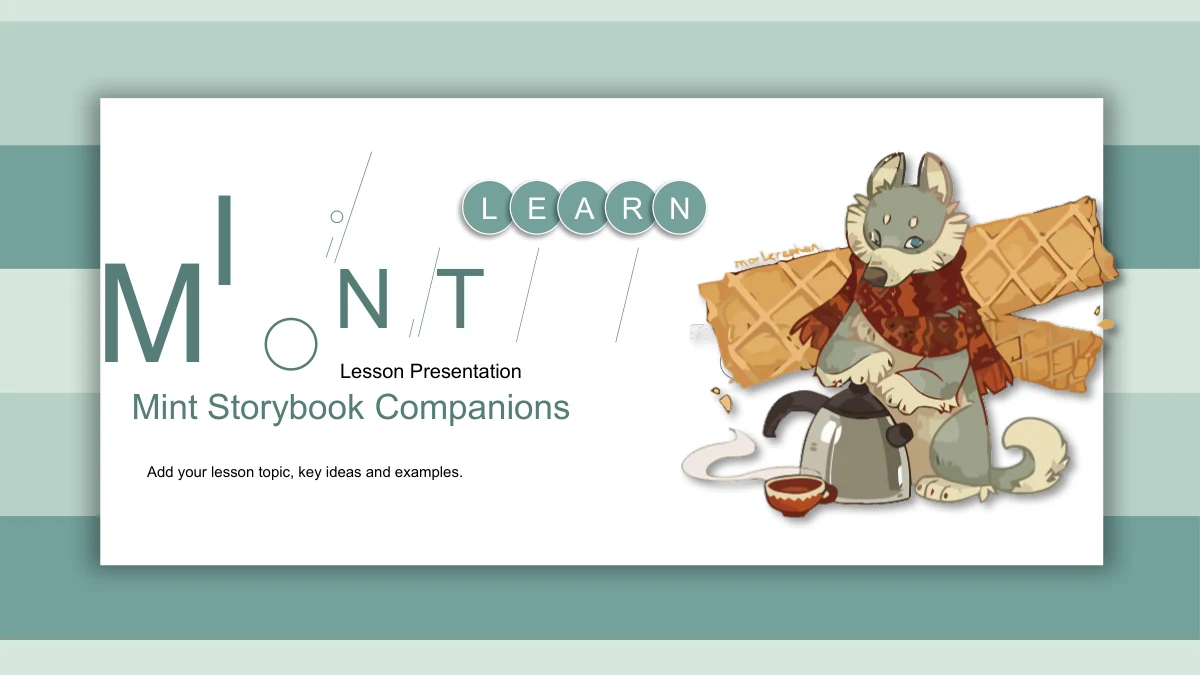
Mint Storybook Companions Presentation Template: illustrated company for your ideas
Mint Storybook Companions sets warm animal illustrations against mint stripes and white cards with soft shadows. Tea cups, waffles and other treats give the artwork a storybook feel, while trees, leaves and a sunflower add quieter accents. The 20-page file follows four lesson stages: Overview, Ideas, Activities and Review. Each section opens with the same pink ice-cream van and a peach numbered circle. Within the sections, stepped panels support a few key points, paired views invite comparison and arrow-linked callouts connect an illustration to short explanations. Cropped animal pictures recur in strips and a four-window arrangement, giving related pages a visual connection. These are general layouts with English sample text, not a finished story or subject lesson. Choose the pages that suit your teaching plan, replace the notes with your own material and keep the explanations brief enough to leave the artwork room to breathe.
Key Features of Mint Storybook Companions Presentation Template
Layered cards, animal artwork and room for short notes.
Mint Stripes and Layered Cards
Horizontal mint bands sit behind white cards with soft shadows. Pale panels and peach circles add areas of emphasis while keeping the lesson visually connected.
Animal Companions with Character
Scarf-wearing animals share the pages with tea, waffles and treats. The decorative artwork gives notes a warm setting without prescribing a particular lesson topic.
Four Van-Themed Section Openings
A pink ice-cream van marks Overview, Ideas, Activities and Review. Each divider pairs a leaf-framed heading with a short introduction and a peach numbered circle.
Stepped Notes and Paired Views
Three rising panels organize key points, while staggered mint boxes and paired notes support comparison. Choose a layout that gives each explanation enough room.
Callouts and Drawn Connections
Four upward arrows, a fox with linked notes and a sunflower with four callouts offer ways to connect ideas. The arrangements organize explanations rather than data.
Picture Strips and Cropped Details
Animal artwork appears in three picture windows and a four-part crop arrangement. Use nearby notes to discuss examples while keeping the original framing in mind.
How to Use Mint Storybook Companions Presentation Template
Choose the layout, add your content and check the details.
-
Match pages to your teaching plan
Divide your material into Overview, Ideas, Activities and Review. Browse the 20 previews to choose stepped notes, paired views or callouts, considering how much space each explanation needs.
-
Write into the English placeholders
Download the English PPTX with an active paid membership and save a working copy. Replace sample headings and notes with your material, keeping text clear of the leaf accents and animal pictures.
-
Inspect the final presentation
Check each picture crop, note panel and section opening after editing. Review an exported PDF for spacing and test slide effects on your computer before sharing the lesson with your class.
Questions about Mint Storybook Companions Presentation Template
What is included in the file?
The 20 slides comprise a cover, contents page, four section dividers, 13 content pages and a closing. Slides 3, 8, 12 and 16 introduce Overview, Ideas, Activities and Review. The gallery shows every page before you download.
Does it include a complete animal story or lesson?
No. The animal and tea-time illustrations are decorative companions to general lesson notes. The file has English sample headings and explanations, so you need to provide your own subject, examples, discussion questions and teaching sequence.
Which parts of the slides are editable?
Text boxes, separate panels, numbers and drawing shapes can be edited. The detailed animal and plant illustrations remain images. Their internal characters and objects cannot be separated into individual drawing elements simply by ungrouping the slide.
What does the price on the ice-cream van mean?
The original van illustration includes Ice Cream and 25¢ as decorative lettering. It is part of the image, not an editable price field or a real offer. Check that detail when deciding whether to use the van dividers for your subject.
How should I handle the artwork credits?
Keep the original Latin signatures and marks in the illustrations. Existing DALI-DALI labels also remain on the contents and divider pages. These details do not establish a verified artist identity or commercial license; check the relevant artwork rights before commercial reuse.
Are the arrows or panels linked to spreadsheet data?
No. This file has no native data charts, embedded workbooks or native tables. The upward arrows, numbered panels and connectors are visual arrangements for explanations. Add a suitable chart separately if your topic requires measured values.
Which fonts and presentation editors should I check?
The English file uses Arial without embedded fonts. Confirm that it displays correctly and review line breaks on the computer you will use. Google Slides and Keynote compatibility has not been tested for this template.
How do I download and share the template?
Download requires an active paid membership. Members have unlimited daily downloads and may download the file again when needed. Every website language provides the same English PPTX. To recommend the design, share the template page link.
What should I check when replacing a picture?
Several layouts use cropped windows, shaped images or a four-part view of one illustration. Inspect the crop and its relationship to nearby notes after replacing an image. Preserve relevant credits and review the finished slide in your presentation editor.