Monochrome City Report Presentation Template: an urban setting for your annual review
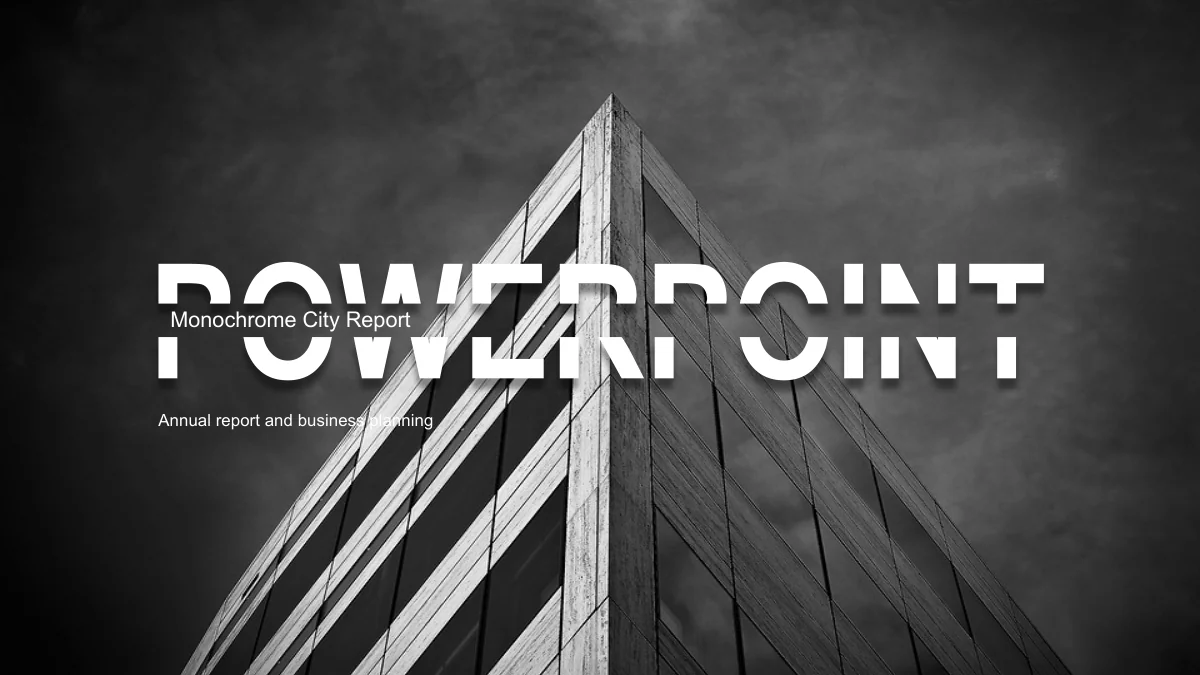
Monochrome City Report Presentation Template starts with a sharply angled building beneath a dark sky. A split white PowerPoint title crosses the photograph, and the same image returns on the closing page. Inside Monochrome City Report Presentation Template, four chapter dividers pair city scenes with overlapping charcoal rectangles. Cyclists, towers and a suspension bridge punctuate the report. Monochrome City Report Presentation Template uses grey circles, diamonds and narrow photo panels to organise shorter points. The percentage examples take several forms, including cylinders on an arrow, a bicycle wheel and four stopwatches. These are manually arranged shapes and labels in Monochrome City Report Presentation Template, so text and geometry need separate edits. All 24 widescreen pages of Monochrome City Report Presentation Template are available in the preview; choose the layouts that explain your own work, results and plans.
Key Features of Monochrome City Report Presentation Template
Urban photographs, grey diagrams and room for a focused report.
An Architectural Opening
Monochrome City Report Presentation Template places a split white title over an angled building. The repeated closing image gives the report a visual endpoint.
Four Photo Dividers
Monochrome City Report Presentation Template separates four chapters with city photos. Dark overlapping panels leave a distinct space for each section title.
A Choice of Idea Diagrams
Monochrome City Report Presentation Template groups ideas in circles, diamonds and triangles. Grey tones distinguish the parts without adding bright accents.
Manual Percentage Examples
Monochrome City Report Presentation Template includes cylinders, rings and stopwatch graphics. Their labels and shape sizes must be adjusted separately.
Photographs in Small Groups
Monochrome City Report Presentation Template has four photo cards and three taller panels. Use their short text areas to compare projects or observations.
Familiar Visual Cues
Monochrome City Report Presentation Template uses five finger-count icons, checkmarks and a laptop frame. Each gives a different structure to a short list.
How to Use Monochrome City Report Presentation Template
Select the report pages, replace the examples and review the finished sequence.
-
Choose a Report Structure
Review all 24 pages of Monochrome City Report Presentation Template. Set the four chapter titles first, then choose the photo panels and diagrams that give each part the right amount of space.
-
Download and Update the Content
Download Monochrome City Report Presentation Template with an active paid membership. Replace the sample text and percentages, then adjust the corresponding shapes to suit your actual figures.
-
Check the Final Sequence
Run through Monochrome City Report Presentation Template at presentation size. Check the grey labels, chapter order and photo crops; keep an editable copy before sharing the finished report.
Questions about Monochrome City Report Presentation Template
How do I download Monochrome City Report Presentation Template?
Sign in with an active paid membership to download Monochrome City Report Presentation Template. Daily downloads are unlimited, including repeat downloads. Keep a fresh copy of Monochrome City Report Presentation Template before editing. You can then recover a photo crop or diagram arrangement from Monochrome City Report Presentation Template if a change does not work.
How many pages does Monochrome City Report Presentation Template include?
Monochrome City Report Presentation Template contains 24 slides in 16:9. The opening and contents lead into four chapters and a closing page. The sections of Monochrome City Report Presentation Template cover an annual overview, completed work, project examples and a plan for next year. Remove unneeded pages from Monochrome City Report Presentation Template and rename the sections to match your material.
Can I edit the diagrams in Monochrome City Report Presentation Template?
Monochrome City Report Presentation Template uses editable shapes and separate labels, not linked Excel charts. Changing a cylinder percentage in Monochrome City Report Presentation Template will not change its height. Adjust the proportions yourself. The ring and stopwatch examples in Monochrome City Report Presentation Template also need their shapes and numbers checked together.
Can I preview every page of Monochrome City Report Presentation Template?
All 24 pages of Monochrome City Report Presentation Template appear in the gallery. Use the thumbnails or arrows to compare diagrams, photos and text areas. Check the narrow three-panel layout in Monochrome City Report Presentation Template if you have long descriptions. The preview of Monochrome City Report Presentation Template also shows how the chapters connect.
Will Monochrome City Report Presentation Template work in other presentation software?
Monochrome City Report Presentation Template is a PowerPoint PPTX. Other editors may interpret custom shapes, grouped icons or picture crops differently. Test a copy of Monochrome City Report Presentation Template first. Compare the split cover lettering, bicycle graphic and overlapping panels in imported Monochrome City Report Presentation Template with the preview before relying on that editor.
Which fonts does Monochrome City Report Presentation Template use?
Monochrome City Report Presentation Template uses Arial, Calibri and Impact. Check availability before editing. In Monochrome City Report Presentation Template, narrow photo panels and percentage labels leave less room for wider fonts. Review the cover subtitle and chapter headings after substitution. Open Monochrome City Report Presentation Template on your presentation computer to catch unexpected line breaks.
Is the slide text in Monochrome City Report Presentation Template English?
Monochrome City Report Presentation Template has English slide text and no background music. Website translations describe this same English file. You can change the wording in Monochrome City Report Presentation Template to another language, then check spacing. Longer phrases may need shorter headings in the photo panels and circular diagrams of Monochrome City Report Presentation Template.
Can I use Monochrome City Report Presentation Template for a commercial project?
Check the original design and photograph permissions before using Monochrome City Report Presentation Template commercially. Membership provides access to the download; it does not establish unrestricted rights to every included asset. For a client report made with Monochrome City Report Presentation Template, use photographs you have permission to share and keep any required attribution. The sample figures are placeholders, not evidence for business claims.
What is the best way to share Monochrome City Report Presentation Template?
Send the page link for Monochrome City Report Presentation Template when someone wants to review the original design. To share your completed report, export a checked PDF or provide the edited deck where permitted. Before sending your version of Monochrome City Report Presentation Template, replace the sample percentages, confirm that the contents match the chapters and inspect the grey text on your intended screen.