Foggy Path Presentation Template: Lunar Pictures and Asymmetric Type
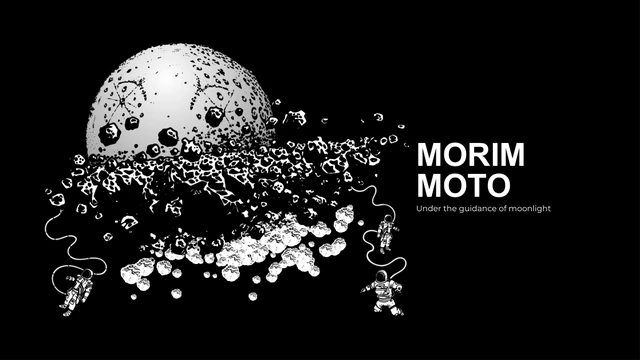
Foggy Path Presentation Template begins with a fragmented moon on black, beside MORIM and MOTO. A small caption reads “Under the guidance of moonlight.” The closing page in Foggy Path Presentation Template returns to FOGGY PATH. Its ten original 16:9 pages keep 60 media parts, including lunar textures, astronauts, faint stars and soft glowing forms. The contents page in Foggy Path Presentation Template scatters 01, 02 and 03 around a large pale planet. A following page centers [01 FOGGY] over the moon. Foggy Path Presentation Template uses small upper captions, a vertical FOGGY label and large cropped right-edge page numerals as decoration. Those cut-off numerals are part of the source design. A timeline in Foggy Path Presentation Template retains 2017, 2018 and 2019 with PREPARE, GROWTH and ACHIEVE. Later layouts in Foggy Path Presentation Template pair three image strips with FIRST, SECOND and THIRD, alongside 45°, 90° and 135° labels. Another page uses separate 180° and 270° captions. These angles and years are examples, not performance measures. Foggy Path Presentation Template has no native charts or embedded workbooks. Its circles, labels and photo panels are artwork and shapes. The three text groups on page 5 originally ran past the lower edge; the third group in Foggy Path Presentation Template was moved upward in the same column to make its text visible. Other object transforms, media and page order remain unchanged. English sample copy and Latin filler remain in Foggy Path Presentation Template. Source promotion and author metadata were cleared; Chinese master labels became English. Foggy Path Presentation Template retains Poppins, Montserrat and DIN bindings, with Arial replacing an unavailable decorative face; fonts are not embedded. Replace sample years, captions and text, check font substitutions and confirm image rights before sharing.
Key Features of Foggy Path Presentation Template
Lunar images, black pages and asymmetric captions.
Lunar Cover
Foggy Path Presentation Template places a fragmented moon on black.
Cropped Numerals
Foggy Path Presentation Template uses large cropped page numbers at the right edge.
Year Timeline
Foggy Path Presentation Template keeps 2017–2019 as editable examples.
Image Strips
Foggy Path Presentation Template arranges three narrow lunar pictures.
Angle Labels
Foggy Path Presentation Template preserves separate angle captions, not chart data.
Glowing Forms
Foggy Path Presentation Template pairs stars with faint planets and glowing shapes.
How to Use Foggy Path Presentation Template
Preview the black pages, replace examples and check small text.
-
Preview
Review all ten pages of Foggy Path Presentation Template.
-
Download
Paid members can download Foggy Path Presentation Template repeatedly without daily limits.
-
Edit
Replace years and captions in Foggy Path Presentation Template, then check fonts and image rights.
Questions about Foggy Path Presentation Template
How do I download Foggy Path Presentation Template?
Sign in with an active paid plan and choose Download PPTX. Foggy Path Presentation Template allows unlimited daily and repeat downloads.
How many slides are in Foggy Path Presentation Template?
Foggy Path Presentation Template contains ten original 16:9 pages: the lunar cover, contents, timeline, image strips, caption layouts and closing page.
Can I edit Foggy Path Presentation Template?
Text and native shapes in Foggy Path Presentation Template can be edited in PowerPoint; lunar and astronaut artwork remain images. Foggy Path Presentation Template has no native charts or embedded workbooks.
Can I preview all of Foggy Path Presentation Template?
Yes, all ten pages of Foggy Path Presentation Template are in the gallery. Check faint stars and small white text on your intended display. Large cropped numerals in Foggy Path Presentation Template are intentional decoration.
Will Foggy Path Presentation Template work in another editor?
Import the PPTX into compatible software, then compare Foggy Path Presentation Template with the previews. Check image crops, glowing shapes and font substitutions.
Which fonts does Foggy Path Presentation Template use?
Foggy Path Presentation Template retains Poppins, Montserrat and DIN font bindings, with Arial used for a source decorative face. Fonts are not embedded. Check small captions and line breaks in Foggy Path Presentation Template.
Is the text in Foggy Path Presentation Template translated?
Chinese master labels in Foggy Path Presentation Template were translated into English. Original English examples and Latin filler remain. All localized pages describe the same English Foggy Path Presentation Template file.
Can I use Foggy Path Presentation Template commercially?
This page does not confirm the rights for every original image in Foggy Path Presentation Template. Check applicable permissions or replace uncertain artwork. Years and angles in Foggy Path Presentation Template are examples, not verified facts.
How do I share Foggy Path Presentation Template?
Share the Foggy Path Presentation Template page link or export your edited deck. Replace filler and sample dates in Foggy Path Presentation Template; keep an editable copy and confirm rights before redistributing the template itself.