Company Summary Presentation Template: Gray Architecture, Team Photos and Shape Diagrams
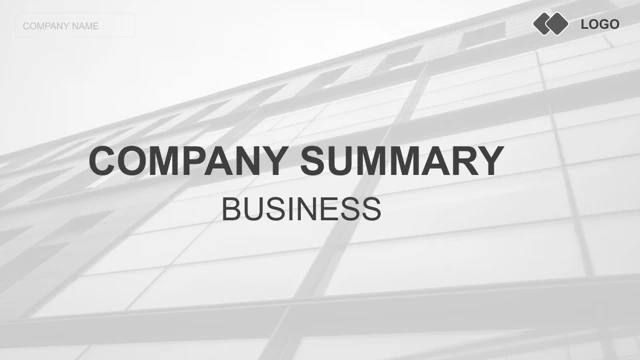
Company Summary Presentation Template uses a gray architectural cover, white pages and black headings. A bridge panorama returns on the four dividers in Company Summary Presentation Template, at pages 3, 8, 12 and 16. The contents page of Company Summary Presentation Template lists four numbered parts. Company Summary Presentation Template places portraits beside text, with a two-person layout, a three-point list and repeated office scenes. Company Summary Presentation Template also has a laptop-shaped picture frame showing hands at a keyboard. These are source images in Company Summary Presentation Template, not verified employees, locations or software screens. The diagrams in Company Summary Presentation Template are editable shapes, with no native chart or embedded workbook. Company Summary Presentation Template keeps a target ring marked 30%, five pointed shapes labeled 40%, 30%, 65%, 85% and 35%, and paired bars labeled 53%, 72%, 60% and 90%. The labels in Company Summary Presentation Template need checking against your data. Company Summary Presentation Template includes three price cards, each marked 299$ m/o. A dotted four-icon network in Company Summary Presentation Template accompanies explanatory text. The timeline in Company Summary Presentation Template uses four 20XX YEAR placeholders around a five-segment chevron; replace the placeholder years rather than treating them as dates. Three icon-led notes close the content before a Thanks page. Company Summary Presentation Template retains all 20 original pages and their 16:9 layout. Source promotion marks and notes are cleared from Company Summary Presentation Template, Chinese master prompts are translated, and long English filler is shortened. Arial bold replaces the major Arial Black font that did not render reliably. Company Summary Presentation Template keeps all original image pixels, object positions, numeric labels and animation structure. Check readability and image rights before sharing.
Key Features of Company Summary Presentation Template
Gray photos and clear section breaks.
Gray architecture
Company Summary Presentation Template opens with a building and uses bridge dividers.
Team layouts
Company Summary Presentation Template pairs business portraits with short text.
Four parts
Company Summary Presentation Template keeps four numbered sections and a contents page.
Shape diagrams
Company Summary Presentation Template includes a target ring, pointed shapes and paired bars.
Pricing cards
Company Summary Presentation Template retains three cards with example 299$ monthly labels.
Timeline and icons
Company Summary Presentation Template combines year placeholders, chevrons and an icon network.
How to Use Company Summary Presentation Template
Make the examples your own.
-
Preview
Company Summary Presentation Template: review all 20 pages.
-
Download
Company Summary Presentation Template: active paid members have unlimited daily downloads.
-
Edit
Company Summary Presentation Template: replace examples and verify image rights before sharing.
Questions about Company Summary Presentation Template
How do I download Company Summary Presentation Template?
Company Summary Presentation Template requires an active paid plan. Sign in and choose Download PPTX. Downloads can be repeated without a daily limit.
How many slides does Company Summary Presentation Template contain?
Company Summary Presentation Template has 20 original slides in 16:9. Four dividers on pages 3, 8, 12 and 16 use the same bridge image; a Thanks page ends the sequence.
What can I edit in Company Summary Presentation Template?
Company Summary Presentation Template preserves native text and shapes. The ring, pointed graphics and paired bars are shape diagrams, with no native chart or embedded workbook. Replace photographs as images; they do not identify your team.
Can I preview all of Company Summary Presentation Template?
Company Summary Presentation Template provides every one of its 20 pages before downloading. Compare text sizes, pale photographs, small numeric labels and the three pricing cards at the size you will use.
Can another editor open Company Summary Presentation Template?
Company Summary Presentation Template is supplied as a .pptx file. Compatible editors may import it. Check layered bars, thin outlines, picture crops and the chevron timeline against the preview.
Which fonts are used in Company Summary Presentation Template?
Company Summary Presentation Template replaces the major Arial Black font with Arial bold for reliable headings. Other source font and theme references remain, including Arial, Calibri and Century Gothic. No fonts are embedded.
Is the text of Company Summary Presentation Template in English?
Company Summary Presentation Template uses shorter English prompts and translates Chinese master text. Source promotion names and sharing notes are cleared. The website languages describe the same English PowerPoint file.
Can Company Summary Presentation Template be used commercially?
Company Summary Presentation Template does not verify commercial rights to the source people or architecture photographs. Confirm required permissions or substitute your own images. Percentages and the 299$ monthly prices are examples.
How should I share Company Summary Presentation Template?
Company Summary Presentation Template should become a finished presentation or PDF. Replace company names, year placeholders and sample amounts, check all diagram labels, and keep an editable copy. Confirm rights before redistributing the template.