Mountain Report Presentation Template: Four Parts Framed by Mountain Photography
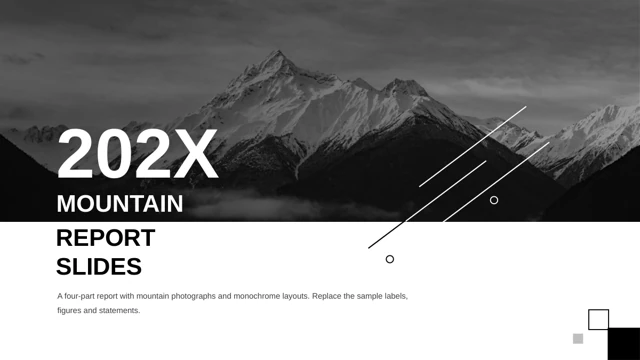
Mountain Report Presentation Template uses snow-covered peaks, rocky ground and a lake as a recurring visual setting. Black panels, white space and gray blocks in Mountain Report Presentation Template give the photographs a consistent frame. The 19-slide sequence in Mountain Report Presentation Template has a contents page and four numbered dividers: overview, evidence, analysis and next steps. The logo of Mountain Report Presentation Template and repeated promotional copy have been removed. Mountain Report Presentation Template keeps the original mountain photographs, including the dark blue night scene and the narrow vertical crop beside a 64% example. Use these views as context, rather than presenting them as evidence for an unrelated claim. The A–B diagram in Mountain Report Presentation Template connects four points through editable lines and icon markers. Mountain Report Presentation Template also includes four percentage circles, four pie-like shapes, numbered action rows and an A–D closing sequence. These layouts support distinct measures or points; the example percentages need not add to a shared total. The quarterly graphic in Mountain Report Presentation Template is built from shapes and text, not a native chart or an embedded workbook. Mountain Report Presentation Template retains the 53%, 72%, 60% and 90% labels and the separate 12.648.258 example. Check each label against its bar height and explain the unit before using it. Text in Mountain Report Presentation Template now gives concise English editing prompts in place of repeated advertising and vague jargon. The final split-color heading in Mountain Report Presentation Template follows the original photograph boundary. Choose only the pages that help your report, replace all example statements and verify the numbers. Preview Mountain Report Presentation Template at presentation size, especially the gray captions, white text over photographs and narrow metric labels.
Key Features of Mountain Report Presentation Template
Mountain photography with black, white and gray layouts.
Four-part report
Four numbered dividers in Mountain Report Presentation Template structure the sequence.
Mountain photographs
Mountain Report Presentation Template frames snow, rocks and a lake.
Connected ideas
Mountain Report Presentation Template links four points between A and B.
Shape-based graphics
Mountain Report Presentation Template keeps editable bars, circles and pies.
Numbered action rows
Four arrows in Mountain Report Presentation Template pair labels with icons.
Flexible closing page
The A–D sequence in Mountain Report Presentation Template supports four final points.
How to Use Mountain Report Presentation Template
Review the layouts, check the numbers and write your report.
-
Preview all 19 slides
Inspect photo crops, gray captions and figure labels.
-
Download the English PPTX
An active paid plan allows unlimited daily downloads.
-
Replace and verify
Update text, bar heights, percentages and action owners.
Questions about Mountain Report Presentation Template
How do I download Mountain Report Presentation Template?
Sign in with an active paid plan and select the download button for Mountain Report Presentation Template. The file uses a temporary private download link. Paid members can download Mountain Report Presentation Template repeatedly without a daily limit; share the public page rather than forwarding that private link.
How many slides does Mountain Report Presentation Template include?
Mountain Report Presentation Template has 19 slides in 16:9, including a contents page, four section covers and working layouts. You can shorten or reorder Mountain Report Presentation Template to suit your outline. Keep an untouched copy so you can return to an original layout while editing your report.
Can I edit the graphics in Mountain Report Presentation Template?
The bars, pies, circles and percentage labels in Mountain Report Presentation Template are shapes and text. There is no native chart or embedded Excel workbook. Change the visual proportions and numeric labels together when editing Mountain Report Presentation Template, and check each figure against the evidence you intend to present.
Can I preview all of Mountain Report Presentation Template before downloading?
All 19 pages of Mountain Report Presentation Template are shown in the gallery in file order. Enlarge the night photograph, narrow mountain crop, quarterly graphic and four-point layouts. In Mountain Report Presentation Template, some captions use pale gray or white over photographs; test their readability at your intended presentation size.
Can another presentation editor open Mountain Report Presentation Template?
An editor with PPTX support may open Mountain Report Presentation Template, but crops, transparency, grouped shapes and text spacing can change. Compare an exported page with the preview before relying on that editor. Check the split-color heading and thin connecting lines in Mountain Report Presentation Template after any font substitution or format conversion.
Which fonts are used in Mountain Report Presentation Template?
Mountain Report Presentation Template uses Arial for its English text, with bold headings where the design calls for them. In Mountain Report Presentation Template, if Arial is substituted, review the large lower-edge title, section dividers and metric captions. Keep the short labels in Mountain Report Presentation Template on one line where possible and check their alignment after editing.
Is the slide text in Mountain Report Presentation Template translated?
Mountain Report Presentation Template contains concise English report headings and editing prompts. Repeated template advertising and vague filler were replaced, while source photographs and numeric examples were retained. Language versions of this website describe Mountain Report Presentation Template; they do not change the English PPTX file into another language.
Can I use Mountain Report Presentation Template commercially?
Paid access to Mountain Report Presentation Template does not prove licensing rights for its original design, mountain photographs, icons or fonts. Confirm permissions for your intended use before distributing a client or public report. Replace assets whose rights are uncertain in your edited Mountain Report Presentation Template, and keep any attribution the applicable license requires.
How can I share Mountain Report Presentation Template?
Share the public page of Mountain Report Presentation Template using the social button or copy its page URL. Recipients need their own active paid plan to download the English file. Before distributing an edited Mountain Report Presentation Template, verify the sample figures, remove unused layouts and confirm permission for the photographs and other assets.