Mountain Forest Portfolio Presentation Template: a quiet frame for outdoor photography
Mountain Forest Portfolio Presentation Template places snow-covered mountains, misty woodland and a warm forest sunset in ten spacious 16:9 slides. White margins, black panels and a pale grey cover band leave room for the photographs to lead. Mountain Forest Portfolio Presentation Template moves between single-image studies, two large views and layered vertical photos. A six-picture page repeats one mountain image in a three-by-two grid; later pages compare three horizontal views and three tall images. Mountain Forest Portfolio Presentation Template has short English headings and editable caption boxes rather than a fixed chapter sequence. Start with a few related photographs, then use the changing proportions to control pace. Mountain Forest Portfolio Presentation Template gives each image a different setting, so check the focal point when replacing it. Describe your own role and project accurately, keep captions brief and use photographs you have permission to share.
Key Features of Mountain Forest Portfolio Presentation Template
Wide landscapes, close details and space to breathe.
Snowy Opening
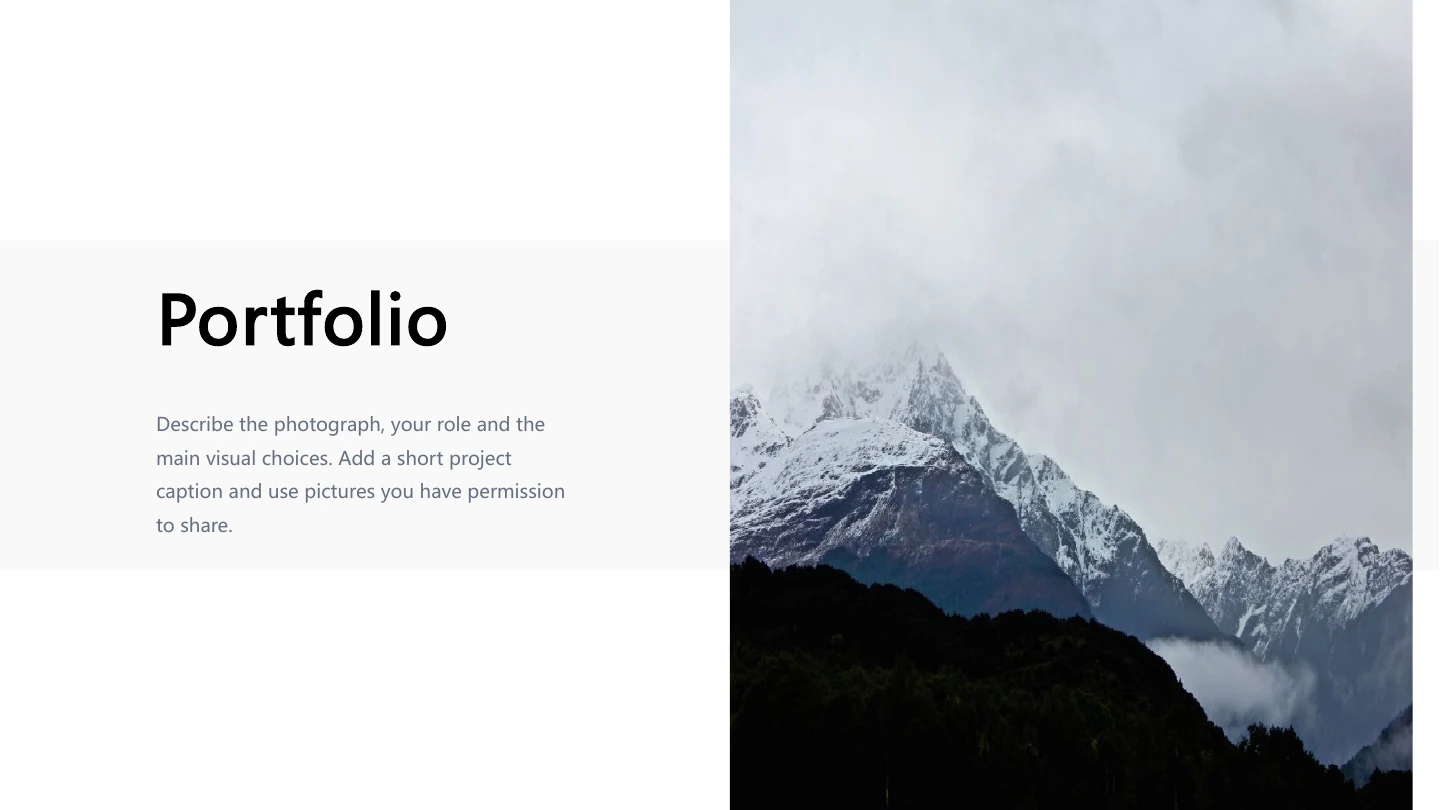
Mountain Forest Portfolio Presentation Template opens with a tall mountain photo beside a pale grey band. Add a concise title and keep the first caption clear.
Dark and Light Panels
Mountain Forest Portfolio Presentation Template pairs black text panels with white margins. Match the caption colour to its background when choosing new photos.
Six-Image Rhythm
Mountain Forest Portfolio Presentation Template repeats one photo in a three-by-two grid. Replace each picture separately to compare related views or details.
Paired Landscapes
Mountain Forest Portfolio Presentation Template places two wide mountain images together. Choose a balanced pair and keep the shared caption beneath them brief.
Overlapping Photos
Mountain Forest Portfolio Presentation Template layers a monochrome mountain image over a warm forest sunset. Preserve the overlap while checking both focal points.
Three-View Comparisons
Mountain Forest Portfolio Presentation Template ends with stacked landscape views and three tall photos. Select a layout that suits your images without poor crops.
How to Use Mountain Forest Portfolio Presentation Template
Choose the views, replace the images and review the story.
-
Choose a photo sequence
Review all ten pages of Mountain Forest Portfolio Presentation Template. Select layouts for your strongest photographs, plan the order and decide where a short caption will help the viewer.
-
Download the English file
Download Mountain Forest Portfolio Presentation Template with an active paid plan. Daily and repeat downloads are unlimited. Open a copy in PowerPoint and keep the original for reference.
-
Replace and review
Update photos and captions in Mountain Forest Portfolio Presentation Template. Check crops, overlaps and line breaks, verify image permissions, then test your finished deck before sharing.
Questions about Mountain Forest Portfolio Presentation Template
How do I download Mountain Forest Portfolio Presentation Template?
Sign in with an active paid plan to download Mountain Forest Portfolio Presentation Template, then use the download button on this page. Paid members have unlimited daily downloads and can download Mountain Forest Portfolio Presentation Template again. Review the full gallery before choosing the file. If your membership is inactive, downloading Mountain Forest Portfolio Presentation Template remains unavailable; changing the website language does not change the requirement.
How many slides are in Mountain Forest Portfolio Presentation Template?
Mountain Forest Portfolio Presentation Template contains ten slides in a 16:9 format. Mountain Forest Portfolio Presentation Template includes photo layouts rather than a numbered contents page or a prescribed chapter structure. Choose only the pages that support your photographs; you do not need to use every layout. Keep a complete working copy of Mountain Forest Portfolio Presentation Template so that you can return to a different composition later.
Can I edit the photos and captions in Mountain Forest Portfolio Presentation Template?
Mountain Forest Portfolio Presentation Template is supplied as an editable PowerPoint file. The photographs remain picture objects and the English captions remain text boxes. When editing Mountain Forest Portfolio Presentation Template, replace an image and examine its crop before adjusting nearby text. A photograph itself is not an editable landscape model. Save another copy of Mountain Forest Portfolio Presentation Template before making extensive changes to the layout.
Can I preview all of Mountain Forest Portfolio Presentation Template before downloading?
You can review all ten pages of Mountain Forest Portfolio Presentation Template in the gallery before downloading. Use the thumbnails or arrow controls and enlarge the preview to inspect details. The gallery of Mountain Forest Portfolio Presentation Template shows the same English deck supplied in the download. Compare photo proportions, captions and overlapping images with your planned work before choosing Mountain Forest Portfolio Presentation Template; viewing the preview does not require a purchase.
Will Mountain Forest Portfolio Presentation Template work in another presentation editor?
Mountain Forest Portfolio Presentation Template is a PowerPoint (.pptx) file that other compatible editors may import. Identical rendering is not guaranteed: photo crops, text positions, fonts and overlaps can change. Open Mountain Forest Portfolio Presentation Template in PowerPoint as a reference, compare the imported result with the gallery and inspect an exported PDF. Mountain Forest Portfolio Presentation Template has picture objects and text boxes rather than native data charts; check every page after importing.
Which fonts does Mountain Forest Portfolio Presentation Template use?
Mountain Forest Portfolio Presentation Template retains source declarations for Microsoft YaHei and Roboto Light, with other references in its layouts and master. Font files are not embedded. The checked previews of Mountain Forest Portfolio Presentation Template render the visible text in Microsoft YaHei. Other computers or editors may substitute fonts. After opening Mountain Forest Portfolio Presentation Template, check the cover title, black panels and small captions for changed line breaks.
Is Mountain Forest Portfolio Presentation Template available in other languages?
The website explains Mountain Forest Portfolio Presentation Template in all supported site languages, including the headings, features, steps and questions. The downloadable Mountain Forest Portfolio Presentation Template is the same English PowerPoint file for every language. There is no separate translated deck supplied. You can write your own captions in Mountain Forest Portfolio Presentation Template; check that the fonts support your language and that the wording fits each original box.
Can I use Mountain Forest Portfolio Presentation Template commercially?
The source licence and photograph permissions for Mountain Forest Portfolio Presentation Template have not been verified. A paid site plan does not establish rights to every sample image. The source creator metadata in Mountain Forest Portfolio Presentation Template names Ade Putra and is retained. Before sharing Mountain Forest Portfolio Presentation Template with clients or publishing the photographs, confirm the relevant permissions and attribution requirements, or use your own authorised images.
How do I share Mountain Forest Portfolio Presentation Template?
Share Mountain Forest Portfolio Presentation Template with this page's share controls or copy its link. For your completed presentation, export a PDF or share the finished deck after checking photograph permissions and required credits. Review Mountain Forest Portfolio Presentation Template for sample captions, crops, crowded overlaps and small text; check the final three-image layouts and exported PDF. Keep an editable copy of Mountain Forest Portfolio Presentation Template with your image credits.