Photographer Portfolio Presentation Template: a gallery for your photographic work
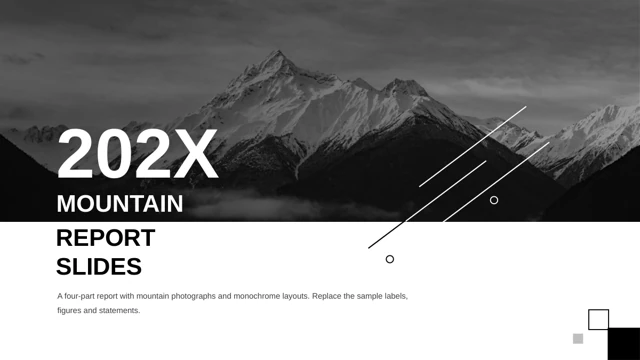
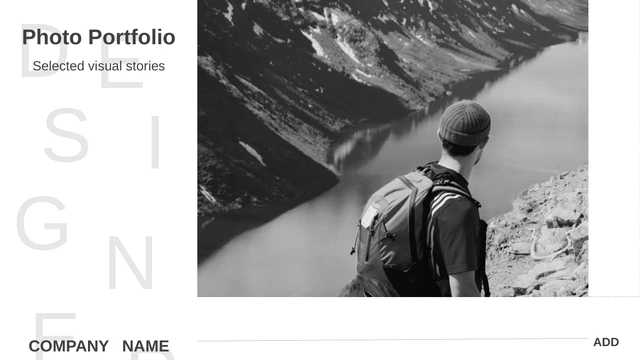
Photographer Portfolio Presentation Template presents 24 widescreen slides built around photographs, black section pages and generous white space. The opening pairs a mountain photograph with scattered DESIGNER letters; the profile page provides space for a portrait and a short introduction. Photographer Portfolio Presentation Template divides the sequence into About Me, Selected Work and Project Notes. Landscape pairs, city views, a three-image object study and a four-photo collection give you several ways to group work. Small caption areas keep the pictures prominent, while longer text pages let you explain a project. Photographer Portfolio Presentation Template includes editable text and picture objects, so you can replace sample photographs and write your own descriptions. Personal details in the profile are examples, and the closing page leaves room for your contact information. Review the preview to check the crops and spacing.
Key Features of Photographer Portfolio Presentation Template
Photographs, chapter breaks and concise project notes.
Photo-led opening
Photographer Portfolio Presentation Template opens with a mountain photograph and oversized scattered letters. Add your name and a short line that introduces your work.
Three chapter breaks
Photographer Portfolio Presentation Template separates the sequence with black pages numbered 01–03. Rename the chapter labels to match your own selection of photographs.
Paired photographs
Photographer Portfolio Presentation Template pairs landscape and portrait images. Connect related subjects with clear spacing between the photographs.
Object and image grids
Photographer Portfolio Presentation Template includes three tall object photographs and a four-image collection. Replace each picture and review its crop in the existing frame.
Room for project notes
Photographer Portfolio Presentation Template balances short captions with text layouts. Describe the brief, location or viewpoint behind each photographic series.
Editable English file
Photographer Portfolio Presentation Template has English sample text and an Arial-based theme. Update the profile, headings and captions, then check line breaks.
How to Use Photographer Portfolio Presentation Template
Choose your images, download and build your story.
-
Preview the sequence
Review all 24 pages of Photographer Portfolio Presentation Template. Compare the single images, paired layouts and grids with your work, then select the pages that support a clear sequence.
-
Download your copy
Sign in with an active paid plan to download Photographer Portfolio Presentation Template. Paid members can download as often as needed. Keep a working copy before replacing the sample photographs.
-
Edit and share
Open Photographer Portfolio Presentation Template in PowerPoint. Replace photographs, captions and profile details; check crops and chapter labels. Export a PDF for review and keep the editable PPTX.
Questions about Photographer Portfolio Presentation Template
How do I download Photographer Portfolio Presentation Template?
Use the download button for Photographer Portfolio Presentation Template after signing in with an active paid plan. Photographer Portfolio Presentation Template is supplied as a PPTX file. Paid members have unlimited daily downloads, including repeat downloads of the same template. Save Photographer Portfolio Presentation Template to your device and make a copy for each project.
How many slides does Photographer Portfolio Presentation Template contain?
Photographer Portfolio Presentation Template contains 24 slides in a 16:9 format. The sequence in Photographer Portfolio Presentation Template includes a cover, a profile, a contents page, three numbered chapter breaks, photographic layouts and a closing page. You can omit pages from Photographer Portfolio Presentation Template when a shorter selection tells your story more clearly.
Can I edit the text and colors in Photographer Portfolio Presentation Template?
Yes. The headings, guidance, profile details and caption areas in Photographer Portfolio Presentation Template are text objects. You can change theme colors and replace picture objects in Photographer Portfolio Presentation Template. A photograph is still a single image, so details inside it are not separate editable shapes. Check Photographer Portfolio Presentation Template after making changes to crops or text length.
Can I preview all of Photographer Portfolio Presentation Template before downloading?
Yes. Every page of Photographer Portfolio Presentation Template is shown in the gallery above. Select a thumbnail for Photographer Portfolio Presentation Template or use the arrows to review the sequence. Enlarge Photographer Portfolio Presentation Template to inspect smaller captions, the dark chapter pages and the white space around paired images.
Can I open Photographer Portfolio Presentation Template in another presentation editor?
Photographer Portfolio Presentation Template uses the PowerPoint PPTX format. Other editors may import the file, but font metrics, picture crops and text wrapping can change. Compare the imported Photographer Portfolio Presentation Template with the full preview before presenting. PowerPoint is the preferred starting point for editing Photographer Portfolio Presentation Template.
Which fonts does Photographer Portfolio Presentation Template use?
The English copy of Photographer Portfolio Presentation Template uses an Arial-based theme. The original Chinese font references were adapted for the English text; font files are not embedded. Use Arial or a suitable installed replacement in Photographer Portfolio Presentation Template, then inspect the headings and captions throughout Photographer Portfolio Presentation Template.
Is the text in Photographer Portfolio Presentation Template translated?
Yes. Chinese headings, profile labels and sample guidance in Photographer Portfolio Presentation Template have been translated into concise English. The photographs and page order are retained. Website translations describe the same English download; they do not create separate language versions of Photographer Portfolio Presentation Template.
Can I use Photographer Portfolio Presentation Template for commercial work?
The source supplied for Photographer Portfolio Presentation Template does not include a verified commercial redistribution license. Paid membership provides download access and does not expand the rights to photographs or other source material. Confirm permission for your intended use of Photographer Portfolio Presentation Template, and replace any image you are not authorized to use.
How should I share Photographer Portfolio Presentation Template?
Use the share controls to send a link to the Photographer Portfolio Presentation Template preview page. For an edited Photographer Portfolio Presentation Template, share an exported PDF or a presentation containing your own authorized material. Keep Photographer Portfolio Presentation Template and your editable working copy for later revisions; recipients need their own eligible account to download the original file.