Botanical Photo Album Presentation Template: plant photographs in layered frames
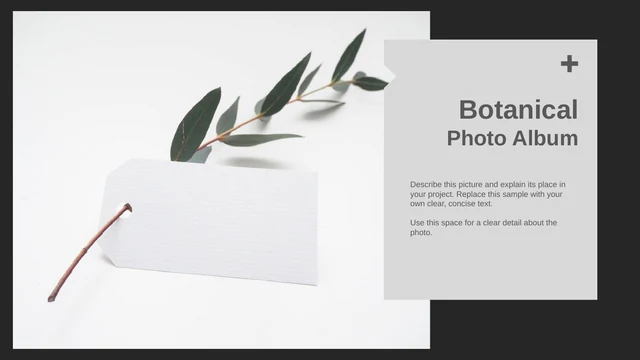
Botanical Photo Album Presentation Template opens with leafy branches and a hanging blank card, framed by black edges and a grey title panel. Ten widescreen pages combine plant photos with open space and offset borders. Botanical Photo Album Presentation Template moves from a single green leaf to a glass vase, three-picture arrangements and a diagonal pair. A red cactus appears in a four-picture grid and three hexagonal frames; a later page places four repeated lemon images in a horizontal strip. Botanical Photo Album Presentation Template uses narrow captions rather than dense text, with a darkened cactus photograph for the closing. The 85% figures and tool bars are editable examples. Botanical Photo Album Presentation Template lets you select layouts for a compact visual album. Add short captions and replace sample values. The creator metadata and Docer source reference remain; check the rights to photographs and design before sharing.
Key Features of Botanical Photo Album Presentation Template
Plant photography, open space and simple geometric frames.
Leaves, Cacti and Lemons
Botanical Photo Album Presentation Template combines leafy branches, glass vases, red cacti and lemons. Match replacement photos to the original light backgrounds.
Layered Rectangular Borders
Botanical Photo Album Presentation Template uses black and grey borders, offset panels and plus signs. Keep new captions clear of the narrow decorative edges.
Three Pictures and a Diagonal Pair
Botanical Photo Album Presentation Template includes a three-picture arrangement and a diagonal pair. Select photographs that work together at different sizes.
Repeated Grids and Strips
Botanical Photo Album Presentation Template repeats a cactus in four panels and lemons in four strips. Replace each image separately to create your own sequence.
Hexagons and Sample Bars
Botanical Photo Album Presentation Template places three cactus photos inside hexagonal outlines. Photoshop and Illustrator labels accompany editable sample bars.
A Full Photograph Closing
Botanical Photo Album Presentation Template ends with a darkened cactus image and short feedback text. Review the light lettering before changing the background.
How to Use Botanical Photo Album Presentation Template
Choose your photographs, replace the samples and review the album.
-
Select a Picture Sequence
Browse all ten pages of Botanical Photo Album Presentation Template. Compare single photos, pairs, grids and strips. Choose layouts that suit your pictures, then put the album in a clear order.
-
Download a Working Copy
Download Botanical Photo Album Presentation Template with an active paid plan. Daily and repeat downloads are unlimited. Save a working copy and gather photographs you have permission to share.
-
Edit Captions and Examples
Open Botanical Photo Album Presentation Template in PowerPoint. Replace captions, the 85% examples and tool labels. Check crops and text wrapping, then review the export and keep a working copy.
Questions about Botanical Photo Album Presentation Template
How do I download Botanical Photo Album Presentation Template?
Sign in with an active paid plan and use the download button beside the preview. Botanical Photo Album Presentation Template is supplied as an English PowerPoint PPTX file. Paid members can download Botanical Photo Album Presentation Template every day without a numerical limit, including repeat downloads. Save Botanical Photo Album Presentation Template to your device and make a working copy. The preview link alone does not provide download access.
How many slides are in Botanical Photo Album Presentation Template?
Botanical Photo Album Presentation Template contains ten slides in a 16:9 format. The sequence covers single plant photographs, a three-picture page, a diagonal pair, a four-image cactus grid, three hexagonal compositions and a horizontal lemon strip. Botanical Photo Album Presentation Template also includes a full-photo closing. Select and reorder Botanical Photo Album Presentation Template to fit your photographs. Choose the layouts you need.
Can I edit the text and colors in Botanical Photo Album Presentation Template?
Native text boxes, borders, plus signs, panels and simple bars in Botanical Photo Album Presentation Template can be edited in PowerPoint. The plant photographs remain image objects. Botanical Photo Album Presentation Template pairs pale surfaces with dark outlines, so check contrast when you change a panel color. Replace photographs in Botanical Photo Album Presentation Template with suitable images. Keep captions short, and inspect each crop after an image replacement.
Can I preview every page of Botanical Photo Album Presentation Template?
The gallery shows all ten pages of Botanical Photo Album Presentation Template, including the cover and cactus closing. Use the thumbnails and arrow controls to compare Botanical Photo Album Presentation Template before downloading. Enlarge narrow captions, the layered rectangles and the three hexagonal compositions to see how they fit. The previews represent the English Botanical Photo Album Presentation Template supplied for download. Check whether these layouts suit your pictures.
Are the numbers and bars in Botanical Photo Album Presentation Template data charts?
The 85% figures and Photoshop/Illustrator bars in Botanical Photo Album Presentation Template are sample labels and shapes. They do not describe the plants, measured results or verified skills. Botanical Photo Album Presentation Template contains no native data chart or embedded spreadsheet. Change or remove these examples when adapting Botanical Photo Album Presentation Template, and use values you can explain. Create a separate chart for linked data and verify its labels and source.
Which fonts does Botanical Photo Album Presentation Template use?
The English release of Botanical Photo Album Presentation Template adapts the original Microsoft YaHei text to Arial. Other theme declarations, including Roboto Thin, Calibri and Times New Roman, remain in the file. No font files are embedded in Botanical Photo Album Presentation Template, so available fonts depend on your editor. Check the cover, small captions and narrow center label in Botanical Photo Album Presentation Template after opening it. Inspect line breaks after any font substitution.
Is the PPTX in Botanical Photo Album Presentation Template translated for each language?
The downloadable Botanical Photo Album Presentation Template is English. Chinese headings and filler passages were replaced with concise English prompts. Each translated website explains the same English Botanical Photo Album Presentation Template; it does not provide a separately translated PowerPoint file. Add your own captions to Botanical Photo Album Presentation Template in the language your audience needs. Check font coverage before sharing. Plant photographs are unchanged, and the original creator metadata and Docer source reference remain.
Can I use Botanical Photo Album Presentation Template commercially?
Commercial use and redistribution rights for Botanical Photo Album Presentation Template have not been verified. Paid download access does not grant additional permissions for the source design or photography. Botanical Photo Album Presentation Template retains Bagus Budiyanto in the creator metadata and a Docer source reference. Confirm the rights relevant to your planned use before distributing Botanical Photo Album Presentation Template. Keep necessary attribution, and use only replacement photographs and text that you have permission to share.
How should I share Botanical Photo Album Presentation Template?
Use the share controls to send the public preview link for Botanical Photo Album Presentation Template. Review your finished photographs, captions and sample labels before exporting a PDF or presentation. Share only material for which you have the necessary permissions. Keep the editable Botanical Photo Album Presentation Template separately for later changes. Anyone who needs the original Botanical Photo Album Presentation Template must download it through their own eligible paid account.