Mucha Art Exhibition Presentation Template: framed artwork and peach gallery panels
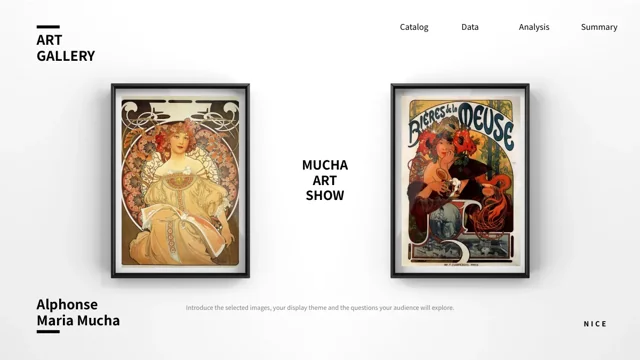
Mucha Art Exhibition Presentation Template opens with two framed images and the artist name Alphonse Maria Mucha. Across 20 widescreen pages, peach panels, white space and small black markers connect tall posters, paintings and side-by-side displays. Mucha Art Exhibition Presentation Template has three numbered parts; each part appears in two different image-and-text arrangements. A contents page introduces the sequence, while six icon prompts, a four-point circular diagram and a SWOT layout offer space for your own observations. In Mucha Art Exhibition Presentation Template, short caption rows and three-image displays help organize visual comparisons. One native bar chart includes an embedded workbook and illustrative values. Mucha Art Exhibition Presentation Template supplies English prompts for describing the selected images. Add checked captions and keep artwork lettering and signatures intact. Review the full 16:9 sequence before deciding which pages to use.
Key Features of Mucha Art Exhibition Presentation Template
Framed pictures, three numbered parts and concise viewing prompts.
Framed Opening and Closing
Mucha Art Exhibition Presentation Template opens and closes with paired images in dark frames. Keep their proportions and use a short introduction for your display.
Three Numbered Parts
Mucha Art Exhibition Presentation Template uses three part numbers in paired layouts. Match the contents to your sequence and write captions that connect nearby images.
Paired and Grouped Artwork
Mucha Art Exhibition Presentation Template combines pairs, four-image rows and three-image displays. Compare visible details and retain the original artwork lettering.
Peach Panels and White Space
Mucha Art Exhibition Presentation Template places images against peach panels and white space. Use brief, contrasting captions beside the tall picture objects.
Icons and Observation Areas
Mucha Art Exhibition Presentation Template offers six icon prompts, a circular diagram and a SWOT page. Use them to organize clear observations about the images.
Native Bar Chart
Mucha Art Exhibition Presentation Template has a bar chart, five categories and a workbook. Replace the sample data and check its labels before presenting your results.
How to Use Mucha Art Exhibition Presentation Template
Choose the images, write checked captions and review the display.
-
Choose the Gallery Sequence
Browse all 20 pages of Mucha Art Exhibition Presentation Template. Select image arrangements for your display, name the three parts and update the contents to match the pages you will present.
-
Write Captions and Edit the Data
Download Mucha Art Exhibition Presentation Template with a paid plan. Save a copy, add checked captions and replace the English prompts; use your own verified data if you keep the bar chart.
-
Review the Artwork and Export
Inspect Mucha Art Exhibition Presentation Template at presentation size. Check image crops, captions, part numbers and chart labels, then review the exported PDF before sharing your display.
Questions about Mucha Art Exhibition Presentation Template
What is included in Mucha Art Exhibition Presentation Template?
Mucha Art Exhibition Presentation Template contains 20 slides in a 16:9 PowerPoint file. The opening and closing pages pair artwork inside dark frames, with the artist name shown nearby. Mucha Art Exhibition Presentation Template includes three numbered parts, each presented through two image-and-text layouts. Mucha Art Exhibition Presentation Template also supplies picture rows, paired layouts, three-image arrangements, icon prompts, a circular diagram, a SWOT page and one native bar chart. Its English text guides you in adding captions and observations; it is not a completed art-history catalogue. Browse Mucha Art Exhibition Presentation Template in the full preview before choosing the pages and deciding which images need explanation.
Can I replace the images in Mucha Art Exhibition Presentation Template?
Mucha Art Exhibition Presentation Template uses picture objects for its paintings, tall posters and framed displays. In Mucha Art Exhibition Presentation Template, preserve the proportions of a tall poster rather than stretching it across a wider area. Add a verified caption for any replacement picture. Mucha Art Exhibition Presentation Template retains the lettering and signatures already inside the supplied artwork; those pixels do not change when you edit slide text. Review Mucha Art Exhibition Presentation Template after each replacement to check the visible crop, adjacent caption and spacing around frames or peach panels.
How are the parts arranged in Mucha Art Exhibition Presentation Template?
Mucha Art Exhibition Presentation Template has three numbered parts introduced by a contents page. Each number appears in two different layouts: pages 3 and 4, pages 8 and 9, and pages 13 and 14. In Mucha Art Exhibition Presentation Template, choose a useful order before writing the section captions. Mucha Art Exhibition Presentation Template does not require you to treat the six numbered pages as six separate chapters. Match the three contents entries to your selected sequence and remove prompts that do not apply to your display. Review Mucha Art Exhibition Presentation Template from the framed opening through the closing page after rearranging the material.
What should I write in the captions of Mucha Art Exhibition Presentation Template?
Mucha Art Exhibition Presentation Template provides English prompts beside the images and within caption rows. Replace them with short descriptions that explain what the audience should notice. In Mucha Art Exhibition Presentation Template, you can compare a visible border, colour relationship, pose or arrangement without inventing an artwork title or date. Mucha Art Exhibition Presentation Template keeps the artist name in the supplied design, but it does not establish an official exhibition, lending arrangement or current event. Keep captions brief and review Mucha Art Exhibition Presentation Template at presentation size so the text remains readable beside the selected image.
Does Mucha Art Exhibition Presentation Template include a real chart?
Mucha Art Exhibition Presentation Template includes one native bar chart on page 17, together with an embedded workbook. It has one series and five numbered categories. In Mucha Art Exhibition Presentation Template, open the chart data in PowerPoint before entering your checked results. Changing the nearby paragraph does not update the values. Mucha Art Exhibition Presentation Template does not verify the original numbers or their relationship to an art-history question. Use clear category labels and explain the source of any results you present. Review the chart in Mucha Art Exhibition Presentation Template alongside its caption to make sure both describe the same comparison.
How can I use the diagrams in Mucha Art Exhibition Presentation Template?
Mucha Art Exhibition Presentation Template includes six icon prompts, a four-point circular layout and a SWOT page. In Mucha Art Exhibition Presentation Template, choose a question that the visible material can support, then write concise points for the surrounding text boxes. Mucha Art Exhibition Presentation Template does not supply a completed analysis or establish an artwork attribution through a diagram. On the four-image page, replace the sample caption headings with descriptions appropriate to the selected pictures; the painted figures are not members of a project team. Review Mucha Art Exhibition Presentation Template as a whole so the diagrams contribute to the image discussion rather than repeating unrelated filler.
Which fonts does Mucha Art Exhibition Presentation Template use?
Mucha Art Exhibition Presentation Template uses Source Han Sans SC Regular and Bold for the prepared English text. No font files are embedded in the PPTX. Open Mucha Art Exhibition Presentation Template on your editing computer and check the opening title, contents entries, numbered parts and small captions before exporting. In Mucha Art Exhibition Presentation Template, inspect the chart labels separately from the surrounding slide text. Letters, signatures and printed words inside an artwork remain part of the image and are not translated through a font change. Save an editable copy of Mucha Art Exhibition Presentation Template and check the exported PDF for missing characters or text outside its box.
How do I download Mucha Art Exhibition Presentation Template?
Mucha Art Exhibition Presentation Template is available to members with an active paid plan. Sign in and use the PPTX download button on this detail page. Paid members can download Mucha Art Exhibition Presentation Template without a daily limit, including repeat downloads. View all 20 preview pages before selecting the file. Save a working copy of Mucha Art Exhibition Presentation Template before replacing pictures, captions, section headings or chart data. You can edit the downloaded PowerPoint file directly without generating a new presentation first. Mucha Art Exhibition Presentation Template supplies a starting sequence for presenting selected images and your own checked captions, comparisons and observations.
What should I check before sharing Mucha Art Exhibition Presentation Template?
Mucha Art Exhibition Presentation Template needs a final review of captions, image crops, three part names and any chart data after editing. Replace the remaining prompts and make the contents match the sequence you plan to show. View Mucha Art Exhibition Presentation Template at presentation size, especially small captions near tall posters or framed pictures. Mucha Art Exhibition Presentation Template does not grant an additional licence to the source artwork reproductions or design. Follow the applicable original terms and keep relevant image credits accurate. Share the Mucha Art Exhibition Presentation Template page link when another person needs to preview or obtain the file for themselves.